6
OUT - N.O. RETURN SEND - N.C. IN
4
8
3
7
2
6
1
5
active
out
pas.-act.
out
powermidi in
midi
out/thru
9VAC/3.4A
OUT - N.O. RETURN SEND - N.C. IN OUT - N.O. RETURN SEND - N.C. IN
OUT - N.O. RETURN SEND - N.C. IN
OUT - N.O. RETURN SEND - N.C. IN
OUT - N.O. RETURN SEND - N.C. IN OUT - N.O.
RETURN SEND - N.C. IN
OUT - N.O. RETURN SEND - N.C. IN
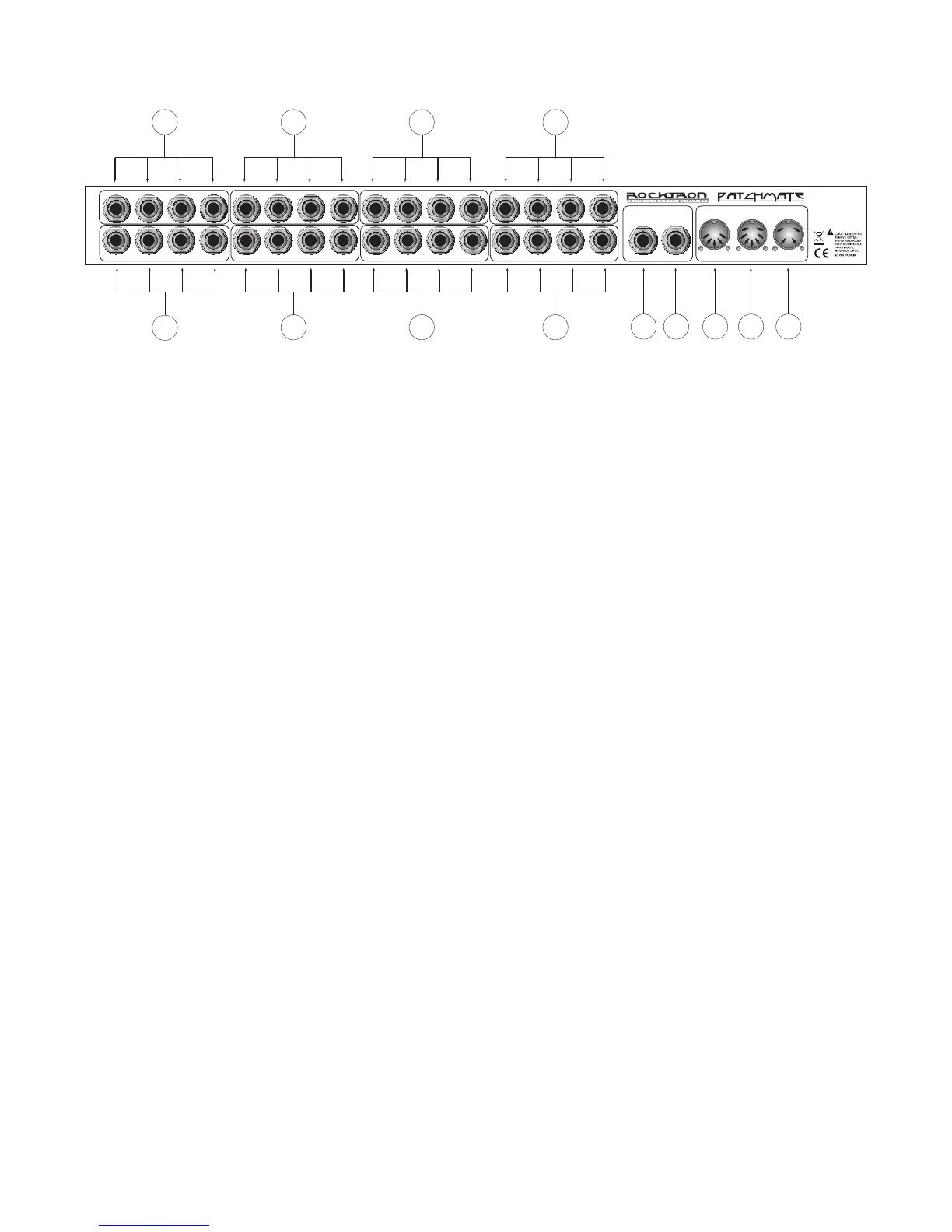
1 LOOP Section Number "1"
These jacks are used to connect your first device in the signal chain. These jacks correspond to
the LOOP Button Number "1" on the front panel of the PatchMate LOOP 8.
2 LOOP Section Number "2"
These jacks are used to connect your second device in the signal chain. These jacks correspond
to the LOOP Button Number "2" on the front panel of the PatchMate LOOP 8.
3 LOOP Section Number "3"
These jacks are used to connect your third device in the signal chain. These jacks correspond to
the LOOP Button Number "3" on the front panel of the PatchMate LOOP 8.
4 LOOP Section Number "4"
These jacks are used to connect your fourth device in the signal chain. These jacks correspond to
the LOOP Button Number "4" on the front panel of the PatchMate LOOP 8.
5 LOOP Section Number "5"
These jacks are used to connect your fifth device in the signal chain. These jacks correspond to
the LOOP Button Number "5" on the front panel of the PatchMate LOOP 8.
6 LOOP Section Number "6"
These jacks are used to connect your sixth device in the signal chain. These jacks correspond to
the LOOP Button Number "6" on the front panel of the PatchMate LOOP 8.
7 LOOP Section Number "7"
These jacks are used to connect your seventh device in the signal chain. These jacks correspond
to the LOOP Button Number "7" on the front panel of the PatchMate LOOP 8.
8 LOOP Section Number "8"
These jacks are used to connect your eighth device in the signal chain. These jacks correspond
to the LOOP Button Number "8" on the front panel of the PatchMate LOOP 8.
PatchMate LOOP 8 Back Panel


 To Next Page