EasyManua.ls Logo

roco MultiMAUS - Page 31

roco MultiMAUS
36 pages
Print Icon
To Next Page IconTo Next Page
To Previous Page IconTo Previous Page
Loading...
60
60
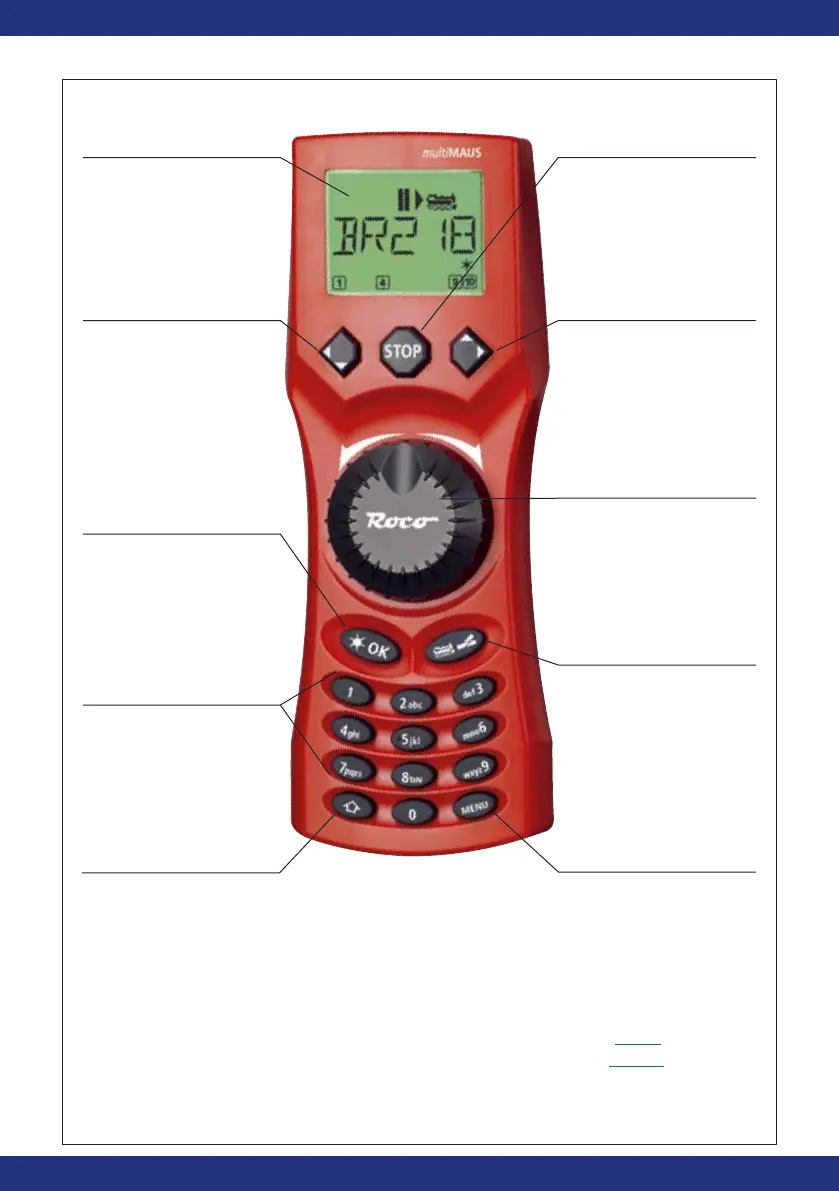
Fig. 1
Fahrregler
control knob
bouton régulateur
Regolatore di
marcia
Funktionstasten
Function Keys
touches
»fonction
Tasti funzionali
Stop-Taste
Stop Key
touche »Stop«
Tasto di arresto
LC-Display
LC display
Écran
LC display
Pfeiltaste (links)
Arrow Key (left)
touche »flèche«
(à gauche)
Tasto freccia (sinistra)
Lok / Weichen-Taste
Loco / Turnout Key
touche
»Locomotive /
aiguillages
«
Tasto locomotiva /
scambi
Menü-Taste
Menu Key
touche »Menu«
Tasto menu
Shift-Taste
Shift Key
touche
»majuscules«
Tasto shift
Pfeiltaste (rechts)
Arrow key (right)
touche »flèche«
(à droite)
Tasto freccia (destra)
Beachten Sie die Erläuterungen zum Display und zu den Tastenbelegungen ab Seite 5.
Please refer the explanations about the display and the key assignment from
page 34.
Quant aux informations concernant l’écran et les différentes fonctions des touches voir page 68.
Fate riferimento alle spiegazioni sul display e sulla assegnazione dei tasti da pagina
100.
Licht / OK-Taste
Light / OK Key
touche »feux / OK«
Tasto luce / OK

Related product manuals