The Z21 multiMAUS is a digital control unit for model railways, designed for intuitive operation and comprehensive control over locomotives and turnouts. It is an innovation from Roco and Fleischmann, offering a user-friendly interface for both beginners and experienced model railway enthusiasts.
Function Description:
The multiMAUS serves as the primary interface for controlling digital model railway layouts. It allows users to select and control individual locomotives, switch turnouts, and manage various locomotive functions. The device communicates with a central unit (such as the Z21) to send commands to decoders installed in locomotives and turnouts.
Key Features:
- Locomotive Control: Users can select locomotives either by name (Library Mode) or by their digital address (Address Mode). Once a locomotive is selected, its speed and direction of travel can be controlled using the central control knob.
- Function Control: The multiMAUS supports up to 10 special locomotive functions (F1-F10), which can be activated or deactivated. These functions typically include lights, sound, smoke generators, and other special effects.
- Turnout Control: The device can switch turnouts, allowing for dynamic route setting on the layout.
- Emergency Stop: A dedicated STOP button allows for an immediate emergency stop of all locomotives on the layout, ensuring safety and preventing collisions.
- Configuration Variable (CV) Programming: The multiMAUS provides access to Configuration Variables (CVs), which are used to customize the behavior of decoders in locomotives and other digital components. This includes setting locomotive addresses, adjusting acceleration/deceleration rates, and fine-tuning other operational parameters.
- Display and Feedback: An LC display provides visual feedback on the selected locomotive, its speed, direction, active functions, and menu navigation. Symbols on the display indicate various states, such as driving direction, standstill, short circuits, emergency stops, and active menu levels.
- Menu Navigation: A MENU key allows access to various settings and programming options, including the Settings menu, Loco menu, and Programming menu.
Technical Specifications (Inferred from Manual):
- Communication Protocol: Digital (DCC compatible, as implied by CV programming and decoder addresses).
- Power Supply: Connected to a central unit (e.g., Z21).
- Display: LC display with various symbols and text capabilities.
- Input: Control knob, numeric keypad (0-9), directional arrow keys, STOP key, OK key, SHIFT key, LOCO/TURNOUT key, MENU key.
Usage Features:
- Ergonomic Design: The multiMAUS features a handheld design with a central control knob and a clearly arranged keypad, making it comfortable to hold and operate.
- Intuitive Interface: The display symbols and key labels are designed for easy understanding, even for new users.
- Library Mode: Simplifies locomotive selection by allowing users to scroll through named locomotives, which is particularly useful for layouts with many different trains.
- Address Mode: Provides direct control for users who prefer to work with specific decoder addresses.
- Key Combinations: The SHIFT key enables access to additional functions and settings, expanding the capabilities of the device without cluttering the main interface.
- Text Input: The keypad supports text input (e.g., for naming locomotives or entering values), indicated by the "ABC" symbol on the display.
- Programming: The multiMAUS facilitates programming of decoder addresses and other CVs, allowing for advanced customization of the model railway system. The process involves selecting the desired CV, entering the new value, and confirming the change.
Maintenance Features:
- Firmware Updates: While not explicitly detailed in the quick guide, digital control units typically support firmware updates to introduce new features or improve performance.
- Service Hotline: Roco and Fleischmann provide a service hotline for technical questions and support, indicating a commitment to product longevity and user assistance.
- Online Resources: Further functionalities and detailed information are available on the manufacturer's website (www.z21.eu), serving as a comprehensive resource for users.
Operational Flow:
- Connection: The multiMAUS connects to a Z21 central unit.
- Loco Selection: Upon power-on, the multiMAUS starts in Library Mode or Address Mode. Users select a locomotive using arrow keys or by entering its address.
- Driving: The control knob adjusts speed and direction. The LC display shows the current status.
- Functions: Function keys (1-10) activate special locomotive features.
- Turnouts: The LOCO/TURNOUT key switches to turnout mode for controlling points.
- Programming: The MENU key provides access to CV programming for advanced settings.
The Z21 multiMAUS is a robust and versatile control unit that simplifies the operation of digital model railway layouts, making it an excellent choice for both casual hobbyists and dedicated enthusiasts. Its combination of intuitive controls, clear display, and comprehensive functionality ensures an engaging and customizable model railway experience.

 Need help?
 General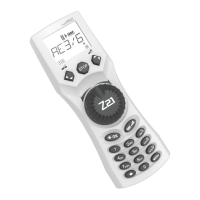

 To Next Page
