ROCPRO™ T32 / User Manual page 7 - 8
6. The Indication of HDD Status
7. Connect with other devices
Status
LED Light Status
Red light always on
Red light always on
Blue light always on
Data acsses
Rebuilding, Source HDD
Rebuilding, Target HDD
Blue light flashing
Breathing blue light
Breathing purple light
No HDD
HDD failed
HDD idle
1. Thunderbolt™ Port: Thunderbolt™ 3 ports can be connected to Thunderbolt™ 3, USB3.1
and Display Port device. It is downward compatible and will support USB3.0 / USB2.0. This product
can connect with dierent USB devices by USB Type C to Type A/B cable. It supports Thunderbolt™
port power delivery (PD) function, which can provide 15W (5V / 3A) power output to support 5V / 3A.
Hence the port can recharge your notebook computer. There is no additional power supply need.
2. Mini Display port: connection port will provide additional screen/display output.
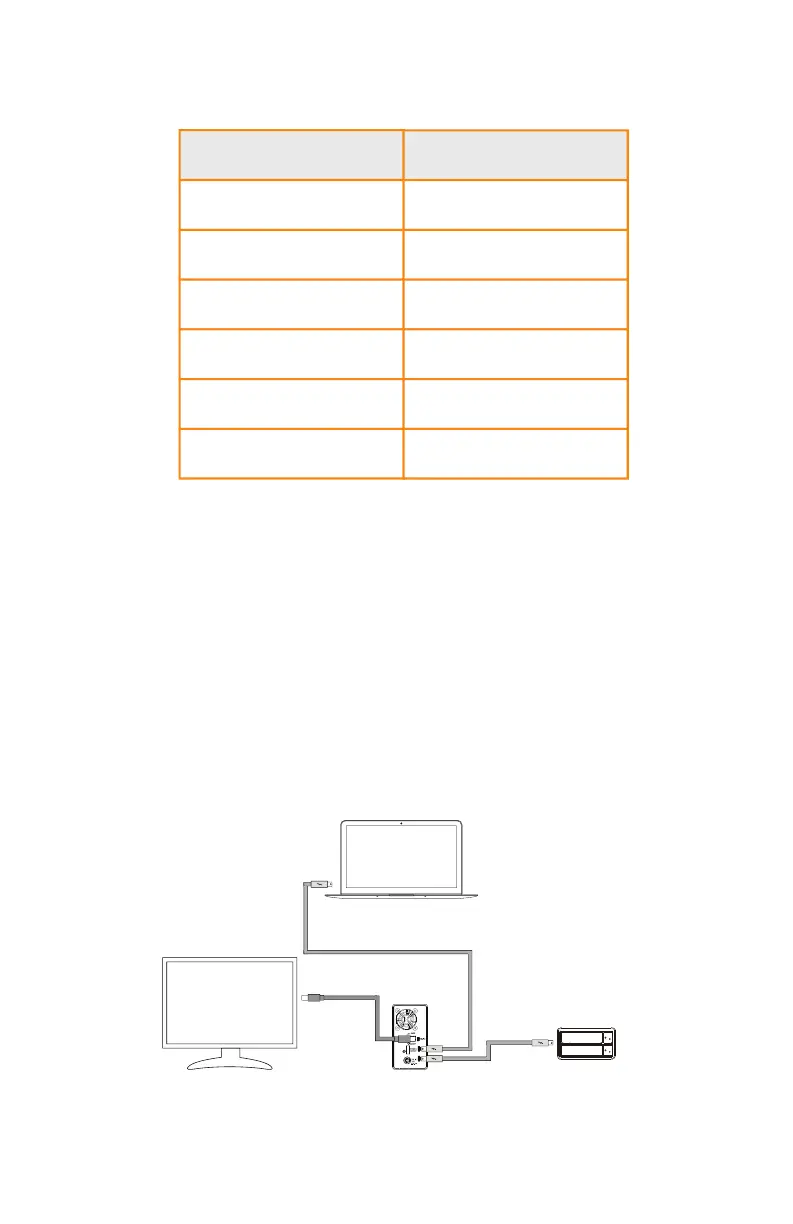
Two System Connections:
A. Rocpro T32: Connect Thunderbolt™ A port to Host (PC/Workstation/Server), Thunderbolt™ B port
to other the other Device (USB or TB), and mDP (Mini Display) port to monitor.












 To Next Page