8. Common Technical Questions
1. Rocpro T32 will always stay SLEEP Mode if (a) it doesn't connect it to Mac/PC host Computer, and(b)
your Computer is Powered-O.
2. Rocpro T32 will also stay on SLEEP Mode if your host Computer initiates SLEEP or IDLE Mode.
3. In case you use two none original old HDDs which already have other RAID setting, wewould
strongly suggest you to rst reset them with JBOD mode on your Rocpro T32 beforesetting them
with any other the RAID mode.
4. If the computer is unable to detect the system, please install the drivers from ocial website
(www.rocstor.com)
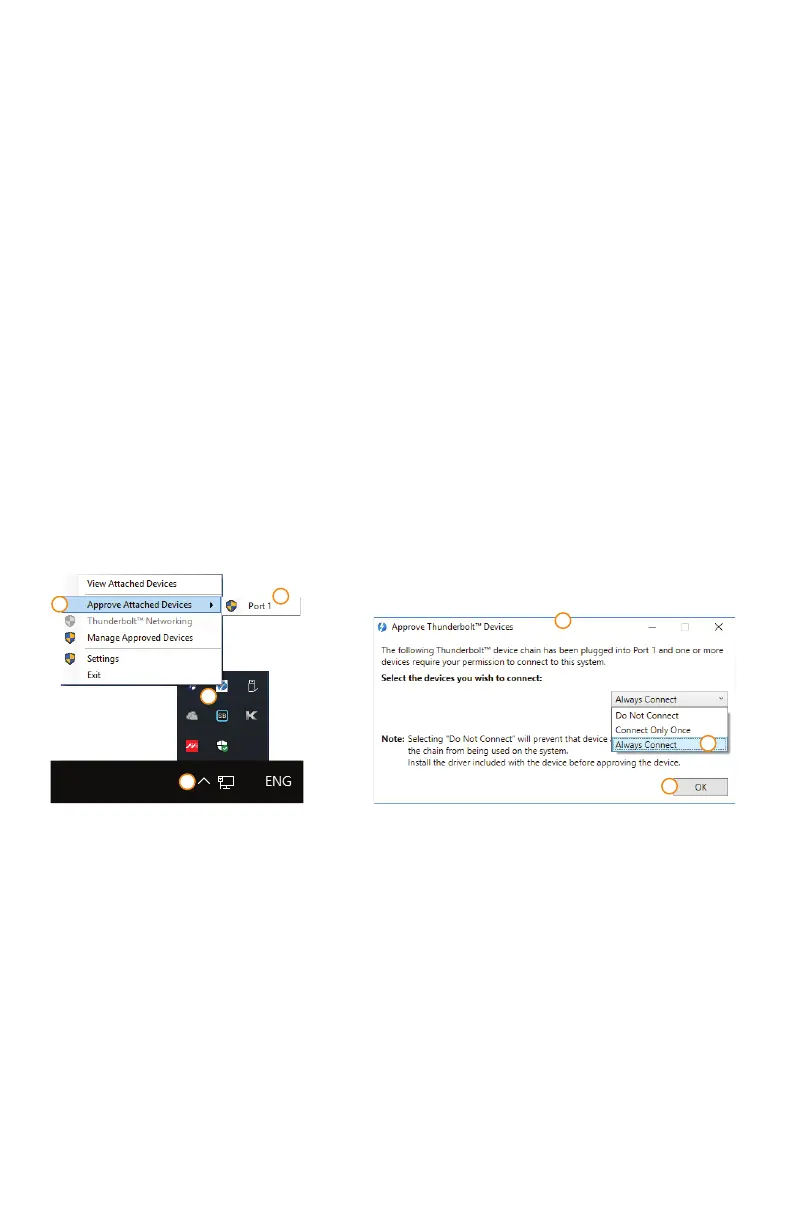
5. If the Rocpro T32 is installed on the Windows OS but can not be connected, refer to thefollowing steps:
A. Update your Thunderbolt Firmware or Drivers in your setting
B. Open the Windows Taskbar.
C. right-click the Thunderbolt™ icon.
D. Select "Approve Attached Devices".
E. Select the port to which the device is connected.
F. Wait for the dialog box "Approve Thunderbolt™™ Devices" to appear.
G. Select "Always Connect"
H. Press "OK".
ROCPRO™ T32 / User Manual page 8 - 8
• Consistently make multiple backup copies of your data for your protection. Hard disk drives are
subject to failure at any time.
•
Rocstor shall not be held liable for loss of data or the restoration or recovery of data on the device.
Please see complete limited Warranty Information in the User’s Manual or on the Rocstor website
(www.rocstor.com) for further details.
Actual accessible hard drive capacity will indicate up to 10% lower than stated under dierent Operating
Systems and formatting. Therefore, a 500GB capacity drive may show up as a 450GB drive
(approximately.)
The Limited warranty period for Rocpro T32 hard drives is three years for parts and labor.
D
Rocstor Rocpro T32
A
C
B
E
G
F












 To Next Page