EasyManua.ls Logo

RODE Microphones PSA1 - Page 2

RODE Microphones PSA1
4 pages
Print Icon
To Next Page IconTo Next Page
To Previous Page IconTo Previous Page
Loading...
Product
Specifications
Approximate
reach:
Horizontal-
820mm
(32.5").
Vertical-
840mm
(33").
Adapter:
3/8"
thread
adaptor.
(3/8"
to
5/8"
adaptor
included)
Weight:
1.74kg
(3.84lbs)
-
2.15kg
(4.73lbs)
boxed
I
1
-
DESK
INSERT
2
-
DESK
CLAMP
3
-
ARM
4-VELCROTAGS
5-ATTACHMENT
PIN
6
-
THUMB
SCREWS
7
-
LOCKING
NUT
Setting
up
the
PSA1
studio
arm
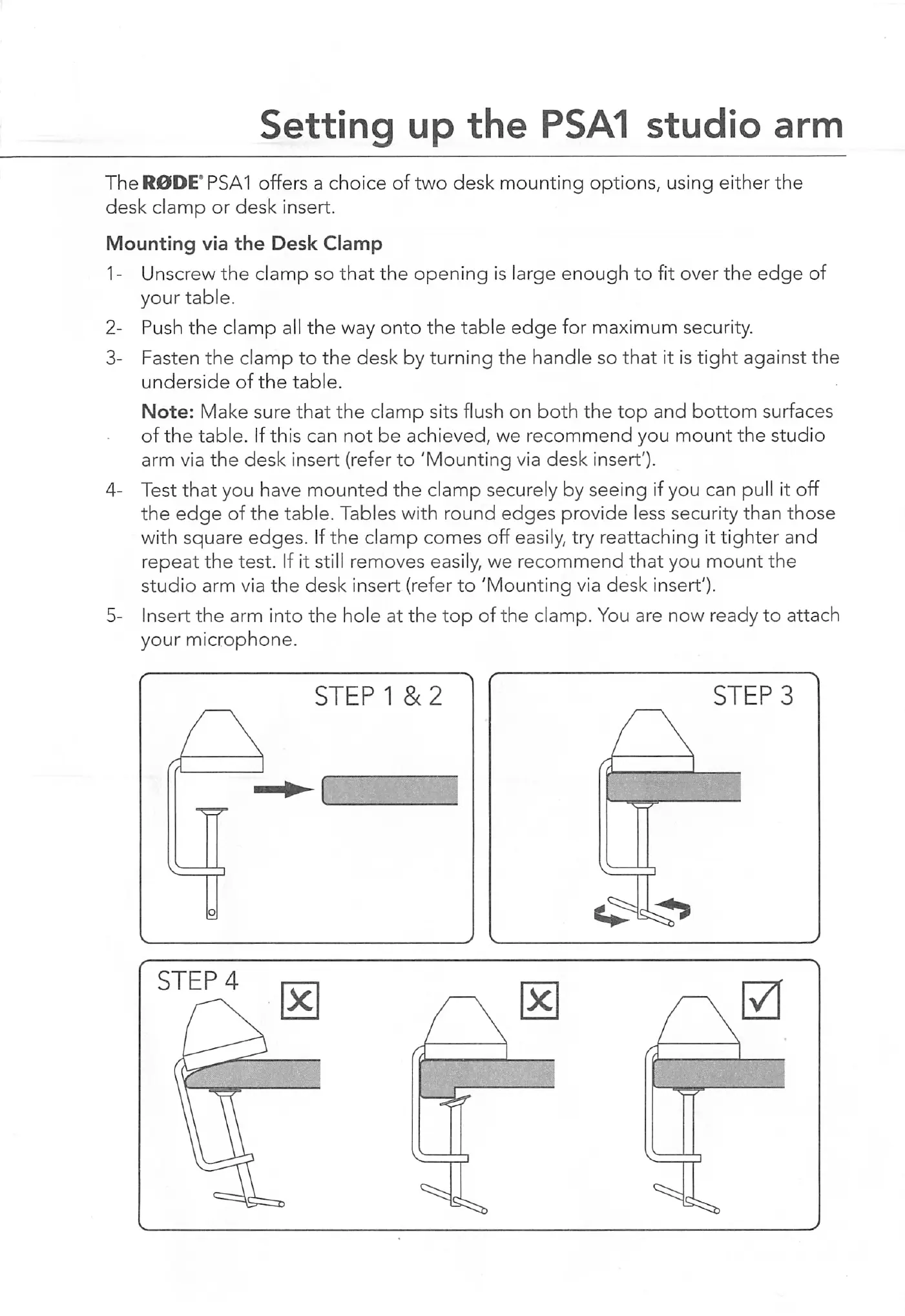
TheR0DE'PSA1
offers
a
choice
of
two
desk
mounting
options,
using
either
the
desk
clamp
or
desk
insert.
Mounting
via
the
Desk
Clamp
1
-
Unscrew
the
clamp
so
that
the
opening
is
large
enough
to
fit
over
the
edge
of
your
table.
2-
Push
the
clamp
all
the
way
onto
the
table
edge
for
maximum
security.
3-
Fasten
the
clamp
to
the
desk
by
turning
the
handle
so
that
it
is
tight
against
the
underside
of
the
table.
Note:
Make
sure
that
the
clamp
sits
flush
on
both
the
top
and
bottom
surfaces
of
the
table.
If
this
can
not
be
achieved,
we
recommend
you
mount
the
studio
arm
via
the
desk
insert
(refer
to
'Mounting
via
desk
insert').
4-
Test
that
you
have
mounted
the
clamp
securely
by
seeing
if
you
can
pull
it
off
the
edge
of
the
table.
Tables
with
round
edges
provide
less
security
than
those
with
square
edges.
If
the
clamp
comes
off
easily,
try
reattaching
it
tighter
and
repeat
the
test.
If
it
still
removes
easily,
we
recommend
that
you
mount
the
studio
arm
via
the
desk
insert
(refer
to
'Mounting
via
desk
insert').
5-
Insert
the
arm
into
the
hole
at
the
top
of
the
clamp.
You
are
now
ready
to
attach
your
microphone.
STEP
1
&
2
STEPS
I

Related product manuals