EasyManua.ls Logo

RODE Microphones PSA1 - Page 3

RODE Microphones PSA1
4 pages
Print Icon
To Next Page IconTo Next Page
To Previous Page IconTo Previous Page
Loading...
Mounting
via
the
Desk
Insert
You
will
need
to
drill
a
hole
into
your
work
desk
for
this
mounting
options
and
therefore
will
require
the
tools
to
do
so.
1-
Take
the
time
to
choose
the
best
location
for
your
new
studio
arm.
Try
different
positions
using
the
desk
clamp
first
so
you
are
comfortable
with
the
location
you
have
chosen.
You
should
also
refer
to
your
microphones
user
manual
for
details
on
the
correct
relationship
between
microphone
and
user.
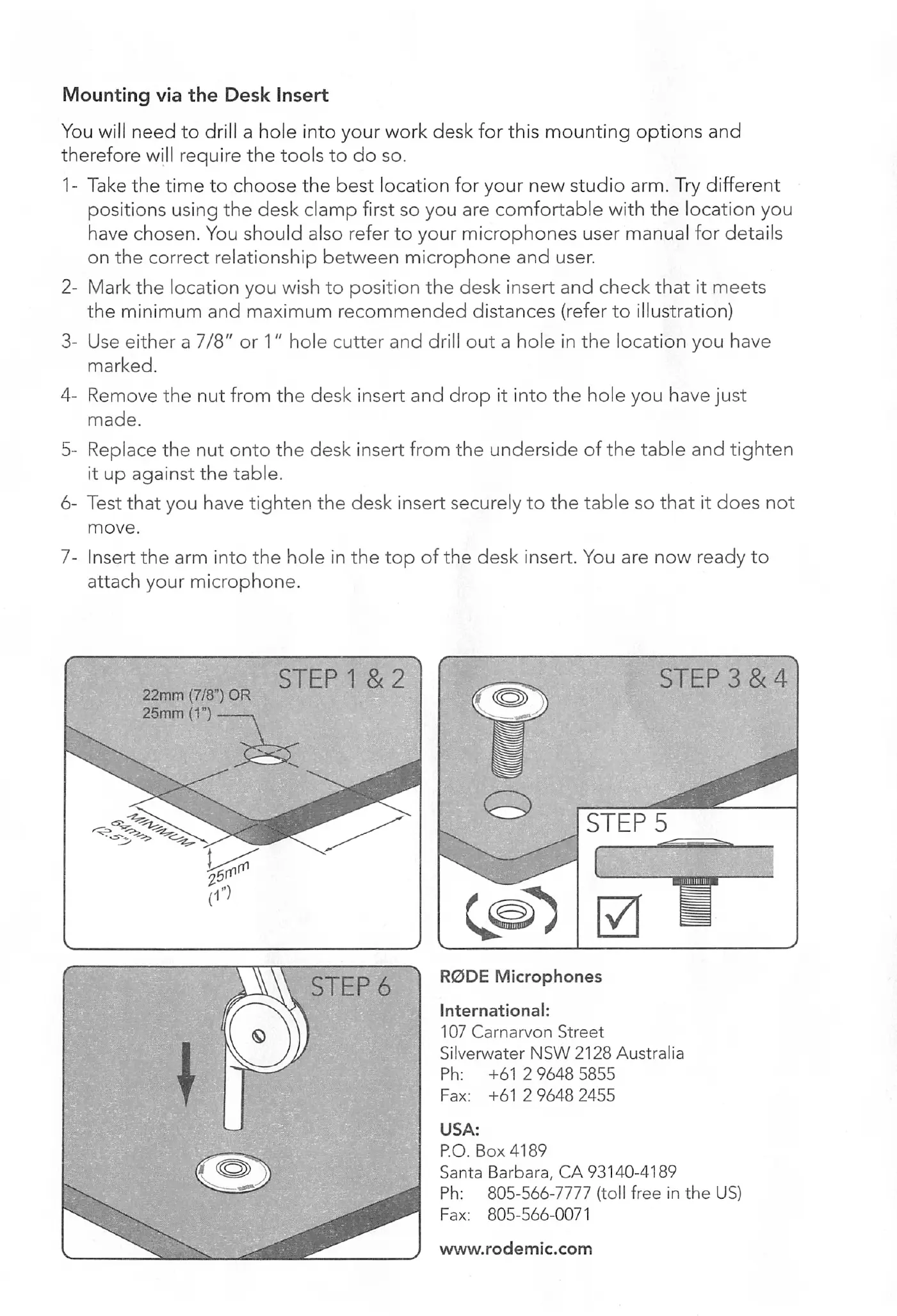
2-
Mark
the
location
you
wish
to
position
the
desk
insert
and
check
that
it
meets
the
minimum
and
maximum
recommended
distances
(refer
to
illustration)
3-
Use
either
a
7/8"
or
1"
hole
cutter
and
drill
out
a
hole
in
the
location
you
have
marked.
4-
Remove
the
nut
from
the
desk
insert
and
drop
it
into
the
hole
you
have
just
made.
5-
Replace
the
nut
onto
the
desk
insert
from
the
underside
of
the
table
and
tighten
it
up
against
the
table.
6-
Test
that
you
have
tighten
the
desk
insert
securely
to
the
table
so
that
it
does
not
move.
7-
Insert
the
arm
into
the
hole
in
the
top
of
the
desk
insert.
You
are
now
ready
to
attach
your
microphone.
22mm
(7/8")
OR
25mm
(1")
,
STEP
1
&
2
STEP
3
&
4
STEPS
R0DE
Microphones
International;
107
Carnarvon
Street
Silverwater
NSW
2128
Australia
Ph:
+61
2
9648
5855
Fax:
+61
2
9648
2455
USA:
P.O.
Box
4189
Santa
Barbara,
CA
93140-4189
Ph:
805-566-7777
(toll
free
in
the
US)
Fax:
805-566-0071
www.rodemic.com
MICROPHONES
PSA1
Instruction
Manual
Designed
In
Australia
Made
in
China
www.rodemic.com

Related product manuals