Cerber
®
C41V1/Cerber
®
C41V4
HOOKUP INSTALLATION & PROGRAMMING BOOK
8
COMMISSIONING
When finishing connections, first reset the system following the procedure
described bellow.
Reset to Default
1. Disconnect power, both batteries and AC power.
2. Connect jumper JP10 (RESET) on PCB.
3. Power the panel and wait for 2 seconds..
4. If the system was reset to default, zone LEDs will blink successively, and
the green READY LED will be lit.
5. Disconnect power, both batteries and AC power.
6. Take jumper JP10 off (RESET) PCB.
7. Power the panel. From now on, the system parameters are set to default
and the system is disarmed.
OPERATION
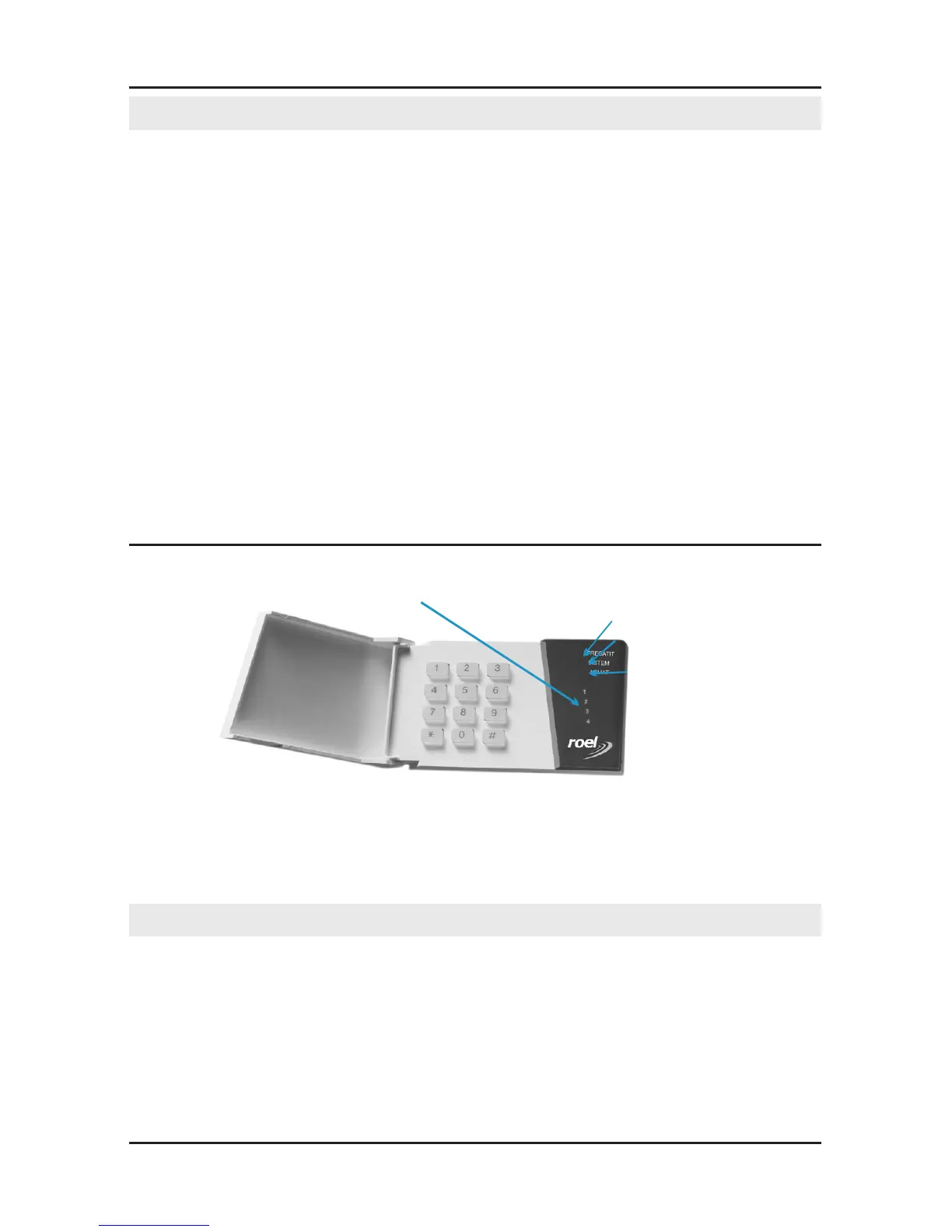
Zone LEDs
SYSTEM LED
READY LED
ARMED LED
System operation is done using the keypad and LEDs' indications. The
keypad has 4 zone LEDs and 3 state LEDs: READY, SYSTEM, ARMED.
LEDs' indications will be detailed throughout this manual.
OPERATING CODES
There are 4 programmable operating codes in the system.
Code 1- Master Code programmed with "1234" value by default. Using the
Master code one can operate the system and program the other user codes.
Code 4 - "Ambush Code", not programmed by default.
If the panel is connected to the phone line, when disarming - using this
particular code - the panel will transmit a phone message to Cerber C41V1
control panel.



 To Next Page