WHAT TO DO STEP 1 (CONTINUED)
STANDARD DEFINITION: If you have a standard-definition TV, do not have an
HDMI cable or do not have a free HDMI port on your TV, use the included A/V
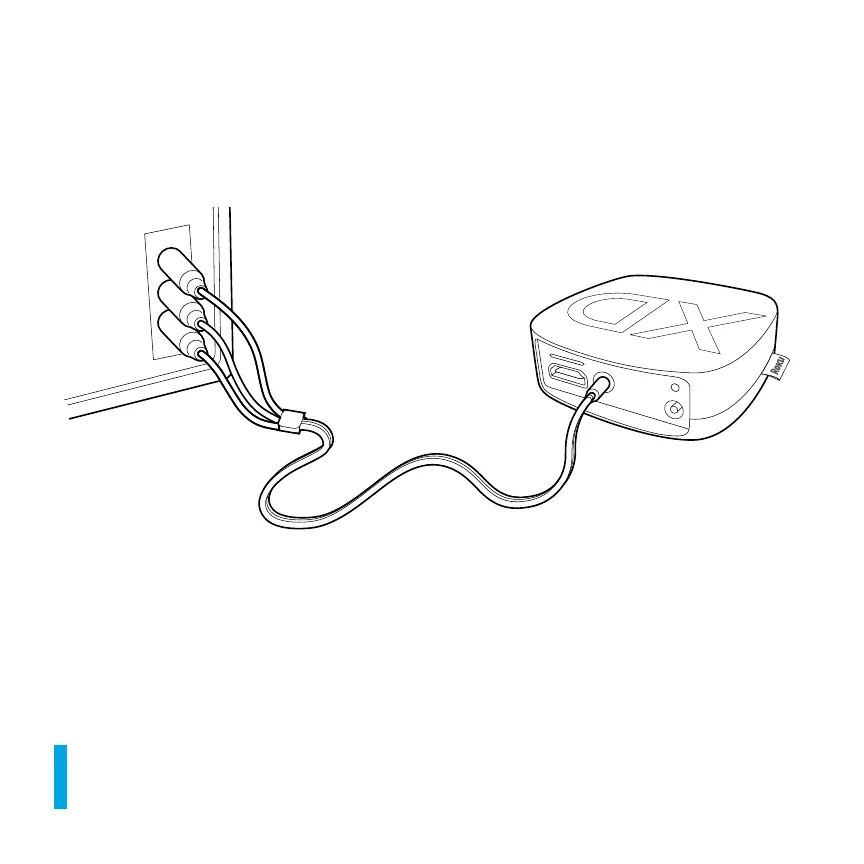
cable to make the connection depicted in the diagram below:
• Connect one end to the composite video and analog audio ports on the back
of your TV (look for Video IN, then match the Yellow/Red/White ports).
• Connect the other end to the A/V port on the back of your Roku player.
IT’S SPECIAL. The A/V cable included with your Roku player was custom-built
for Roku. Because the Roku 2 XS is so small, we use a single connector into the
Roku player to carry video and stereo audio.



 To Next Page