Adding Lyrics to a song
E-60/E-50 Music Workstation
r
121
The message means that the lyrics of the previously
selected song will be erased. If that’s OK with you,
press the [YES] field. If not, press the [NO] field to
return to the TXT IMPORT page, where the previous
lyrics are displayed.
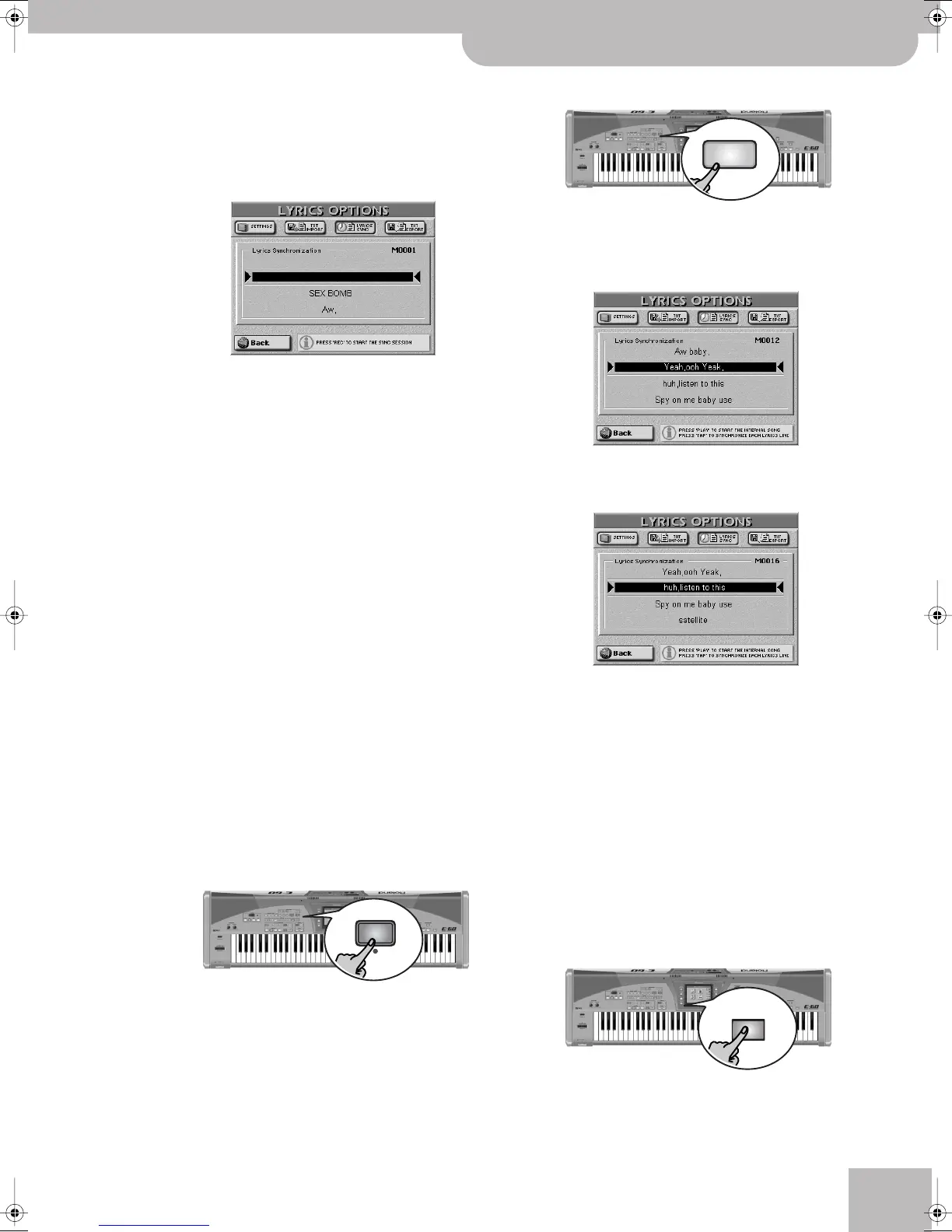
Now you’re all set for the synchronization work:
(This page can also be selected with the
[LYRICS¥SYNCHRO] field.)
This display page should contain the first line of the
text you imported. The function can also be used to
correct the synchronization of Lyrics data contained
in a song you loaded.
Here’s what we’re going to do: every line of the text
you imported can be associated with a given quarter
note of the song. We’ll do this while the song is play-
ing back. Synchronizing text lines is a matter of
pressing the TEMPO [TAP] button on the beats where
the currently selected line should appear during nor-
mal playback of the Standard MIDI File. Each press of
the [TAP] button associates the text line below the
arrows (® √) with the quarter note where the but-
ton was pressed. The preceding line automatically
scrolls above the (® √) section, while the next line
appears below the arrows.
(9) Press [TOP¥|√] to return to the beginning of the
song or use [BWD] or [FWD] to jump to a measure
that lies a little ahead of the place where the first
line should be displayed during normal operation.
Note: If the song already contains Lyrics, they will follow the
measures (indicated in the upper right-hand corner) when you
press [BWD] or [FWD].
(10) Press the RECORDER [REC¥∏] button (its indicator
lights).
Press [FWD] to go to another measure without caus-
ing the text to follow.
(11) Press the [PLAY÷STOP¥®÷ª] button.
Playback (and Lyric synchronization recording) starts
and the [REC¥∏] button lights.
(12) On the beat where the first text line should be dis-
played, press the [TAP] button.
(13) Repeat this at the quarter note where the second
line should be displayed.
(14) Press [TAP] on all beats where the subsequent text
lines should appear.
In places where there are no lyrics to synchronize
(e.g. the bridge or the solo), you can press [FWD] to
quickly jump to the next measures to which you wish
to link a line of text.
(15) Press the [PLAY÷STOP¥®÷ª] button when all Lyrics
data have been synchronized.
(16) If you made a mistake somewhere, you can return
to that measure using [BWD] and start anew from
that position.
In that case, you will need to synchronize all remain-
ing text (even text you already synchronized) until
the end of the song.
(17) Press the [DISK&MEDIA] button.
REC
START
STOP
DISK &
MEDIA
E-60_50_OM_UK.book Page 121 Thursday, June 22, 2006 10:06 AM



 To Next Page