15
Playing the Keyboard
Adding Reverberation to Sounds
(Reverb Effect)
You can apply a reverb effect to the notes you play on the keyboard.
Applying reverb adds pleasing reverberation to what you play, so it sounds
almost as if you were playing in a concert hall.
When the power is turned on, the reverb effect will be cancelled.
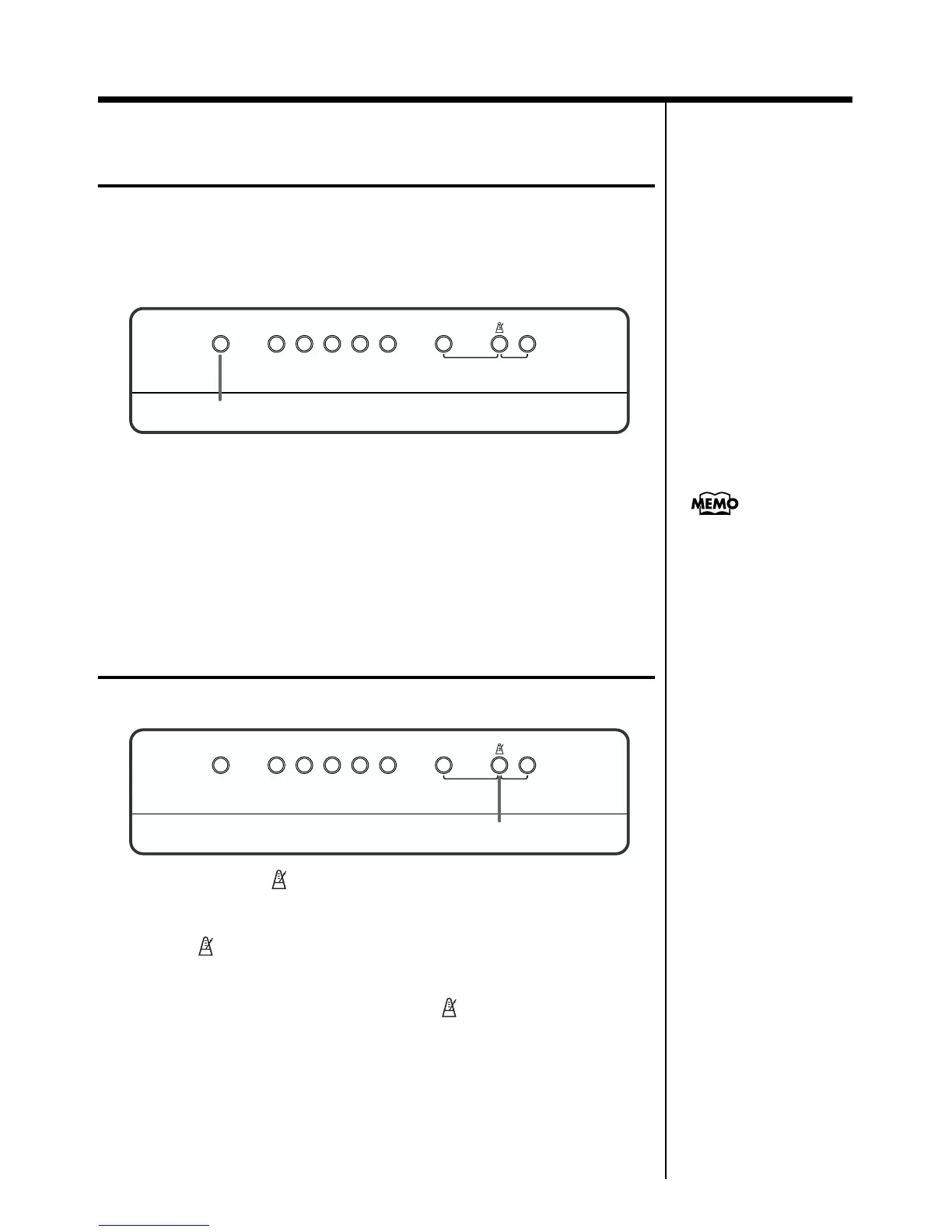
fig.02-03
1. Press the [Reverb] button, and confirm that its indicator has
lighted.
The reverb effect is applied to the sound.
2. Pressing the [Reverb] button once more turns off the
button’s indicator and cancels the reverb effect.
Sounding the Metronome
Here’s how you can make use of the metronome.
fig.02-04
1. Pressing the [ (Metronome)] button starts the metronome’s
sound.
The [ (Metronome)] button’s indicator flashes in time with the tempo
selected at that time.
2. To stop the metronome, press the [ (Metronome)] button,
extinguishing its indicator.
Reverb DemoStringsOrganE.Piano
Harpsi-
chord
Key Touch
Dual Balance
Piano Variation
1, 2
You can select the depth of
reverb effect. For details,
refer to “Changing the
Depth of the Reverb” (p.
20).
Reverb DemoStringsOrganE.Piano
Harpsi-
chord
Key Touch
Dual Balance
Piano Variation
1, 2


 To Next Page