EasyManua.ls Logo

Roland GR-55 - User Manual

Roland GR-55
96 pages
Print Icon
To Next Page IconTo Next Page
Loading...

Table of Contents

Other manuals for Roland GR-55

Questions and Answers

  • M
    mooredaisyAug 19, 2025
    What to do if patches are not switching on my Roland GR-55?
    • M
      Michelle WaltersSep 12, 2025
      With the Roland GR-55 Synthesizer, you can only switch patches from the Play screen. If you are on a difefrent screen, press the [EXIT] button to return to the Play screen.
  • C
    Cody WatkinsAug 23, 2025
    Why is the volume uneven among the strings on my Roland GR-55 Synthesizer?
    • E
      Erik RogersAug 23, 2025
      If you notice that the volume is uneven among the strings on your Roland Synthesizer, check if the 'GK SENS' setting was adjusted correctly for each string. Also, make sure the GK pickup is attached correctly by referring to its manual. The Roland website provides 'GK-3/3B Installation Tips' with explanations and photos on how to attach the GK pickup.
  • C
    Christine MarshallAug 26, 2025
    Why can't I control parameters set with Assign as expected on my Roland Synthesizer?
    • P
      Paul RoweAug 26, 2025
      If you are unable to control parameters set with Assign as expected on your Roland Synthesizer, ensure that the effects incorporating the parameters being controlled are turned on. If using MIDI, verify that both devices are set to the same MIDI channel and that the controller numbers (CC#) match.
  • D
    Diane MckeeAug 27, 2025
    Why are MIDI messages not being transmitted/received on my Roland GR-55 Synthesizer?
    • M
      Megan CarsonAug 27, 2025
      If MIDI messages are not being transmitted or received by your Roland Synthesizer, first, try replacing the MIDI cable to eliminate any shorts. Then, check the connection between the GR-55 and the external MIDI device. Also, ensure that both devices are set to the same MIDI channel. If transmitting from the GR-55, verify that the Program Change message transmission is ON and the controller number settings are correct.
  • M
    Megan ArellanoAug 30, 2025
    What to do if the external sound module connected to the MIDI OUT connector does not sound on my Roland Synthesizer?
    • K
      Kendra TaylorAug 30, 2025
      If the external sound module connected to the MIDI OUT connector of your Roland Synthesizer does not produce sound, ensure that the MIDI channels of the transmitting and receiving devices match. Also, check if the volume has been turned down using the volume control of the GK pickup or the expression pedal; if so, raise the controller or volume.
  • D
    Diana BlairSep 1, 2025
    How to stop unwanted synthesizer sound when playing softly on my Roland GR-55 Synthesizer?
    • D
      dlawsonSep 1, 2025
      To reduce unwanted triggering when playing softly on your Roland Synthesizer, adjust the 'VELOCITY' setting under 'GK SETTING.' Increasing the LOW VELOCITY CUT value will make softly played notes less likely to produce sound.
  • S
    Susan RhodesSep 3, 2025
    What causes oscillation on my Roland GR-55 Synthesizer and how to fix it?
    • S
      Sara WeissSep 3, 2025
      If oscillation occurs with your Roland Synthesizer, check the effect settings. A gain value or volume-related parameter might be set too high; try decreasing the value.
  • G
    Gregory Scott DVMSep 5, 2025
    Why is the synthesizer sound inconsistent in volume on my Roland GR-55 Synthesizer?
    • J
      jmataSep 5, 2025
      Adjust the 'PLAY FEEL' parameter on your Roland Synthesizer. Setting 'PLAY FEEL' to '5' provides a completely fixed velocity and consistent sound regardless of your playing strength.
  • J
    Jessica RoachSep 7, 2025
    Why does the pitch not change smoothly on my Roland GR-55?
    • C
      Colin ShermanSep 7, 2025
      If the pitch does not change smoothly on your Roland Synthesizer, check the master parameter GTR-MIDI-CHROMATIC. If it's turned 'ON,' pitch bend data will not be output, and the pitch will change in semitone steps. Turn it 'OFF.'
  • G
    Gail GreenSep 9, 2025
    Why can't I change parameters with pedals or buttons on my Roland GR-55?
    • M
      marcoboydSep 10, 2025
      When INTERNAL PEDAL or WAVE PEDAL is used for the assign source on your Roland Synthesizer, the effect parameters set as the assign targets change automatically. To change parameters with the knobs or PATCH/VALUE dial, first switch off Control Assign and cancel the INTERNAL PEDAL setting.

Summary

USING THE UNIT SAFELY

IMPORTANT NOTES

Main Features

Sound Generation Capabilities

Describes the fusion of PCM and COSM sound generation for versatile tones.

Settings

First, get your guitar;bass ready

Essential first steps to prepare your guitar or bass for use with the GR-55.

Preparations for Using the GR-55

Connections and Power

Diagrams and instructions for connecting the GR-55 and turning it on/off.

Selecting Guitar or Bass (GUITAR<->BASS)

How to set the GR-55 mode for guitar or bass input.

Adjusting Pickups (GK SETTING)

Essential settings for the GK pickup to ensure optimal performance.

Adjusting Your Guitar Pickup

Adjusting Your Bass Pickup

Specifying the Output System (OUTPUT SELECT)

Tuning Your Instrument (Tuner Function)

Quick Guide

Selecting and Playing Sounds

Guide to choosing and playing sounds (patches) on the GR-55.

Creating an Original Sound

Saving the Sound You Created

Steps for saving edited sounds as user patches.

Panel Descriptions

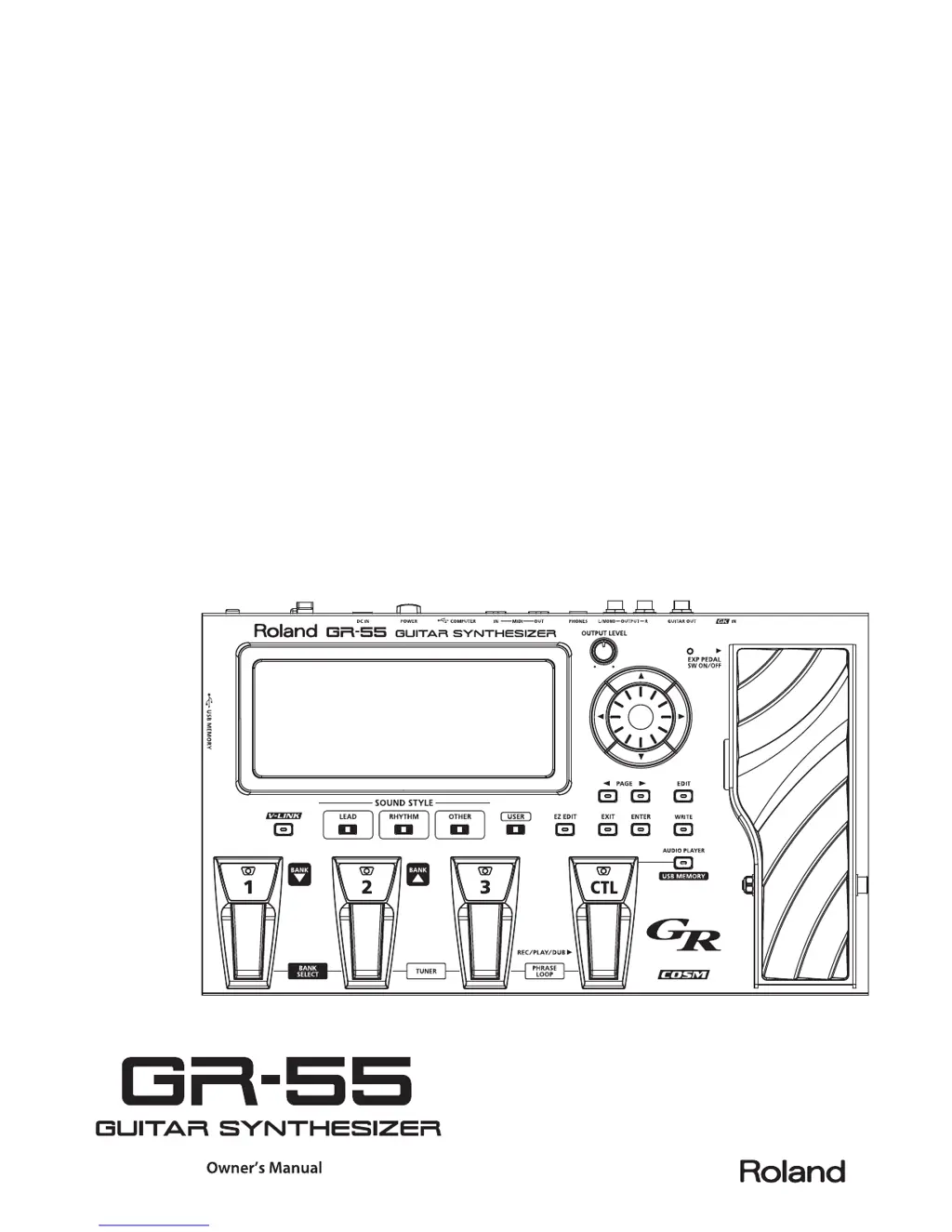
Front Panel

Detailed description of the controls and indicators on the front panel.

Rear Panel

Description of the connectors and ports on the rear panel of the GR-55.

How the GR-55 Works

Editing the Tones (TONE)

Parameter Lists (PCM, FILTER, TVA, LFO, MODELING)

Detailed lists and explanations of tone editing parameters.

Effect Settings (EFFECT)

Changing the Structure;Connection Destination

How to change the effect chain structure and connection destinations.

Parameter List (EFFECT)

Patch Settings (MASTER)

GK Pickup Settings for Each Patch (GK SET)

Storing and recalling GK pickup settings for different guitars.

Saving a Patch (PATCH WRITE)

Controller Assignments

Connecting External Equipment

Settings for the Entire GR-55 (SYSTEM)

Setting the GK Pickups (GK SETTING)

Crucial settings for the divided pickup to optimize playing performance.

Pedal Calibration and Factory Reset

Procedures for calibrating the pedal sensitivity and restoring factory settings.

Parameter List (SYSTEM)

GK SETTING

Detailed list and explanation of GK pickup settings.

OUTPUT SELECT

List of output system settings and their descriptions.

Troubleshooting

No Sound;Low Volume

Common problems and solutions for lack of sound or low volume.

Error Messages

Roland GR-55 Specifications

General IconGeneral
Bit rate24 bit
Best usesGuitar
Sample rate44.1 kHz
Product typeFootswitch/controller
Sound effectsChorus, Delay, Modulation, Reverberation
Delay effects quantity7
Number of footswitches-
Sound effects quantity93
Chorus effects quantity4
Reverberation effects quantity5
Modulation (MOD) effects quantity14
Display typeLCD
Power source typeAC
Weight and Dimensions IconWeight and Dimensions
Depth244 mm
Width405 mm
Height78 mm
Weight3300 g

Related product manuals