EasyManua.ls Logo

Roland JAZZ CHORUS - User Manual

Roland JAZZ CHORUS
7 pages
Print Icon
To Next Page IconTo Next Page
Loading...
Main Features
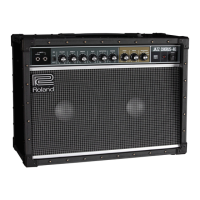
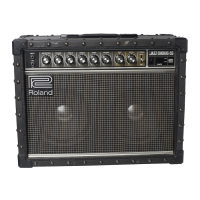
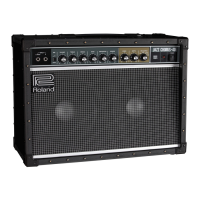
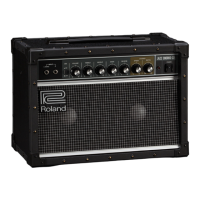
The JC-22 is a 30 W stereo-input/output guitar amp featuring a transparently clean tone that faithfully
expresses the true character of your guitar.
5 Its unique stereo-input design lets you connect a stereo eect unit to the front panel and enjoy a
stereo eect using just a single amp.
5 A beautifully dimensional space chorus eect is produced by spatial mixing (allowing the direct
sound and eect sound to mix in the air).
5 In addition to a 3-band tone-stack EQ, it also provides a bright switch, giving you a rich palette of
tone settings.
5 With two independent power amps and two custom-designed 6.5-inch speakers, the JC-22 delivers a
stereo eect.
5 The enclosure is designed for strength and durability, made of hardened berboard and equipped
with corner protectors.
5 If a separately sold footswitch is connected, you can turn chorus and reverb on/o with your foot.
JC-22
Owners Manual
Dimensional space chorus
This uses two completely independent amps and speakers; one
amp and speaker output the direct sound that is sent from the
guitar, while the other amp and speaker output a sound that is
subtly pitch-modulated. These two sounds are mixed in the air,
creating a softly spacious three-dimensional eect that is warm,
deep, and natural-sounding.
MAIN AMP MAIN AMP
CHORUS
Question and Answer IconNeed help?

Do you have a question about the Roland JAZZ CHORUS and is the answer not in the manual?

Summary

Main Features

Dimensional Space Chorus Effect

Explains the stereo chorus effect using two amps and speakers for a spatial sound.

Unit Safety Guidelines

Safety Notices and Symbols Explained

Details the meaning of WARNING, CAUTION, and symbol notations used in the manual for safety.

General Safety Precautions

Summarizes critical safety guidelines regarding power, environment, usage, and physical handling.

Important Operational Notes

Safe Handling and Disconnection

Provides guidance on grasping plugs, cleaning, and disconnecting cables for safe operation.

Power Supply and Placement Advice

Covers connecting to power outlets and optimal unit placement to avoid interference and heat issues.

Maintenance and Additional Precautions

Details cleaning methods, handling controls, and other operational precautions for longevity.

Intellectual Property Rights

Information regarding trademarks and registered product names.

Panel and Control Descriptions

Front Panel Controls and Jacks

Describes the function of each control and jack on the front panel of the amplifier.

Power On;Off Procedure

Step-by-step guide for safely powering the amplifier on and off.

Rear Panel Connections

Details the AC power input, headphone output, line outputs, effect loop, and footswitch jacks on the rear panel.

Main Specifications

Technical Specifications Summary

Lists rated output, input levels, speaker size, dimensions, weight, and power consumption.

Block Diagram

Signal Flow and Effect Loop Configuration

Illustrates the internal signal routing and the function of the effect loop in series and parallel modes.

Overview

The Roland JC-22 Jazz Chorus is a 30W stereo-input/output guitar amplifier designed to deliver a transparently clean tone that faithfully expresses the true character of your guitar. This amplifier is equipped with two independent power amps and two custom-designed 6.5-inch speakers, enabling it to produce a rich stereo effect. Its robust enclosure is crafted from hardened fiberboard and features corner protectors for enhanced strength and durability.

Function Description

The JC-22 serves as a guitar amplifier, providing amplification and tone shaping for electric guitars and external effect units. Its core function is to deliver a clean, uncolored sound, making it an ideal platform for guitarists who rely on their instrument's natural tone or external effects. A key feature is its "dimensional space chorus" effect, which utilizes spatial mixing to blend direct and subtly pitch-modulated sounds in the air, creating a warm, deep, and natural-sounding three-dimensional effect. The amplifier also includes a reverb effect for adding spatial depth to the sound.

Usage Features

The JC-22 offers a variety of features designed to enhance its usability and tonal versatility:

  • Input Jacks: The amplifier features L/MONO and R input jacks. For direct guitar connection or monaural effect units, the L/MONO jack is used. When connecting a stereo-output effect unit, both L and R jacks can be utilized to achieve a stereo effect through the JC-22's left and right speakers. If only the R jack is used, sound will only be heard from the right speaker.
  • BRI (Bright) Switch: This switch brightens the mid- and high-frequency range, making the sound more crisp and articulate.
  • VOLUME Knob: This control adjusts the overall output volume of the amplifier.
  • Tone Controls (TREBLE, MIDDLE, BASS): A 3-band tone-stack EQ allows for precise adjustment of the high-, mid-, and low-frequency ranges, providing a rich palette of tone settings.
  • REVERB Knob: This knob controls the depth of the reverb effect, adding spaciousness to your sound.
  • CHORUS Controls (SPEED, DEPTH): The JC-22's signature dimensional space chorus effect can be adjusted using these two knobs. The SPEED knob controls the modulation speed of the chorus, while the DEPTH knob adjusts the modulation depth. Setting the DEPTH knob to "OFF" disables the chorus effect.
  • POWER Switch: This switch turns the amplifier on and off. An indicator light illuminates when the power is on.
  • PHONES Jack: A stereo 1/4-inch phone jack is provided for connecting headphones, allowing for silent practice. When headphones are connected, no sound is output from the JC-22's internal speakers.
  • LINE OUT Jacks: L/MONO and R 1/4-inch phone type jacks allow connection to a PA system or recorder. This enables direct line recording of performances while monitoring through the JC-22's speaker. If chorus is active and a stereo line out is used, the dimensional space chorus effect is maintained, with the L output carrying the direct sound and the R output carrying the effect sound.
  • EFFECT LOOP (SEND/RETURN Jacks): The amplifier includes an effect loop with SEND and RETURN jacks, allowing external effect devices to be integrated into the signal chain. The SEND jack connects to the input of an external effect device, and the RETURN jack connects to its output. If a stereo effect unit is connected, the stereo effect is reproduced through the JC-22's speakers. For monaural effect units, the L/MONO RETURN jack should be used. It's important to note that sound input through the RETURN jacks is not affected by the front panel tone and bright controls (BRI, TREBLE, MIDDLE, BASS). To apply these controls, external equipment should be connected to the front panel INPUT jacks.
  • LOOP Switch (SERIES/PARALLEL): This switch determines how the external effect loop interacts with the amplifier's signal. In "PARALLEL" mode, the external effects sound is mixed with the direct sound. In "SERIES" mode, only the external effects sound is played. If the external effect device's volume is turned down or it is powered off in "SERIES" mode, no sound will be produced.
  • FOOT SWITCH Jacks: The JC-22 supports separately sold footswitches (BOSS FS-5L, FS-6, FS-7) for remote control of the chorus and reverb effects. This allows guitarists to turn these effects on and off with their foot during performance. The amplifier is compatible with latch-type footswitches. For FS-6 or FS-7, the mode of A and B should be set to FS-5L (LATCH). A monaural 1/4" plug should be used for connecting to jack A or B of an FS-6 or FS-7. For the A&B jack of an FS-6, a stereo 1/4" plug to two monaural 1/4" plugs (e.g., PCS-31L) is required.

Maintenance Features

Proper maintenance ensures the longevity and optimal performance of the JC-22:

  • Power Cord Handling: Always grasp the power cord by its plug when disconnecting it to prevent conductor damage. The mains plug should be grounded to a mains socket outlet with a protective earthing connection. To completely power off the unit, the power switch should be turned off, and the plug should be pulled from the outlet. The outlet should be easily accessible.
  • Power Plug Cleaning: Periodically clean the power plug to prevent dust or foreign objects from accumulating between the plug and the outlet, which could lead to fire or electric shock.
  • Disconnection for Extended Periods: Disconnect the power plug when the unit will not be used for an extended period to prevent potential fire hazards in case of a breakdown.
  • Cable Management: Route all power cords and cables carefully to prevent entanglement, which could cause injury or damage to the unit.
  • Cleaning: Never use benzine, thinners, alcohol, or any type of solvent, as these can cause discoloration and deformation. If any liquid is spilled on the unit, promptly wipe it away with a soft, dry cloth.
  • Environmental Considerations: Avoid using or storing the unit in locations subject to extreme temperatures (direct sunlight, near heating ducts, enclosed vehicles), dampness (baths, wet floors), rain, steam, smoke, salt exposure, dust, sand, high vibration, or poor ventilation. The apparatus should be used in moderate climates.
  • Placement: Ensure sufficient space around the unit for ventilation, as it emits a slight amount of heat during normal operation. Avoid placing the unit in unstable locations where it could topple. Do not place containers with liquid on the unit, and prevent foreign objects from entering it.
  • Power Supply: Do not connect the unit to the same electrical outlet as appliances controlled by inverters or motors (e.g., refrigerators, washing machines), as power supply noise may cause malfunction or audible noise. If a separate outlet is not feasible, use a power supply noise filter.
  • Interference Avoidance: Keep the unit away from power amplifiers or other equipment with large power transformers to prevent hum. Relocate wireless communication devices (e.g., cell phones) if they cause noise.
  • Condensation Prevention: If moving the unit between locations with significant temperature/humidity differences, allow it to stand for several hours to fully evaporate any condensation before use to prevent damage or malfunction.
  • Surface Protection: Be aware that the unit's rubber feet may discolor or mar the surface it rests on, depending on the material and temperature.
  • Volume Control: Use the unit at reasonable volume levels to avoid disturbing others and to protect your hearing. Extended use at high volume can cause hearing loss. If hearing loss or ringing in the ears occurs, stop using the unit and consult a physician.
  • Professional Servicing: Do not disassemble, modify, or attempt to repair or replace parts yourself. All servicing should be referred to an authorized Roland service center or distributor.
  • Power Cord Usage: Use only the supplied power cord, and do not use it with any other device. Do not bend the power cord or place heavy objects on it, as this may result in fire or electric shock.
  • Overseas Use: Consult with your retailer or an authorized Roland distributor before using the unit overseas.

Roland JAZZ CHORUS Specifications

General IconGeneral
Stereo ChorusYes
ReverbYes
Channels2
Amplifier TypeSolid State
Power Output120W (60W per channel)
Speakers2 x 12 inches

Related product manuals