14
Playing the Keyboard
Adding Reverberation to the Sound — Reverb Effect
The pt-2000 allows you to add reverberation to what you play on the keyboard. With the
reverb effect, you can get a pleasant reverberation, making it sound as if you were
performing in a concert hall or similar space.
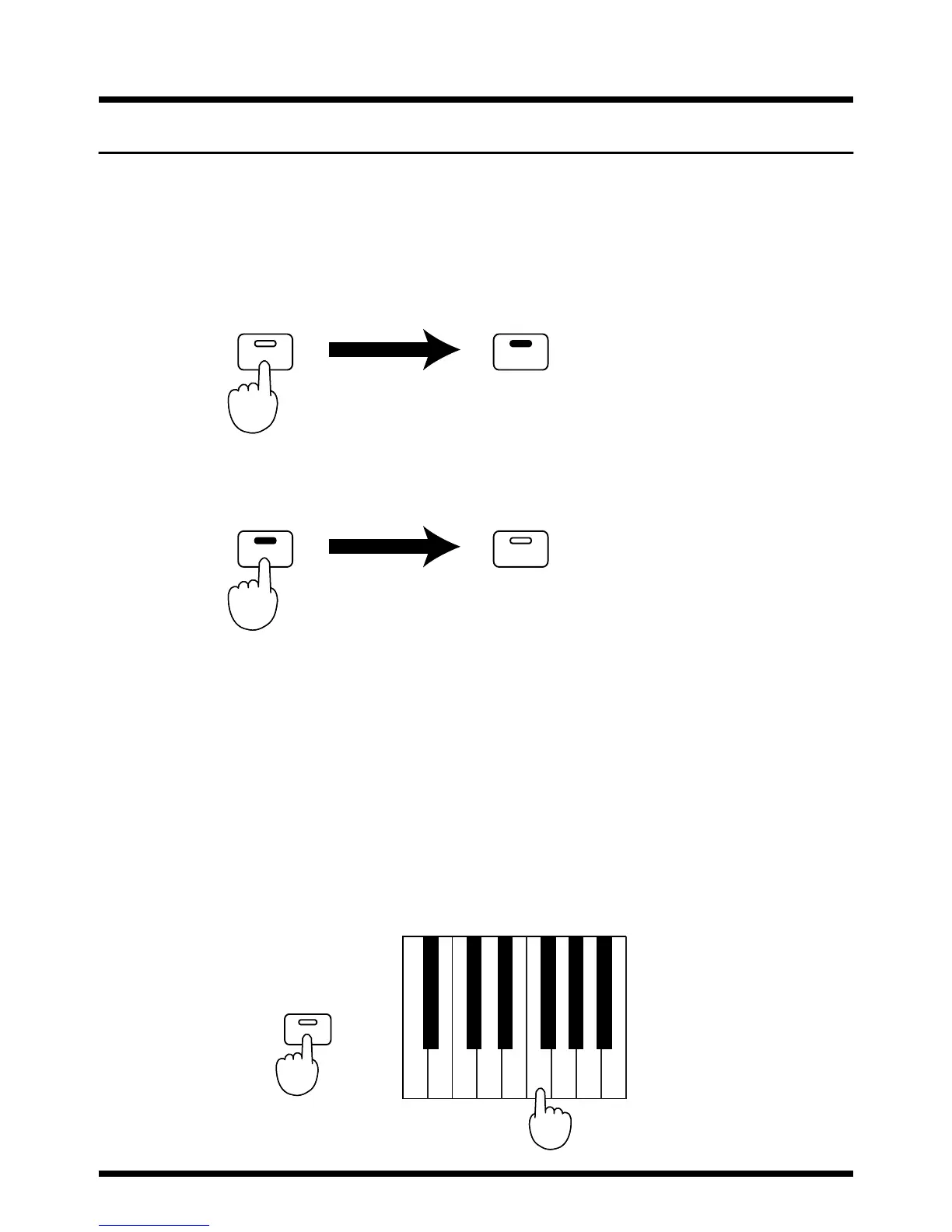
1. Press the [Reverb] button; the button indicator lights.
Reverberation is added to the sound.
fig.4-08.e
2. Press the [Reverb] button once more; the button indicator goes off,
and the reverb effect is no longer added to the sound.
fig.4-09.e
Changing the Reverb Type
The pt-2000 features eight reverb types, 1-8, allowing you to select the preferred reverb
sound.
The higher the reverb type number, the deeper the effect is.
The reverb is reset to type 4 when the power is switched on.
To change the reverb type, hold down the [Key Touch/Demo Song] button and press
one of the keys C3-G3 (corresponding to reverb types 1-8).
<Ex.> Selecting Reverb Type 6
While holding down the [Key Touch/Demo Song] button, press the
F3 key (the fourth white key below Middle C).
Refer to “Functions Assigned to the Keyboard” (p. 23).
fig.4-11.e
Reverb Reverb
Press lit
Reverb Reverb
Press dark
Demo Song
Key Touch/
F3C3 G3
1 3568
742
While holding down...
Press



 To Next Page