EasyManua.ls Logo

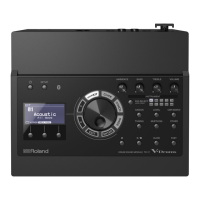
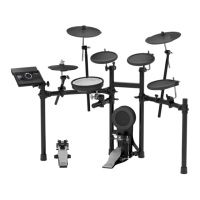
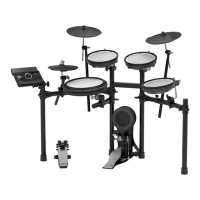
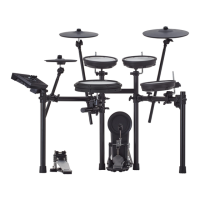
Roland TD-17-L - User Manual

Roland TD-17-L
28 pages
Print Icon
To Next Page IconTo Next Page
Loading...
Before using this unit, carefully read “USING THE UNIT SAFELY” and “IMPORTANT NOTES (the leaet “USING THE UNIT SAFELY” and
the Owners Manual (p. 27)). After reading, keep the document(s) where it will be available for immediate reference.
© 2018 Roland Corporation
Owners Manual
Look What You Can Do with the TD-17/TD-17-L
Performing
Perform with various sounds (
&
p. 8)
A diverse selection of drum sounds is built into this unit.
You can perform using a wide variety of tonal choices.
Supports a variety of performance techniques
(
&
p. 7)
Just like acoustic drums, this unit responds to a variety of
dierent performance techniques.
Customizing
Adjust the playing feel (
&
p. 21)
By adjusting the sensitivity of the sensors, you can
customize the playing feel to your taste.
Create your very own kits (
&
p. 14)
By customizing a kit, you can create an original that’s like
no other kit in the world.
Eco-Friendly Power-Save Function
The power automatically turns o when a certain length
of time elapses after you stopped playing or operating the
unit (AUTO OFF function). (
&
p. 23)
* If you don’t want the power to turn o automatically, set
AUTO OFF to OFF.
Practicing
Sounding a click (metronome) (
&
p. 9)
You can practice while listening to a click sound.
Practicing along with a song (
&
p. 9)
Songs that are ideal for practice are built into this unit. You
can practice along with these songs.
Recording a song that you’re practicing (
&
p. 10)
You can use the recording function to evaluate your own
performance.
Practicing with Coach mode (
&
p. 11)
This unit provides a Coach mode that supports your
practicing. This is a great way to improve your speed
control, precision, and endurance.
Perform along with audio from your smartphone
(
&
p. 5)
This unit is equipped with Bluetooth. You can perform
along with audio from your smartphone (TD-17-L
excepted).
Owners Manual (this document)
Read this rst. This explains all the functions of
this unit.
PDF Manual (download from the web)
5 Data List
This explains the parameters and sound of
this unit.
5 MIDI Implementation
This is detailed reference material regarding
MIDI messages.
To obtain the PDF manual
1. Enter the following URL in your
computer.
http://www.roland.com/manuals/
I
2. Choose TD-17” or TD-17-L as the product
name.

Table of Contents

Other manuals for Roland TD-17-L

Questions and Answers

  • K
    kennethbutlerAug 7, 2025
    Why does my Roland TD-17-L Drums sound bad when using certain sticks or brushes?
    • V
      vanessawarnerAug 7, 2025
      If you are experiencing sound issues or malfunctions with your Roland Drums when using certain sticks or brushes, consider the following: * Using carbon or metal sticks might cause the sensor to malfunction. Use wood or plastic sticks instead. * Using metal brushes might cause the sensor to malfunction or scratch the pad. Use nylon brushes instead.
  • C
    Caitlin Phillips DVMAug 12, 2025
    What to do if Roland Drums have no sound?
    • M
      Madison WilliamsAug 12, 2025
      If your Roland Drums aren't producing sound, here are a few things to try: * Check all connections to ensure they are secure. * Verify that an instrument is assigned. * Adjust the instrument's volume. * Make sure your audio system is working correctly. * Ensure the volume is at an appropriate level. * Set “Local Control” to “ON.”
  • K
    Kelsey RhodesAug 17, 2025
    What to do if a specific pad on my Roland TD-17-L doesn't sound?
    • J
      Judith Torres MDAug 17, 2025
      If a specific pad on your Roland Drums isn't producing sound, try the following: * Reload the user sample. * Assign a different instrument to the pad.
  • D
    douglasrhodesAug 22, 2025
    How to fix Roland TD-17-L USB connection problems?
    • W
      William ThompsonAug 22, 2025
      If you're having USB connection problems with your Roland Drums, try these steps: * Check all the connections. * Install the USB driver on your computer. * Use a cable that supports USB 2.0. * Choose the USB setting appropriate for your situation.
  • Y
    yhollandAug 27, 2025
    How to fix Roland Drums SD card problems?
    • M
      Mary BarnettAug 27, 2025
      To resolve SD card issues with your Roland Drums, consider the following: * Format the SD card on the drum machine. * Ensure you are using MP3/WAV files that the product supports. * Check the audio file format, file name, and file name extension for compatibility. * Verify the location of the audio file on the SD card. * Keep the number of audio files in a folder to 200 or fewer.
  • M
    Matthew WhiteAug 31, 2025
    How to troubleshoot MIDI issues with Roland TD-17-L Drums?
    • R
      Rachel KnappSep 1, 2025
      If you're experiencing MIDI problems with your Roland Drums, try these solutions: * Check all MIDI connections. * Ensure the MIDI channels of the drum machine and external MIDI device are set to the same setting. * Set the pad’s “NOTE NO.”

Summary

Getting Ready: Initial Setup and Connections

Getting Ready: Bluetooth Connectivity

Bluetooth Connectivity

Wireless audio and MIDI connection to mobile devices for performing and practice.

Recording and Playback

Recording Your Performances

Capturing playing directly on the unit and recording with songs.

Practice Modes

Coach Mode Overview

Introduction to practice modes for improving speed control, accuracy, and endurance.

Customizing Kits

User Samples: Importing and Managing

Loading, listing, and managing custom audio files as user samples.

Overall Settings (SETUP)

System Configuration Overview

Accessing and modifying global settings for the entire unit.

Restoring Factory Settings

Resetting the unit to its original factory default state.

Troubleshooting

Sound and File Playback Issues

Resolving no sound, low volume, and audio file playback problems.

MIDI and Bluetooth Connectivity Issues

Troubleshooting MIDI connection and Bluetooth device pairing problems.

Safety Precautions

Operational and Handling Safety

Important warnings for safe operation, AC adaptor usage, stand placement, and handling.

Roland TD-17-L Specifications

General IconGeneral
TypeElectronic Drum Kit
ModuleTD-17
Sound EnginePrismatic Sound Modeling
Snare DrumPDX-12
Kick PadKD-10
Hi-HatCY-5
MetronomeYes
Triggering TechnologyAdvanced triggering technology for realistic and expressive drumming
ConnectivityUSB, MIDI, Bluetooth
Audio PlaybackYes, via USB or Bluetooth
Tom Pads3 x PDX-8

Related product manuals