
 Need help?
Do you have a question about the Roland V-160HD RCS and is the answer not in the manual?
Configure network settings on Windows for V-160HD LAN connection.
Configure network settings on Mac for V-160HD LAN connection.
Setting IP address and subnet mask for V-160HD LAN connectivity.
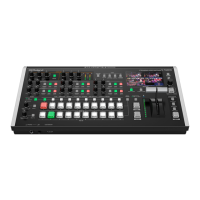
The Roland V-160HD RCS is a comprehensive software application designed for remote control and management of the Roland V-160HD video switcher. This application provides a user-friendly interface that mirrors the physical controls of the V-160HD, allowing for seamless operation from a computer. It supports both Windows and Mac operating systems, ensuring broad compatibility for users. The V-160HD RCS is particularly useful for enhancing workflow efficiency by providing a centralized control point for complex video productions.
The core function of the V-160HD RCS is to provide remote control over all major features of the V-160HD video switcher. This includes managing video inputs, transitions, keying effects, audio mixing, and camera control.
Video Switching and Transitions: The application offers a virtual representation of the V-160HD's program (PGM) and preview (PVW) buses, allowing users to select and switch between various video sources such as HDMI inputs and still images. A wide array of transition types, including MIX, FAM, NAM, and WIPE, are available, with adjustable transition times for smooth and professional-looking cuts. The "AUTO SWITCHING" feature can be enabled for automated transitions.
Keying and PinP (Picture-in-Picture): The V-160HD RCS provides dedicated controls for up to four PinP & KEY layers and two DSK (Downstream Keyer) layers. Users can configure these layers to overlay graphics, text, or additional video sources onto the main program output. Each keyer has its own setup options, allowing for precise control over keying parameters.
Preset Memory: The application features a robust preset memory system, allowing users to save and recall up to 30 complete switcher states. These presets can include input selections, transition settings, keyer configurations, and more, enabling quick recall of complex setups during live productions. The presets are organized into groups of 10 for easy navigation.
Audio Mixing: A dedicated AUDIO MIXER screen provides comprehensive control over all audio inputs and outputs. Users can adjust levels for individual HDMI inputs, AUX inputs, USB audio, and other sources. Features such as SOLO and MUTE buttons are available for precise audio management. The application also supports MIDI mapping for external MIDI controllers, allowing for tactile control over audio faders and buttons.
Camera Control (PTZ): The V-160HD RCS includes a CAMERA CONTROL screen specifically designed for controlling PTZ (Pan-Tilt-Zoom) cameras. Users can select individual cameras, adjust their pan, tilt, and zoom positions, and set focus and exposure. Camera presets can be stored and recalled, streamlining multi-camera setups. The application also supports the use of game controllers for intuitive PTZ camera operation.
Output Fade: The "OUTPUT FADE" function allows for smooth fades to black or other designated outputs, providing a professional ending or transition for video segments.
Effects and Macros: The application includes controls for various video effects and a macro system. Macros can be programmed to automate sequences of operations, significantly simplifying complex tasks and ensuring consistent execution.
Still Image Management: Users can manage and select still images (STILL 1, STILL 2) as video sources, which is useful for displaying logos, lower thirds, or background graphics.
The V-160HD RCS is designed for flexible and efficient operation, offering multiple connection methods and intuitive control schemes.
Multiple Connection Options: The application supports several ways to connect to the V-160HD:
Intuitive User Interface: The graphical user interface (GUI) of the V-160HD RCS closely mimics the physical layout of the V-160HD, making it easy for operators familiar with the hardware to transition to software control. Buttons, faders, and knobs are clearly labeled and logically arranged.
MIDI Controller Integration: For enhanced tactile control, the V-160HD RCS can be connected to external MIDI controllers. Users can map MIDI messages from faders, knobs, and buttons on their MIDI controller to corresponding controls within the application, such as audio levels or transition parameters. This "MIDI mapping" feature allows for a more hands-on and expressive control experience, particularly useful for live audio mixing.
Game Controller for PTZ: The application innovatively supports the use of commercially available game controllers for controlling PTZ cameras. This provides an ergonomic and familiar control method for camera operators, allowing for precise pan, tilt, and zoom adjustments.
Connection Status Indicators: The application provides clear visual feedback on the connection status (e.g., "USB," "LAN," "RS-232"), ensuring users can quickly verify that the device is properly connected and communicating.
While the V-160HD RCS is primarily an operational tool, it includes features that contribute to system maintenance and reliability.
System Program Compatibility: The application emphasizes the importance of keeping the V-160HD's system program updated. It specifies compatibility with V-160HD system program version 1.08 and later, ensuring optimal performance and access to all features. Users are advised to update their V-160HD firmware to the latest version for full functionality.
Network Configuration Management: For LAN and Wi-Fi connections, the application provides clear instructions for configuring network settings, including IP addresses, subnet masks, and network passwords. This helps in troubleshooting network connectivity issues and maintaining a secure connection.
MIDI Mapping Management: The MIDI mapping feature includes options to view, delete individual, or clear all MIDI mappings. This allows users to easily reconfigure their MIDI controllers or reset mappings if conflicts arise, ensuring flexibility in control setups.
Software Updates: As a software application, the V-160HD RCS itself will likely receive updates to improve performance, add new features, and address any bugs. Users are encouraged to keep the RCS application updated to benefit from the latest enhancements.
Troubleshooting Guidance: The manual provides step-by-step instructions for establishing connections and configuring settings, which serves as a valuable resource for troubleshooting common setup issues. For instance, it details how to check network information on the V-160HD and how to configure network adapters on the computer.
In summary, the Roland V-160HD RCS is a powerful and versatile remote control application that significantly extends the operational capabilities of the V-160HD video switcher. Its comprehensive feature set, flexible connectivity options, and user-friendly design make it an indispensable tool for professional video production environments.
 General
| Streaming | Yes |
|---|---|
| Effects | Yes |
| Multiviewer | Yes |
| Sampling Rate | 48 kHz |
| Streaming Resolution | 1080p |
| Input Connectors | HDMI, SDI |
| Output Connectors | HDMI, SDI |
| Audio Input Connectors | XLR, RCA |
| Audio Output Connectors | XLR, RCA |
| Control Connectors | USB, Ethernet |
| Supported Input Resolutions | 1080p, 1080i, 720p, 576i, 480i |
| Supported Output Resolutions | 1080p, 1080i, 720p, 576i, 480i |
| Power Supply | AC 100–240 V |
| Operating Temperature | +0 to +40 degrees Celsius (+32 to +104 degrees Fahrenheit) |






 To Next Page