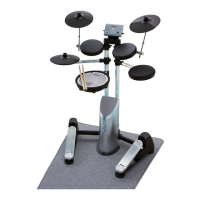
What to do if the sound is distorted in headphones connected to my Roland V Lite HD-1 Drums?
- EEvan ThorntonJul 31, 2025
Try adjusting the volume. To check if the headphones are working correctly, connect them to another audio source to verify.
What to do if the sound is distorted in headphones connected to my Roland V Lite HD-1 Drums?
Try adjusting the volume. To check if the headphones are working correctly, connect them to another audio source to verify.
What to do if there is no sound from an external audio source connected to the Roland V Lite HD-1 MIX IN jack?
First, ensure you are using a cable without a resistor, as cables with resistors can reduce the volume. Check if the cable is faulty and replace it if necessary. Also, verify the volume setting on the connected audio source, as well as the amp or audio system settings and connections.
Descriptions of the kick drum and tom drums, key components of the kit.
Description of the snare drum, the primary voice of the drum kit.
Controls power on/off for the unit.
Details on connecting the AC adaptor and positioning it correctly.
Steps to diagnose and resolve issues when no sound is produced.
Troubleshooting for external audio sources and distorted headphone/output sound.
How to set the global sensitivity for all drum pads.
Descriptions of the kick drum and tom drums, key components of the kit.
Description of the snare drum, the primary voice of the drum kit.
Controls power on/off for the unit.
Details on connecting the AC adaptor and positioning it correctly.
Steps to diagnose and resolve issues when no sound is produced.
Troubleshooting for external audio sources and distorted headphone/output sound.
How to set the global sensitivity for all drum pads.
| Type | Electronic Drum Kit |
|---|---|
| Number of Pads | 8 |
| Songs | 10 |
| Metronome | Yes |
| Headphone Output | Yes |
| Aux Input | Yes |
| Connectivity | MIDI Out |
| Sounds | 15 |
| Kick Pedal | Included |
| Display | LED |
| Connectors | MIDI Out |
| Power Supply | AC Adapter |