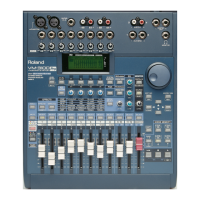
The VM-3100 can store up to 32 different Scenes arranged into eight
sets—or “banks”—containing four Scenes each. Once you’ve chosen
the desired bank, you can select the desired Scene by pressing one of
the four dedicated Scene buttons located in the VM-3100’s SCENE
MEMORY area.
Let’s save everything we’ve done so far in this
Supplemental Note
as
Scene 2 in Bank 4:
1. Press the BANK 1-8 (LOC/SCENE) button. The “SELECT BANK”
screen appears.You can turn the VALUE dial to select any of the
eight banks of Scenes.
2. Turn the dial to select Bank 4.
3. Press ENTER/YES (REDO) to confirm your selection—an asterisk
will appear to the right of the “04.”
4. Press LEVEL METER (BIG T.C.) to exit the screen.
To save a Scene in the selected bank, you can press any unlit
Scene button.
5. Press SCENE 2 (DEL)—the button lights, indicating that your
settings are now stored as Scene 2 in Bank 4.
Select the desired Scene bank—see Steps 1-4 1 in “How to Save Mixer
Settings as a Scene”—and use the following procedure to recall the
Scene:
1. Press the desired SCENE button.
Select the desired Scene bank—see Steps 1-4 in “How to Save Mixer
Settings as a Scene”—and use the following procedure to delete the
Scene:
1. While holding down SHIFT, press the SCENE button of the Scene
you wish to delete. Its light will turn off, indicating that the Scene
has been deleted, and that the location is now available for the
storing of a new Scene.
1999 Roland Corporation U.S. The Basics of the VM-3100/VM-3100Pro Faxback# 21099 Page 21
How to Save Mixer Settings as a Scene (continued)
®ÂØÒňΠSupplemental Notes The Basics of the VM-3100/VM-3100Pro
The currently selected bank is noted with an asterisk to the right of its
number.
When a Scene has been saved in one of the four Scene memory
locations in the current bank, the corresponding Scene button lights to
indicate that the location is already in use.
XXIII. How to Recall a Scene
XXIV. How to Delete a Scene



 To Next Page
 Loading...