29
Overheat protection
• To protect the motor against overheating, the appliance is equipped with an integrated heat
protection, which automatically turns off the motor if the temperatures are too high.
NOTE: It may occur that the pilot lights in the operating panel continue to shine.
ATTENTION: In case of motor overheating, absolutely turn off the appliance by turning the rotary switch to
position “OFF“ and disconnect the power plug from the power socket. Allow the appliance to cool down to
room temperature before operating it again.
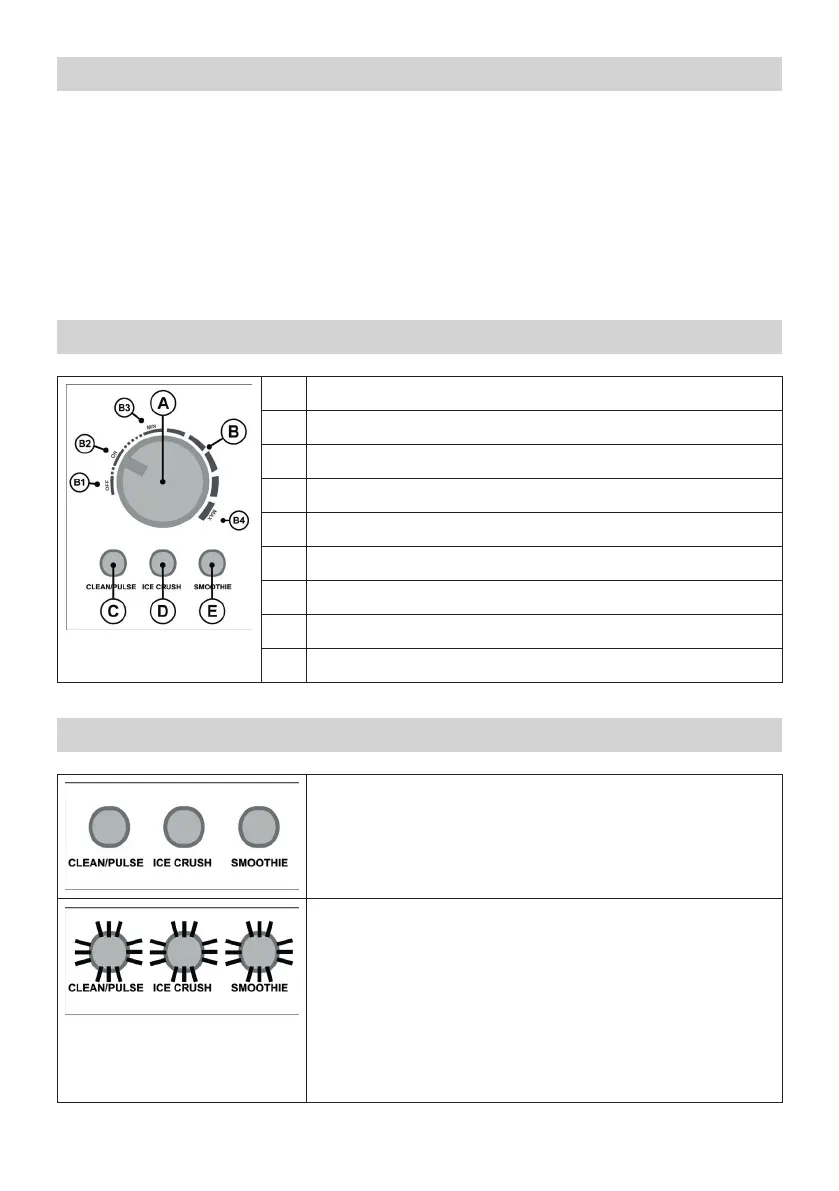
Control panel
A Rotary switch
B Operating scale
B1 Position “OFF”
B2 Position “ON”
B3 Position “MIN“ for continuous speed regulation
B4 Position “MAX“ for continuous speed regulation
C Button “CLEAN/PULSE“ with pilot light
D Button “ICE CRUSH” with pilot light
E Button “SMOOTHIE“ with pilot light
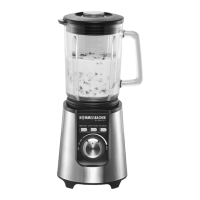
Pilot lights
None of the 3 pilot lights is lit/fl ashing:
• The appliance is connected to the power supply, the rotary knob
is set to “OFF“ and the glass jar and top cover are properly
assembled.
All 3 pilot lights are fl ashing simultaneously:
• If the appliance is connected to the power supply and the glass
jar is not placed and/or the top cover is not placed, all 3 pilot
lights are fl ashing.
• If the appliance is connected to the power supply when it is
already switched on (rotary knob in position “ON” or in the fi eld
between “MIN” and “MAX”), all 3 pilot lights are fl ashing.
• If the top cover or the glass jar is removed during operation, the
appliance stops and all 3 pilot lights are fl ashing.


 To Next Page