ROPE INNOVATION CO., LTD. CONFIDENTIAL NO.:ROPE-15121802
Copyright © 2016 ROPE INNOVATION CO., LTD. All rights reserved. Website: www.ropetrack.com
3.2 Installation
NOTE:
3.2.1 To prevent theft of the device, it should be installed as covertly as possible. Covertly installation is
suggested.
3.2.2 Avoid placing the device close to higher power electrical devices, such as reversing radar, anti-theft
device or other vehicle communication equipment;
3.2.3 The device should be fixed into position with cable ties or wide double-side tape.
3.2.4 The device has built-in GSM antenna and GPS antenna. During installation, please make sure the
receiving side face is up, with no metal object above the device to interfere with GPS reception. The
following places are suggested for installation:
-shelter in the decorated board below the front windshield;
-shelter around the front instrument panel (non-metallic material face);
-in the decorated board below back windshield;
4. Web based tracking online activation
4.1 Open website www.overseetracking.com and login with the user & password that provided by Rope.
4.2 Click Information Management
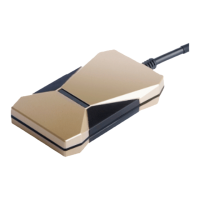
4.3 Click Vehicle Tracker List and you will see all your vehicles are listed there. Please note, to add more
devices, please contact your sales.
Please check the Tracker Status, if it is Unactivated, please click Activate. If it is Activated, please click
Edit.
4.4 Click Activate, please fill in the blanks marked with red *. You also can fill in other blanks to complete
the device information.


 To Next Page