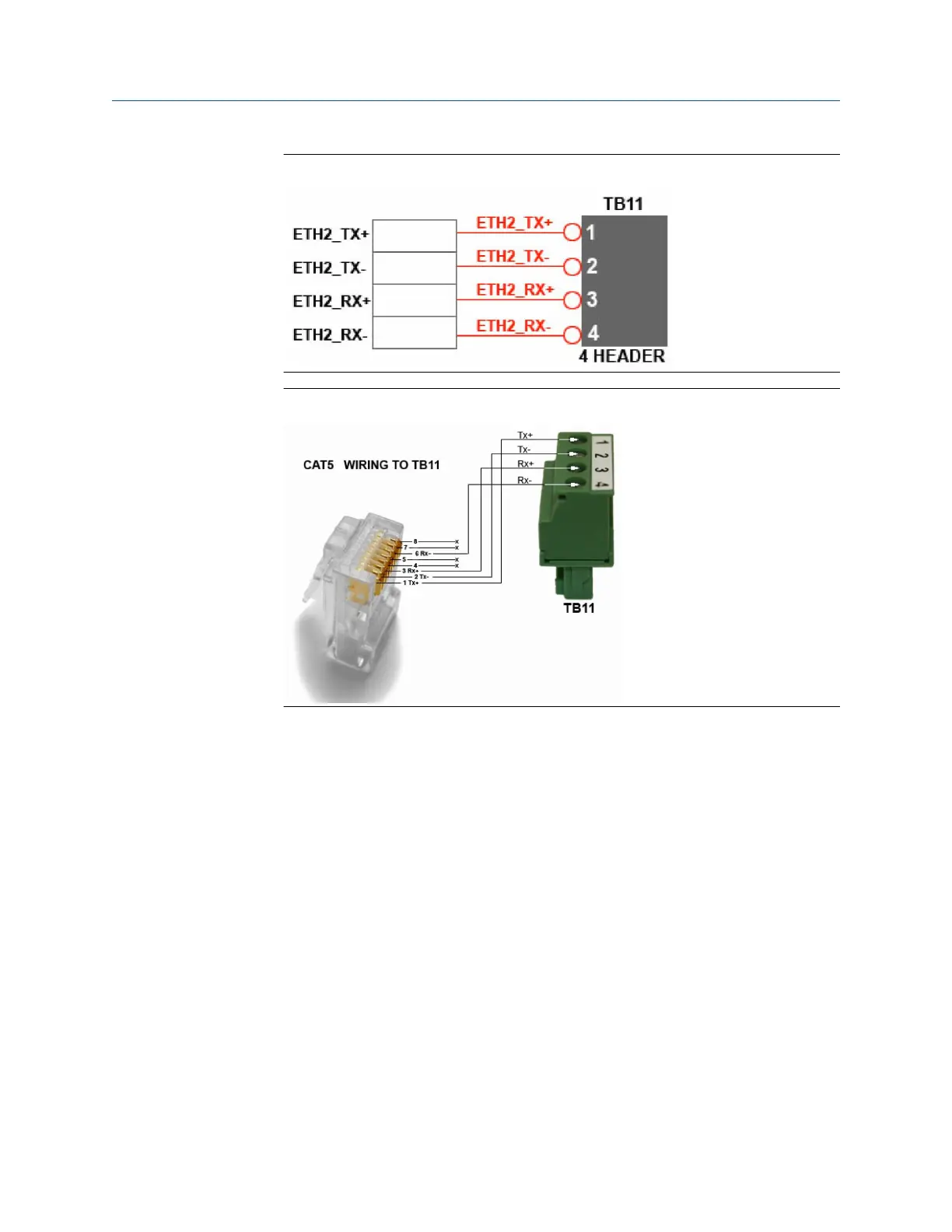
Figure 2-10: Field Wiring to TB11
Figure 2-11: CAT5 Wiring to TB11
2. Once you have wired the cable to the Ethernet terminal, plug the other end into a
PC or a wall jack.
See Assign a static IP address to the gas chromatograph (GC) to continue
configuring the GC.
2.4.11
Assign a static IP address to the gas chromatograph (GC)
Procedure
1. Start MON2020 and log in to the GC using a direct Ethernet connection.
For more information, refer to Connect directly to a personal computer (PC) using
the gas chromatograph's (GC’s) Ethernet1 port.
2. Select Application → Ethernet ports....
The Ethernet Ports window displays.
3. Depending upon the Ethernet port to which you want to assign a static IP address,
do the following:
a) The Ethernet port at TB11: Enter the appropriate values in the Ethernet2 IP
Address, the Ethernet 2 Subnet, and the Default Gateway fields.
Quick Start Guide Installation and start-up
00825-0100-3770 July 2020
Rosemount 700XA 33


 To Next Page