Wireless N Dual Band Adapter N600PCE User Manual
18
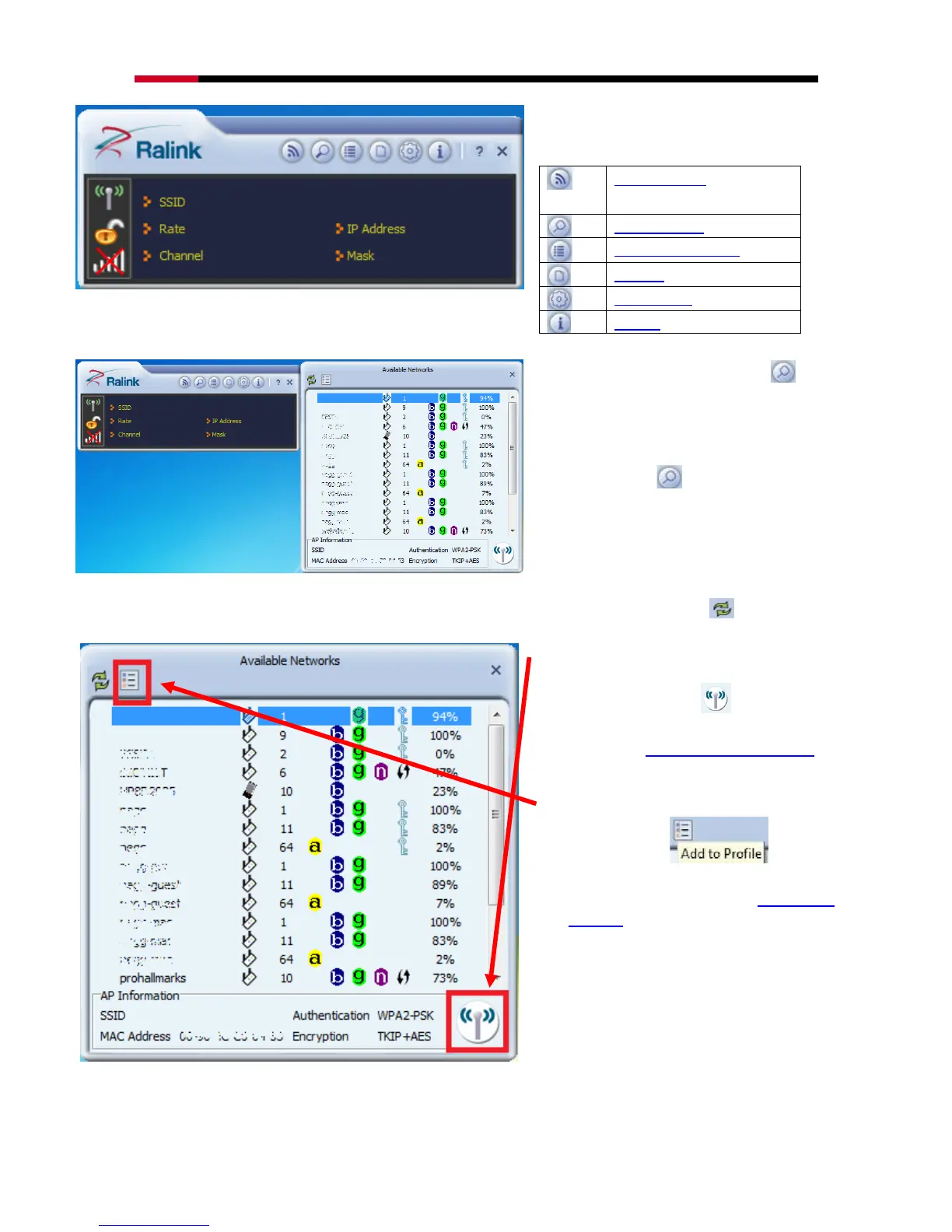
This is the startup window of the Ralink
Wireless Utility
Here is each button‟s function:
Wi-Fi Direct
(will appear only if your computer
can support this function)
Please first start by selecting to
search nearby wireless signal for
connection.
When click on , a window will
popup and presents to you the nearby
Wi-Fi Signals.
If you did not see the signal you want to
connect, please click to rescan.
One time connection:
Please first highlight your desired
SSID, then click . Then follow
the popup window‟s direction to
connect. (Please see for detail)
Setup the Profile for all future
connection:
Please click to add
the SSID to profile for all future use.
For detail, please follow Add/Edit
Profile.
Now you have completed the setup of your wireless network. You should be ready to surf!


 To Next Page