Wireless N Dual Band Adapter N600PCE User Manual
19
Chapter 4 Ralink Utility Configuration
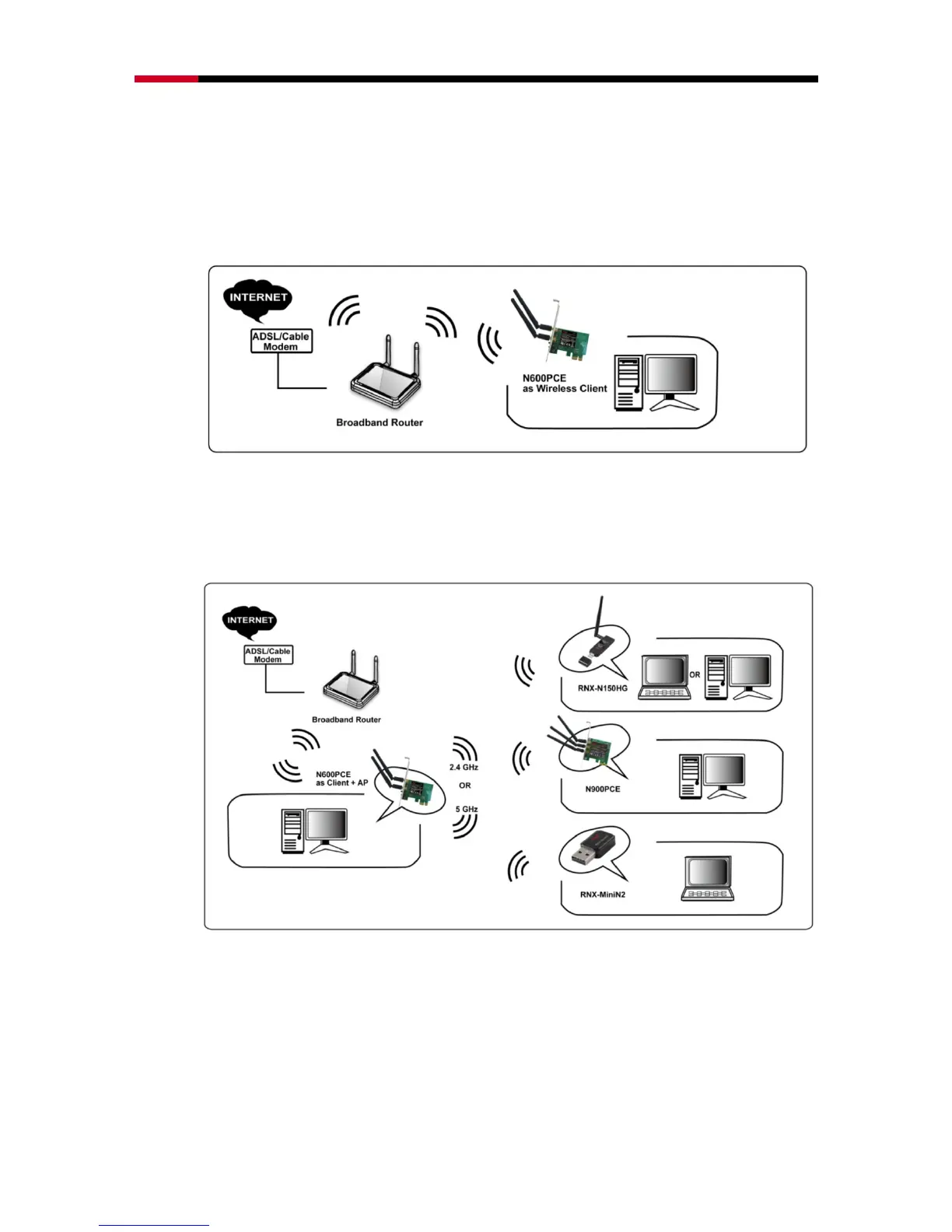
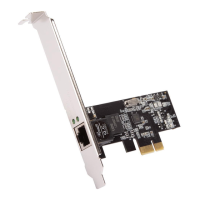
Ralink Utility enables N600PCE to serve as 3 modes: Wireless Client mode, Client + AP
mode, and AP mode.
Wireless Client mode: This is the basic and default mode for N600PCE when you
install the Utility. N600PCE will serve as a wireless dual band adapter at this mode.
Client + AP mode: N600PCE under this mode will serve as a wireless dual band
adapter while broadcast signals that other Wi-Fi devices can connect to. (Note:
N600PCE can only transmit 2.4GHz signal if receives 2.4GHz signal from
wireless router, and 5GHz signal if receives 5GHz signal from wireless router)
AP mode: N600PCE as AP will serve as a signal broadcaster while the computer it
installed in is connecting to internet via wire connection. (Note: N600PCE can only
transmit either 2.4GHz signal or 5GHz signal in one time, but not at the same
time)


 To Next Page