7
NAME AND INSTRUCTIONS FOR QUICK CONTROL BUTTONS
Touch Screen Controller Instructions
The “Touch Screen Controller Instructions” can be found on the Touch screen Controller display.
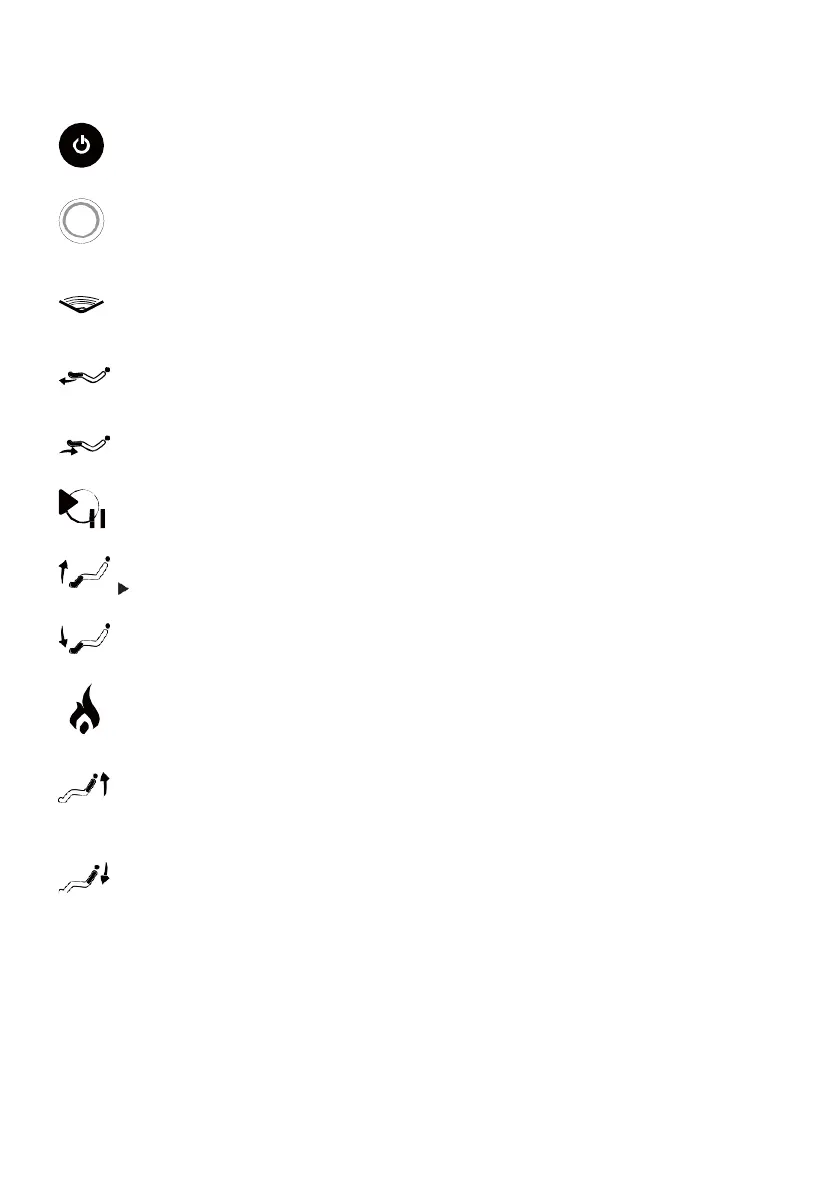
Long press to turn the chair on/o. Quick press rotary switch to toggle auto massage
programs.
Power/Auto Massage
Rotate clockwise/counter-clockwise to increase/decrease 3-D massage intensity.
Rotary Switch
Press to position the chair in Zero Gravity Position. Press again to restore to the default
position. A third press will restore to default position.
Zero Gravity Position
Press and hold to extend the Footrest. Release the button to stop. (Ensure there are no
obstructions in the way of the footrest).
Footrest Extension
Press and hold to retract the Footrest. Release the button to stop.
Footrest Retraction
Press to pause the massage chair function. Press this button again to continue.
Pause
Press and hold to raise the Footrest. Release the button to stop.
Raise Footrest
Incline: Press and hold to incline the backrest to upright position and release the button
to stop.
Raise Backrest
Press and hold to lower the Footrest. Release the button to stop.
Lower Footrest
Recline: Press and hold to recline the backrest. Release the button to stop. NOTE: -
When the backrest reclines to its third quarter position, it will stop and wait for the
lower mechanism to reach a safe clearance before it continues to recline.
Rotary Switch
Press to turn on Back and Leg Heat function. Press again to turn this function o.
Back & Leg Heat
ZeroG


 To Next Page