35
5.5 General cleaning
☛
Never immerse the coffee machine in water.
☛
Never use a scrubbing cleaner to clean the coffee machine.
• Use a soft, damp cloth to clean the inside and outside of the case.
• Empty the drip pan (9b) and the grounds holder (9c) only when the display indica-
tes this. From time to time, use soapy water for cleaning.
☛
When cleaning the drip pan (9b), make sure that the two contacts (9d) at the
back of the pan are always clean.
• The water tank should be rinsed out daily and filled with fresh, cool water.
• The hot water/steam jet must be cleaned with a moist cloth after each use.
6. System messages
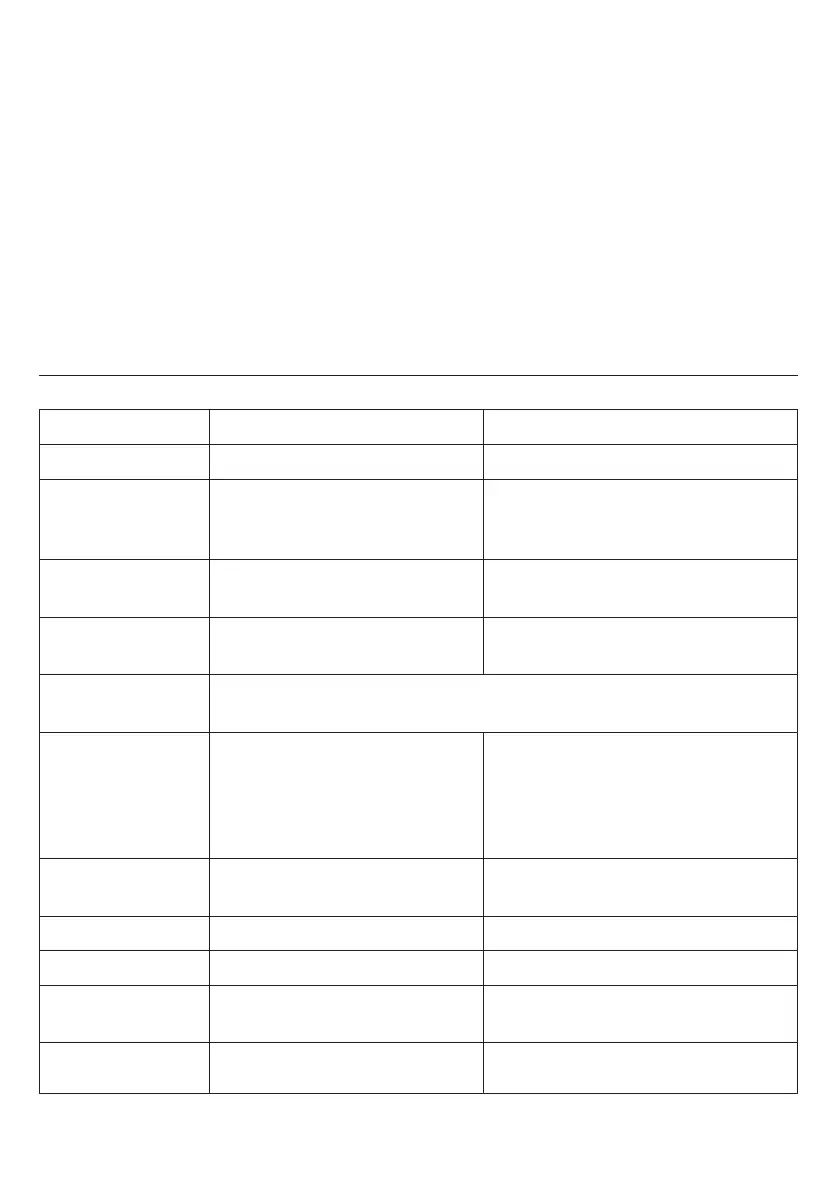
Message Meaning Remedy
Fill up Pipe-Sys
– Fill or rinse the water system. – Open the hot water dial (11).
FILL WATER
–Water tank (17) is empty. – Fill with fresh water.
–Water tank (17) missing or not – Insert water tank.
installed correctly.
FILL BEANS
– No coffee beans. – Fill the bean holder (18) with fresh
beans.
EMPTY trays
– Drip pan (9a) and/or grounds – Empty the pan and/or holder.
holder (9c) is full.
Please note:
The message
fill beans
will only turn off after another
coffee has been made.
trays MISSING
– Drip pan (9a) with grounds – Insert the drip pan with the
holder (9c) is missing or not grounds holder.
inserted correctly.
– The contacts (9d) on the drip – Clean the contacts.
pan are not clean.
SYSTEM TOO HOT
– The system is too hot. – Allow the system to cool off by
drawing out hot water (see 3.6).
PLEASE CLEAN
– Cleaning is necessary. – Clean the coffee machine (see 5.3).
SYSTEM CALCif.
– Decalcifying is necessary. – Decalcify the coffee machine (see 5.4).
FILTER CHANGE
– The effectiveness of the filter – Change the filter (see 5.2).
is exhausted.
CLOSE the DOOR
– The brewing unit cover – Close the cover.
(22) is open.


 To Next Page