36
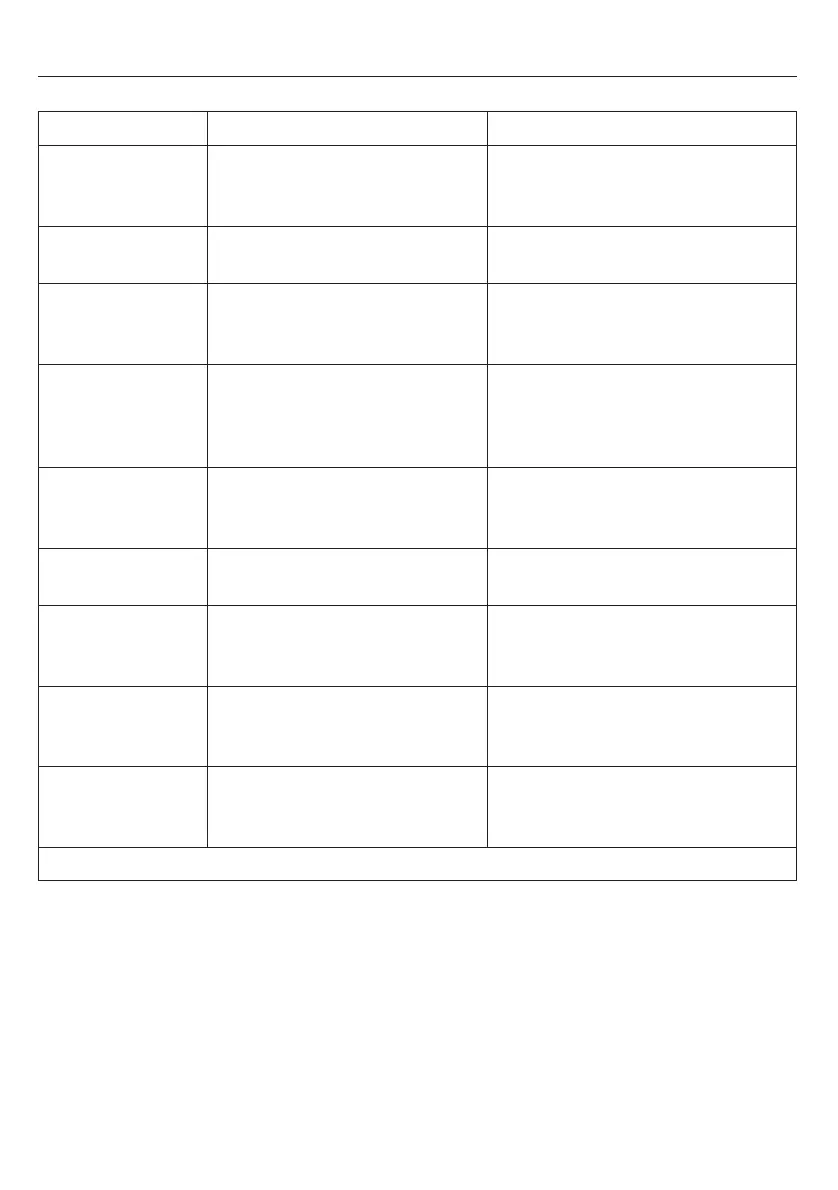
Problem Meaning Remedy
It is not possible – The jet (12) is plugged up. – Clean jet thoroughly.
to draw hot
water or steam.
Too little milk foam – You are using the wrong kind – Use cold milk with 15% fat content.
or liquid foam. of milk.
Coffee just drips – Milling is set too fine. – Set the milling to a coarser setting
out. (see page 24).
– Coffee is milled too fine. – Use coarser milled coffee.
The coffee is – Not the right type of coffee. – Change the type of coffee.
missing its – The beans are not fresh ground. – Use fresh ground beans.
«foamy layer». – The milling fineness is not right – Fix the milling fineness
for the coffee bean type.
(see page 24).
Loud noise from – Foreign object in the milling – Contact the Service Hotline
the coffee mill. works, for example a pebble. (see below). You can still use ground
coffee.
Decalcifying pro- – The filter is programmed to
YES
.–Program the filter to
NO
(see page 29).
gram will not start.
ERROR 1
– The on/off switch (2) ring blinks. – Let the coffee machine warm up to
– The coffee machine is too cold. room temperature for a couple of
hours.
ERROR 5
– The on/off switch (2) ring blinks. – Let the coffee machine warm up
– The coffee machine has not to room temperature for a couple
reached operating temperature. of hours.
ERROR 8
– The on/off switch (2) ring blinks. – Please call our Service Hotline
– The brewing unit is blocked or (see below).
not in the right position.
If you are unable to fix the problem yourself, please call our Service Hotline: 062 787 77 00.
7. Troubleshooting


 To Next Page