EasyManua.ls Logo

Rotel RC-980BX - Connecting Components

Rotel RC-980BX
6 pages
Print Icon
To Next Page IconTo Next Page
To Previous Page IconTo Previous Page
Loading...
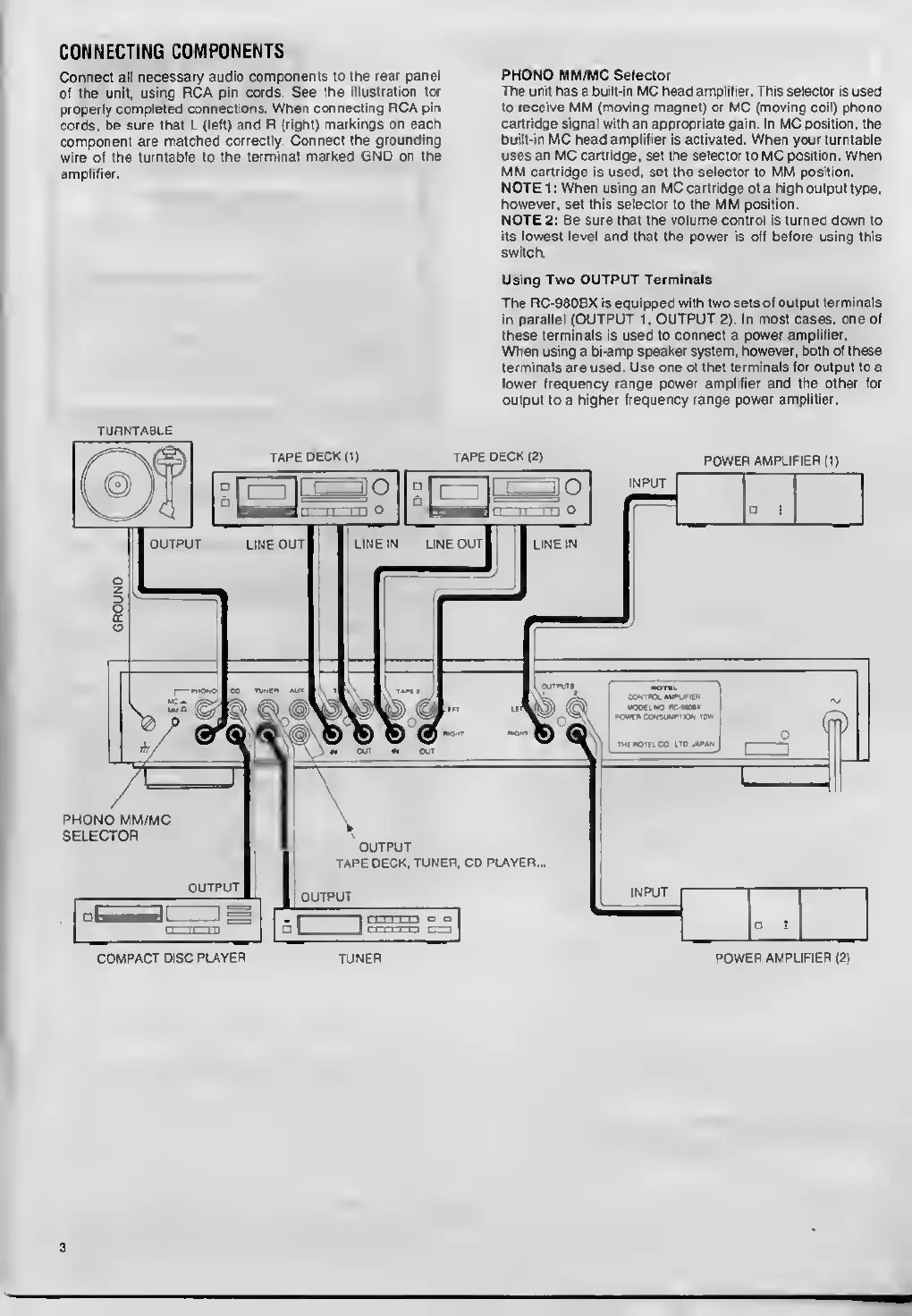
CONNECTING
COMPONENTS
Connect
all
necessary
audio
components
to
the
rear
panel
of
the
unit,
using
RCA
pin
cords.
See
the
illustration
for
properly
completed
connections.
When
connecting
RCA
pin
cords,
be
sure
that
L
(left)
and
R
(right)
markings
on
each
component
are
matched
correctly.
Connect
the
grounding
wire
of
the
turntable
to
the
terminal
marked
GND
on
the
amplifier.
PHONO
MM/MC
Selector
The
unit
has
a
built-in
MC
head
amplifier.
This
selector
is
used
to
receive
MM
(moving
magnet)
or
MC
(moving
coil)
phono
cartridge
signal
with
an
appropriate
gain.
In
MC
position,
the
built-in
MC
head
amplifier
is
activated.
When
your
turntable
uses
an
MC
cartridge,
set
the
selector
to
MC
position.
When
MM
cartridge
is
used,
set
the
selector
to
MM
position.
NOTE
1
:
When
using
an
MC
cartridge
of
a
high
output
type,
however,
set
this
selector
to
the
MM
position.
NOTE
2:
Be
sure
that
the
volume
control
is
turned
down
to
its
lowest
level
and
that
the
power
is
off
before
using
this
switch.
Using
Two
OUTPUT
Terminals
The
RC-980BX
is
equipped
with
two
sets
of
output
terminals
in
parallel
(OUTPUT
1,
OUTPUT
2).
In
most
cases,
one
of
these
terminals
is
used
to
connect
a
power
amplifier.
When
using
a
bi-amp
speaker
system,
however,
both
of
these
terminals
are
used.
Use
one
of
thet
terminals
for
output
to
a
lower
frequency
range
power
amplifier
and
the
other
for
output
to
a
higher
frequency
range
power
amplifier.
TURNTABLE
INPUT
OUTPUT
OUTPUT
TAPE
DECK.
TUNER.
CD
PLAYER.
INPUT
OUTPUT
TAPE
DECK
(1)
TAPE
DECK
(2)
POWER
AMPLIFIER
(1)
PHONO
MM/MC
SELECTOR
COMPACT
DISC
PLAYER
TUNER
POWER
AMPLIFIER
(2)