EasyManua.ls Logo

Rotel RC-980BX - Switches and Controls; Operation

Rotel RC-980BX
6 pages
Print Icon
To Next Page IconTo Next Page
To Previous Page IconTo Previous Page
Loading...
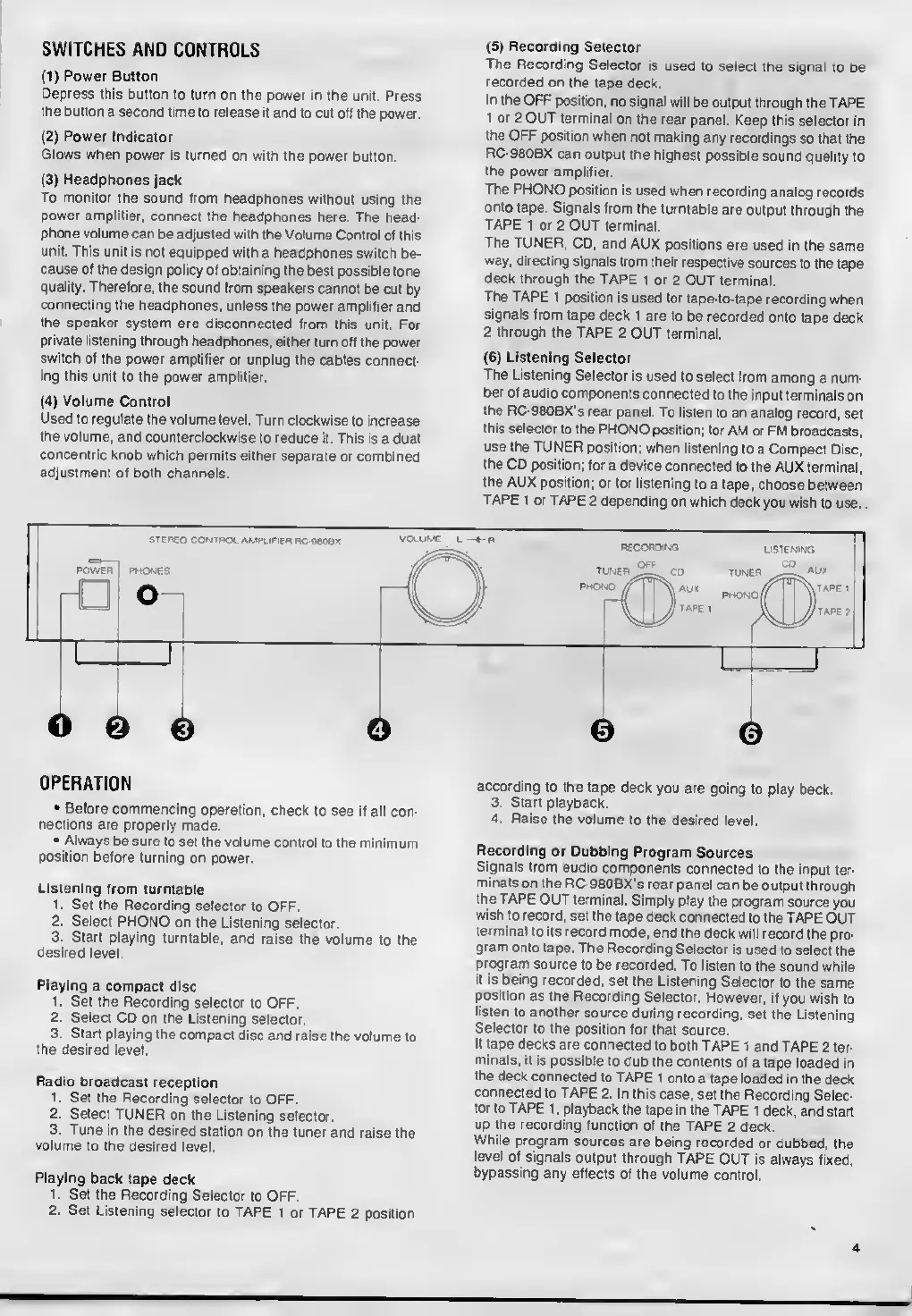
SWITCHES
AND
CONTROLS
(1)
Power
Button
Depress
this
button
to
turn
on
the
power
in
the
unit.
Press
the
button
a
second
time
to
release
it
and
to
cut
off
the
power.
(2)
Power
Indicator
Glows
when
power
is
turned
on
with
the
power
button.
(3)
Headphones
jack
To
monitor
the
sound
from
headphones
without
using
the
power
amplifier,
connect
the
headphones
here.
The
head¬
phone
volume
can
be
adjusted
with
the
Volume
Control
of
this
unit.
This
unit
is
not
equipped
with
a
headphones
switch
be¬
cause
of
the
design
policy
of
obtaining
the
best
possible
tone
quality.
Therefore,
the
sound
from
speakers
cannot
be
cut
by
connecting
the
headphones,
unless
the
power
amplifier
and
the
speaker
system
are
disconnected
from
this
unit.
For
private
listening
through
headphones,
either
turn
off
the
power
switch
of
the
power
amplifier
or
unplug
the
cables
connect¬
ing
this
unit
to
the
power
amplifier.
(4)
Volume
Control
Used
to
regulate
the
volume
level.
Turn
clockwise
to
increase
the
volume,
and
counterclockwise
to
reduce
it.
This
is
a
dual
concentric
knob
which
permits
either
separate
or
combined
adjustment
of
both
channels.
(5)
Recording
Selector
The
Recording
Selector
is
used
to
select
the
signal
to
be
recorded
on
the
tape
deck.
In
the
OFF
position,
no
signal
will
be
output
through
the
TAPE
1
or
2
OUT
terminal
on
the
rear
panel.
Keep
this
selector
in
the
OFF
position
when
not
making
any
recordings
so
that
the
RC-980BX
can
output
the
highest
possible
sound
quality
to
the
power
amplifier.
The
PHONO
position
is
used
when
recording
analog
records
onto
tape.
Signals
from
the
turntable
are
output
through
the
TAPE
1
or
2
OUT
terminal.
The
TUNER,
CD,
and
AUX
positions
are
used
in
the
same
way,
directing
signals
from
their
respective
sources
to
the
tape
deck
through
the
TAPE
1
or
2
OUT
terminal.
The
TAPE
1
position
is
used
for
tape-to-tape
recording
when
signals
from
tape
deck
1
are
to
be
recorded
onto
tape
deck
2
through
the
TAPE
2
OUT
terminal.
(6)
Listening
Selector
The
Listening
Selector
is
used
to
select
from
among
a
num¬
ber
of
audio
components
connected
to
the
input
terminals
on
the
RC-980BX's
rear
panel.
To
listen
to
an
analog
record,
set
this
selector
to
the
PHONO
position;
for
AM
or
FM
broadcasts,
use
the
TUNER
position;
when
listening
to
a
Compact
Disc,
the
CD
position;
for
a
device
connected
to
the
AUX
terminal,
the
AUX
position;
or
for
listening
to
a
tape,
choose
between
TAPE
1
or
TAPE
2
depending
on
which
deck
you
wish
to
use.
OPERATION
•
Before
commencing
operation,
check
to
see
if
all
con¬
nections
are
properly
made.
•
Always
be
sure
to
set
the
volume
control
to
the
minimum
position
before
turning
on
power.
Listening
from
turntable
1.
Set
the
Recording
selector
to
OFF.
2.
Select
PHONO
on
the
Listening
selector.
3.
Start
playing
turntable,
and
raise
the
volume
to
the
desired
level.
Playing
a
compact
disc
1.
Set
the
Recording
selector
to
OFF.
2.
Select
CD
on
the
Listening
selector.
3.
Start
playing
the
compact
disc
and
raise
the
volume
to
the
desired
level.
Radio
broadcast
reception
1
Set
the
Recording
selector
to
OFF.
2.
Select
TUNER
on
the
Listening
selector.
3.
Tune
in
the
desired
station
on
the
tuner
and
raise
the
volume
to
the
desired
level.
Playing
back
tape
deck
1.
Set
the
Recording
Selector
to
OFF.
2.
Set
Listening
selector
to
TAPE
1
or
TAPE
2
position
according
to
the
tape
deck
you
are
going
to
play
back.
3.
Start
playback.
4.
Raise
the
volume
to
the
desired
level.
Recording
or
Dubbing
Program
Sources
Signals
from
audio
components
connected
to
the
input
ter¬
minals
on
the
RC-980BX
S
rear
panel
can
be
output
through
the
TAPE
OUT
terminal.
Simply
play
the
program
source
you
wish
to
record,
set
the
tape
deck
connected
to
the
TAPE
OUT
terminal
to
its
record
mode,
and
the
deck
will
record
the
pro¬
gram
onto
tape.
The
Recording
Selector
is
used
to
select
the
program
source
to
be
recorded.
To
listen
to
the
sound
while
it
is
being
recorded,
set
the
Listening
Selector
to
the
same
position
as
the
Recording
Selector
However,
if
you
wish
to
listen
to
another
source
during
recording,
set
the
Listening
Selector
to
the
position
for
that
source.
If
tape
decks
are
connected
to
both
TAPE
1
and
TAPE
2
ter¬
minals,
it
is
possible
to
dub
the
contents
of
a
tape
loaded
in
the
deck
connected
to
TAPE
1
onto
a
tape
loaded
in
the
deck
connected
to
TAPE
2.
In
this
case,
set
the
Recording
Selec¬
tor
to
TAPE
1,
playback
the
tape
in
the
TAPE
1
deck,
and
start
up
the
recording
function
of
the
TAPE
2
deck.
While
program
sources
are
being
recorded
or
dubbed,
the
level
of
signals
output
through
TAPE
OUT
is
always
fixed,
bypassing
any
effects
of
the
volume
control.
4