10 11
14. Press and hold the
MODE
button to return to current measurement.
15. Press
EXIT
for 2 seconds into the function of AC+DC. Test DC and AC TURE rms.
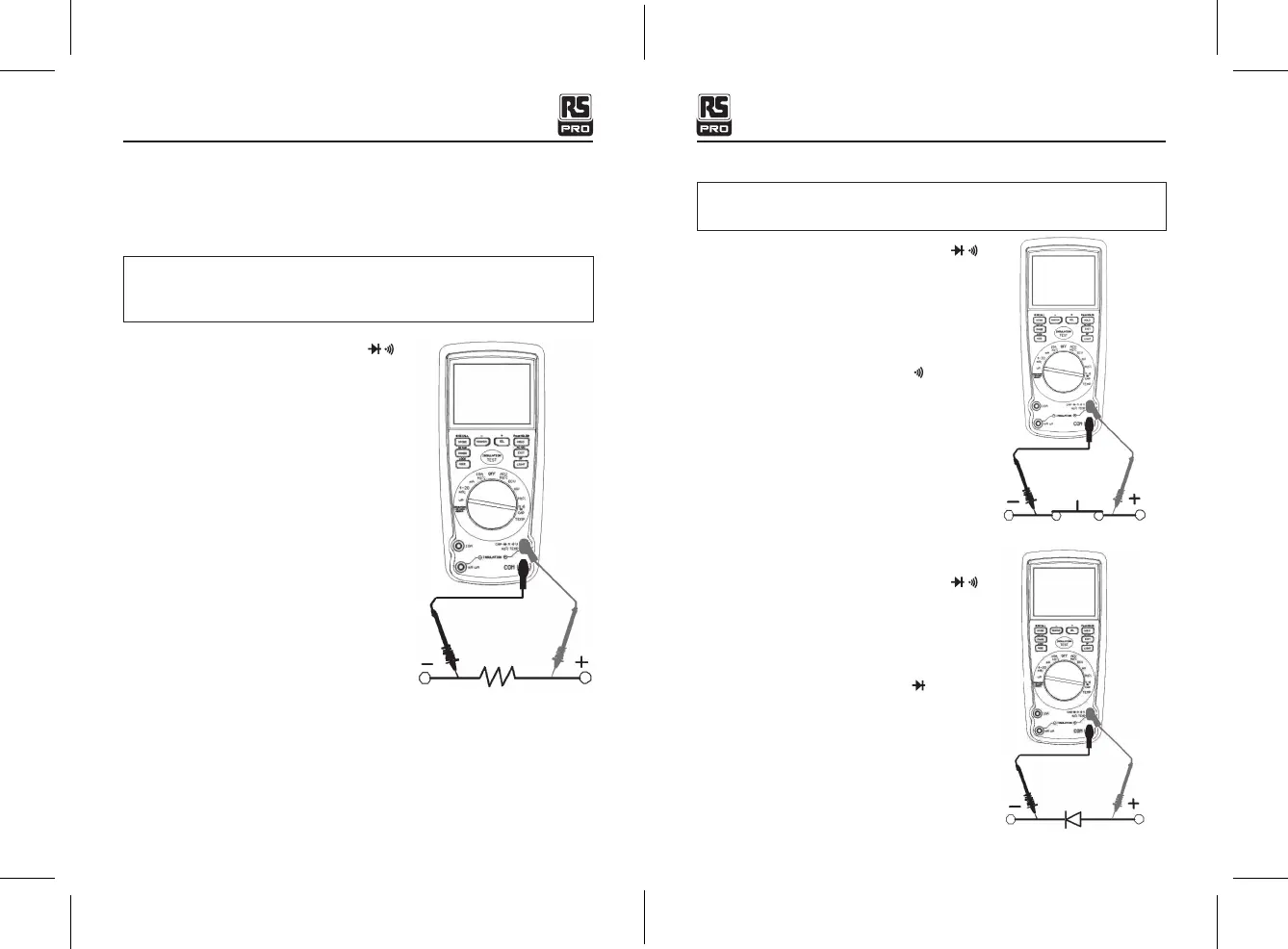
RESISTANCE MEASUREMENTS
WARNING:
To avoid electric shock, disconnect power to the unit under test and
discharge all capacitors before taking any resistance measurements. Remove the
batteries and unplug the line cords.
1. Set the function switch to the green
Ω CAP
position.
2. Insert the black test lead banana plug into the
negative
COM
jack.
Insert the red test lead banana plug into the
positive
Ω
jack.
3. Press the
MODE
button to indicate “
Ω
” on the
display.
4. Touch the test probe tips across the circuit or
part under test. It is best to disconnect one side
of the part under test so the rest of the circuit
will not interfere with the resistance reading.
5. Read the resistance on the display.
CONTINUITY CHECK
WARNING:
To avoid electric shock, never measure continuity on circuits or wires
that have voltage on them.
1. Set the function switch to the green
Ω CAP
position.
2. Insert the black lead banana plug into the negative
COM
jack.
Insert the red test lead banana plug into the
positive
Ω
jack.
3. Press the
MODE
button to indicate "
" and “
Ω
”
on the display
4. Touch the test probe tips to the circuit or wire you
wish to check.
5. If the resistance is less than approximately 35 Ω,
the audible signal will sound. If the circuit is open,
the display will indicate “
OL
”.
DIODE TEST
1. Set the function switch to the green
Ω CAP
position.
2. Insert the black test lead banana plug into the
negative COM jack and the red test lead banana
plug into the positive V jack.
3. Press the
MODE
button to indicate “
“ and “
V
”
on the display.
4. Touch the test probes to the diode under test.
Forward voltage will typically indicate 0.400 to
0.700V. Reverse voltage will indicate “
OL
”.
Shorted devices will indicate near 0 V and an open
device will indicate “
OL
” in both polarities.
Insulation Tester with Multimeter / EnglishInsulation Tester with Multimeter / English
25/01/2018 Version No. 00125/01/2018 Version No. 001


 To Next Page