CONTROL INTERFACES, IST-10
Technical Support: support@rticontrol.com - Customer Service: custserv@rticontrol.com 2
Overview
Mounting Bracket Installation
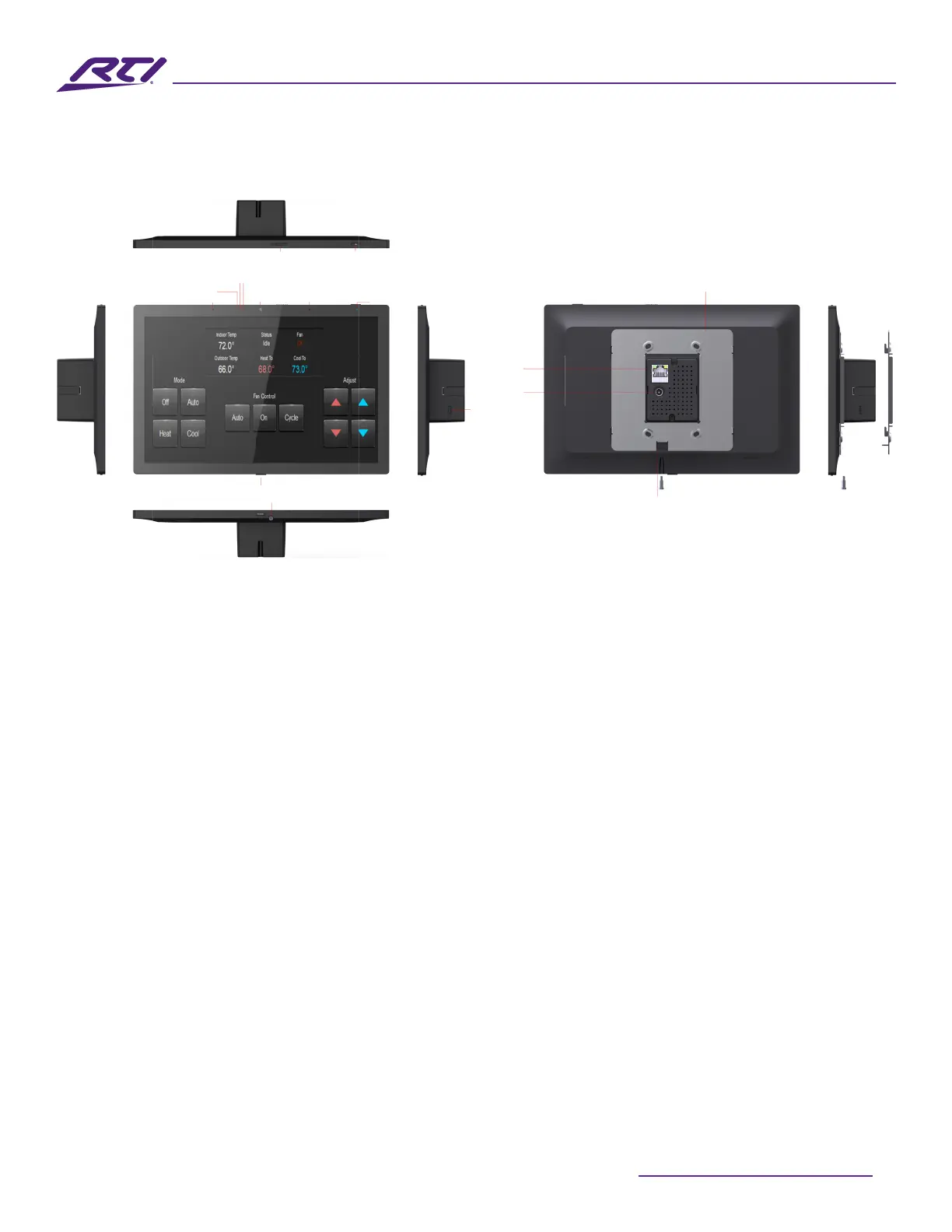
The IST-10 is designed to be wall mounted in either Portrait or Landscape orientation, or on tabletop
using the stand (available separately).
Mounting Depth
The IST-10 requires a minimum mounting depth of 1.34” (34mm) from the wall surface. Leave space to
account for the RJ-45 or 24V barrel connector.
Mounting Height
The recommended mounting height for the IST-10 is 57”- 65”(145 cm -165 cm) from the nished oor to
the center of the unit.
Mounting Bracket
The IST-10 is designed to be mounted to a US standard dual gang wall box or a dual gang low voltage
bracket (included in the box).
The IST-10 mounting bracket, included in the box, should be attached to the 2 gang low voltage bracket
with the supplied screws, then the IST-10 unit is mounted on the metal rear mounting bracket with one
captive screws located at the bottom of the IST-10.
Light Sensor
Proximity Sensor
Microphone
Ethernet
w/ PoE
Microphone
Mute Button
Mute Indicator
DC In
USB-C
(not used)
Speakers
Power Button
Captive Screw
Screw Slot
Metal Mounting Bracket
Camera Lock
Camera



 To Next Page