CONTROL INTERFACES, IST-10
5
www.rticontrol.com
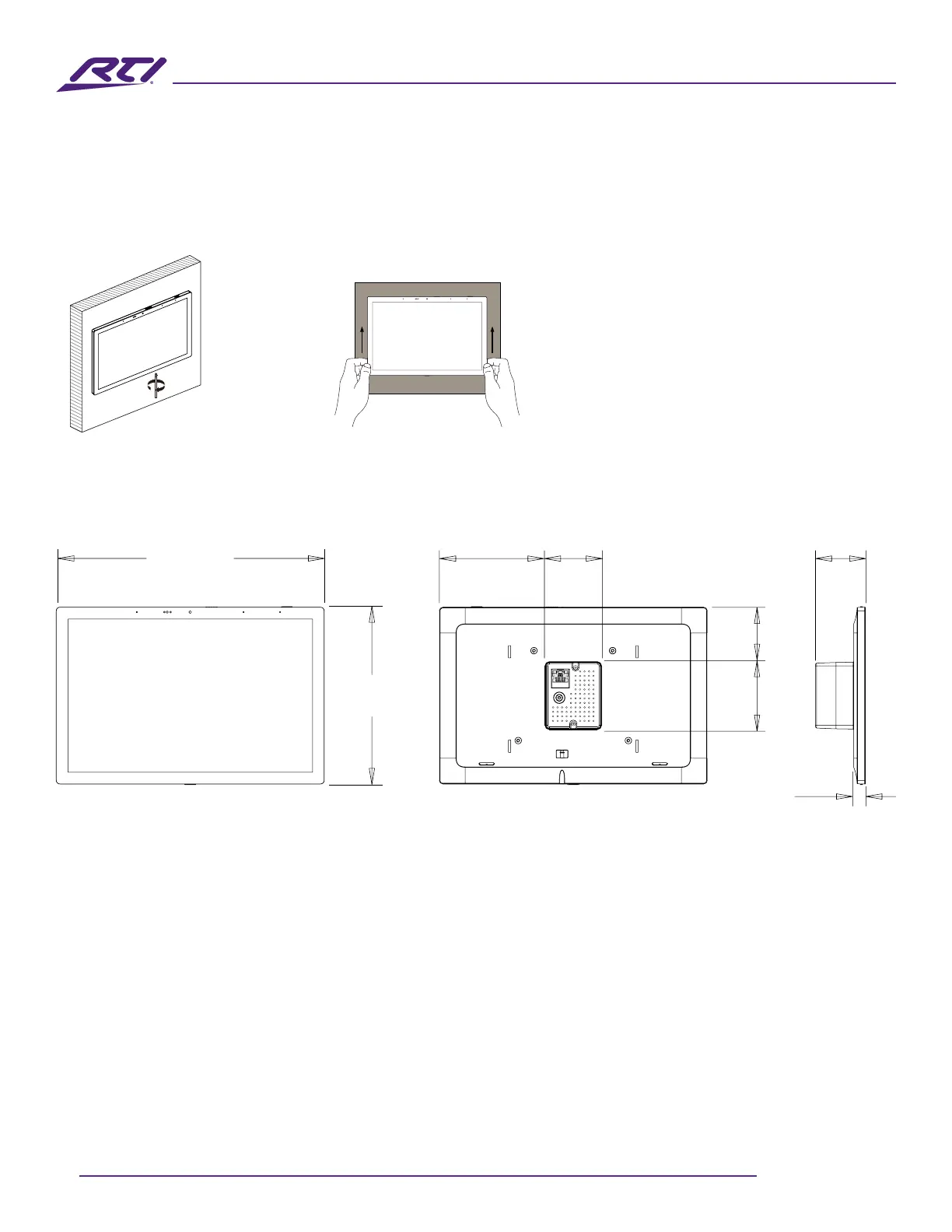
Remove the IST-10
• Using a Philips head screw driver, loosen the captive screw on the IST-10, then gently pull straight up
from the mounting frame to disengage the unit.
Loosen
Loosen captive
screw
Gently pull IST-10
down
Dimensions
Ethernet Communication
• When the IST-10 is connected to a network switch by Ethernet cable, the unit will acquire a network
address via DHCP and automatically connect to the LAN.
Programming
Touchscreen Display
The IST-10 touchscreen display is programmed using the RTI Integration Designer Programming
Software. Normally, it is organized into a series of pages containing objects (buttons, text, graphics, etc.)
that are related to each other.
Updating the Software
RTI’s Integration Designer data les can be downloaded to the IST-10 via Ethernet network.
238.5mm
9.39”
44.5mm
1.75”
158.5mm
6.24”
50.5mm
1.99”
60.5mm
2.38”
48.4mm
1.91”
94.0mm
3.70”
10.5mm
0.41”



 To Next Page