6
8.
The “Pol(“ button will cause the Ruby Calculator to disconnect from any
connected devices. This button is necessary when the user wishes to switch the
calculator from one device to another.
This button contains secondary functionality. Press “SHIFT” followed by “Pol(“ to
toggle the state of the Bluetooth on the calculator between on and off. This may
be useful if the user only wishes to use the note storage feature and would like to
turn their Bluetooth off.
9.
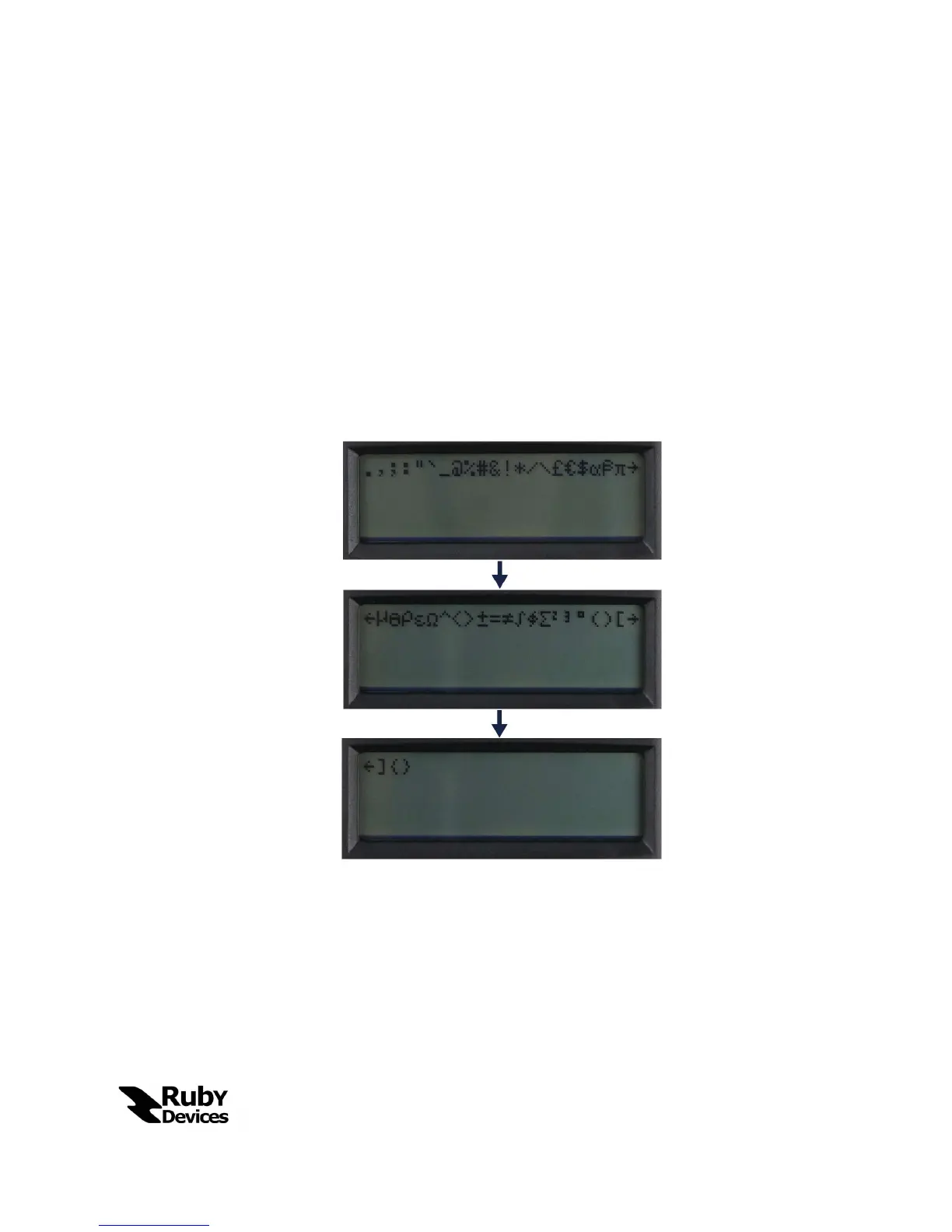
The “^” button will open the “Special Symbol” palette. Although users are able to
type all standard alphanumeric characters and numbers using the Number Pad
they may like to type special symbols like letters from the Greek Alphabet or
Mathematical Symbols. This palette will allow the user to do so. See below for a
visual description of characters included in the Special Symbol palette.
10.
The “sin(” button is the Auto-Scroll button for file reading. If the user wishes for a
file to automatically scroll page by page through a file without having to touch
the calculator they may push this button to enable or disable auto-scrolling. To
enable or disable Auto-Scrolling the user should push this button while reading a
file to toggle the state of the feature. The default auto-scroll time if 5 seconds per
page; this time interval may be modified by pressing the same “sin(“ button while
in standard Chat Mode – that is, not while the file reader is open.


 To Next Page