Test method one (recommended)
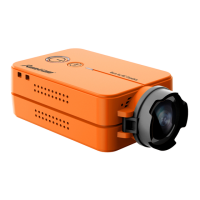
Assign the channel to the switch of the controller
Please choose your Model on the controller, then access to
INPUT and MIXER inteace, and assign the channel to the a
button. Here we take Radiomaster TX12 as an example,
assigning the channel CH10 to SA button.
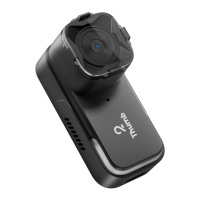
Congure at Modes
Navigate to the Modes tab at the BetaFlight, and nd Mode
USER2. Here we take AUX6 as an example to congure.
Control the camera via radio controller
With camera on, sho press SA button on TX12,
camera will record.
When recording, sho press the button to stop recording.
With camera on, double press SA button on TX12,
camera will take a photo.
# resource motor 6 none
# resource pinio 2 B05
# set pinio_cong = 129,129,1,1
# set pinio_box = 0,41,255,255
# save
Congure M6 at CLI mode
·Connect the ight controller to BetaFlight and enter the CLI
inteace
·Type in resource to proceed, and type the command as below


 To Next Page