Home
Runcobo
Scales
CS20C
Page 34 (Settings)
Runcobo CS20C - Settings; Customizing App Settings and Preferences
48 pages
Manual
Save Page as PDF
To Next Page
To Next Page
To Previous Page
To Previous Page
Loading...
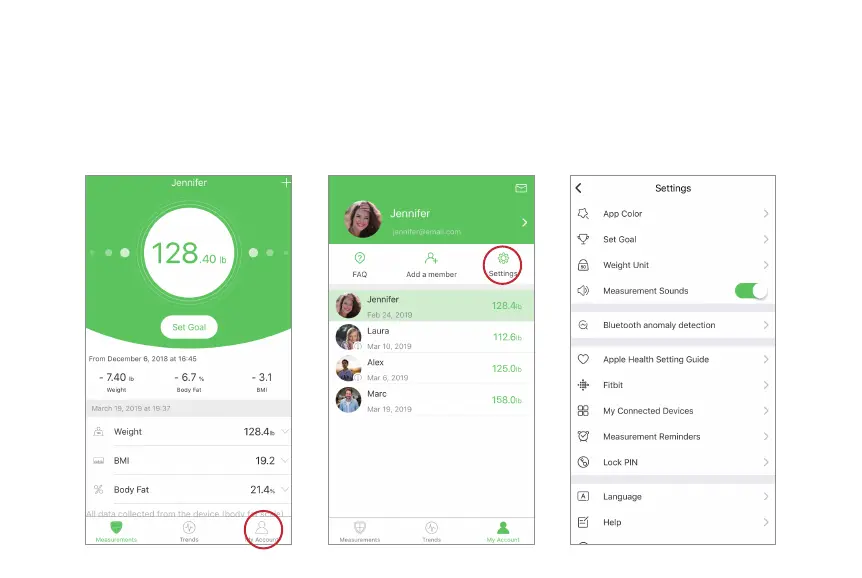
3. On the Settings menu, you can change
the app theme, set weight goals, change
weight units, select sound mode, or select
languages.
Settings
1. To access the Settings menu tap “My Account”.
2. T
ap “Settings”.
34
33
35
Table of Contents
Main Page
Table of Contents
3
Safety Information
4
Scale Overview
6
Setup Scale
7
Insert Batteries
7
Weighing Without the App
8
Setup Runcobo Mobile App
9
Setup App with Bluetooth Connections
10
Setup App with Wi-Fi Connections
17
Measurements
21
Measurements with Bluetooth Connections
21
Measurements with Wi-Fi Connections
23
Switches between Bluetooth and Wi-Fi
25
Using Runcobo Mobile App
26
View Reports
27
Delete Measurement Data
29
Show Progress
30
Add/Delete Users
32
Settings
34
Connect to Other Fitness Apps
35
Apple Health
35
Google Fit
36
Fitbit
38
Maintenance
40
Troubleshooting
42
Frequently Asked Questions
43
Specifications
44
Warranty
45
Customer Support
46


 To Next Page