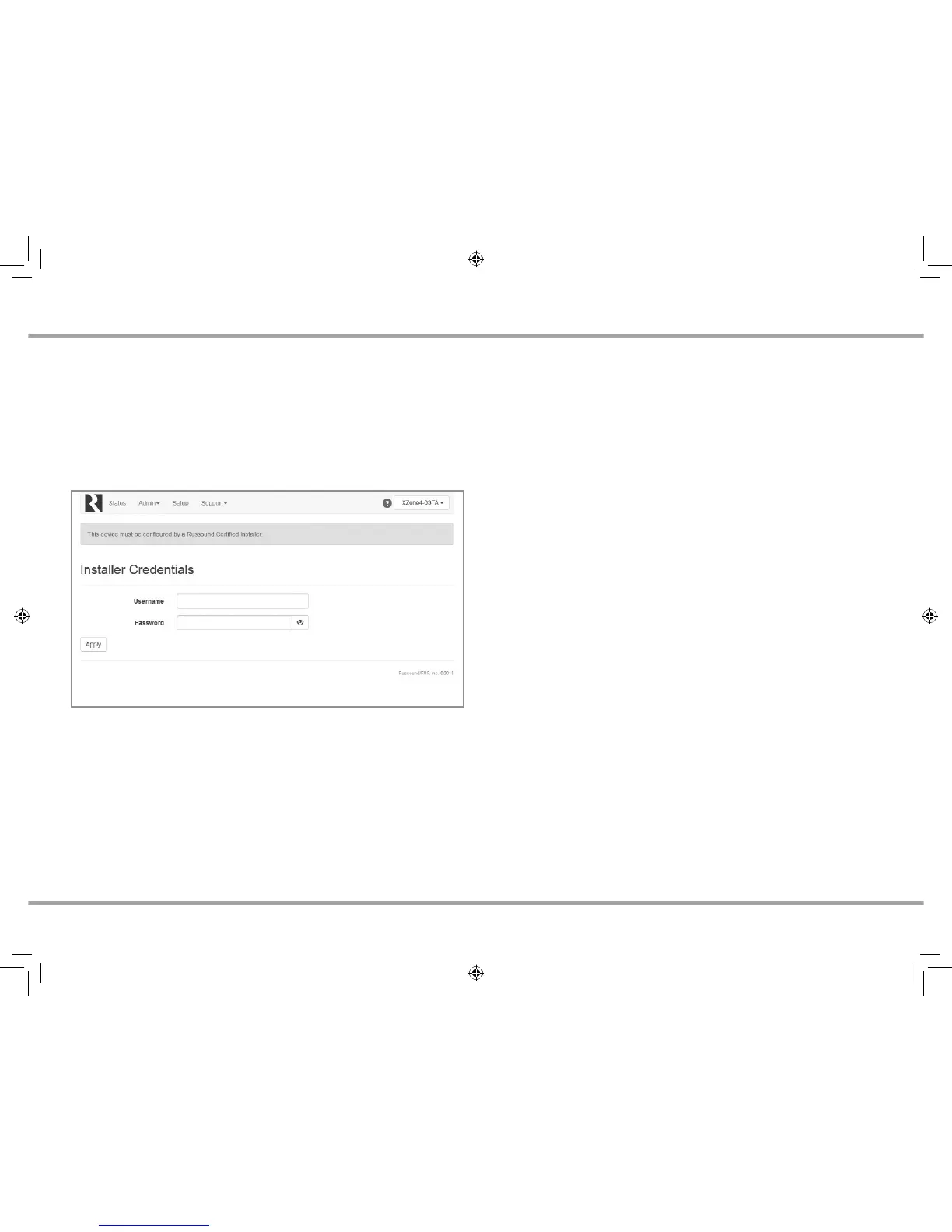
At the top of the web browser, a notication will appear stating that the
product must be unlocked by a Russound Certied Installer. Click on the unlock
button and you will be taken to a page where you will enter your credentials.
Enter your Russound Certied Installer Email Address and password into the
elds shown and click “Apply”. Once your information has been validated,
the XZone4 will unlock and be ready for conguration and use. This unlock
process will need to be repeated any time that the XZone4 is reset to factory
settings using the rear panel reset button.
INSTALLATION OVERVIEW
Step 5. Firmware Update – Because new features and capabilities may be
added at any time, make sure to verify that the XZone4 has the latest rmware
available. From the Web Cong page, go to Admin, Firmware Update. If the
XZone4 has an internet connection, it will automatically verify if it is running
the latest rmware from Russound. You may update the XZone4 by selecting
Web Update for any XZone4 with an internet connection, or by choosing
File Update to update the XZone4 from a rmware update le stored on a
computer that is on the same network as the XZone4.
Note: It can take 10-15 minutes for a rmware update to be completed.
XZone_Manual.indd 8 3/3/16 11:31 AM



 To Next Page