54
Performance audit testing a (-)P17AZ heat pump in a
Coil Only configuration only requires installation per
this manual and controlling the unit using traditional
24V controls to the terminals in the outdoor unit. For
agency testing, there should be no jumper between
the U1 and U2 terminals.
Performance audit testing a (-)P17AZ variable speed
outdoor unit's rated combination when matched with
an Econet equipped indoor unit requires an EcoNet™
Control Center (according to the AHRI rating database)
as an accessory to obtain the rated performance.
Utilize the following instructions to properly operate
the system during audit tests.
1. Install the rated system consistent with this manual
and ASHRAE 37.
2. Leak check and charge the rated system per the
instructions found in this manual.
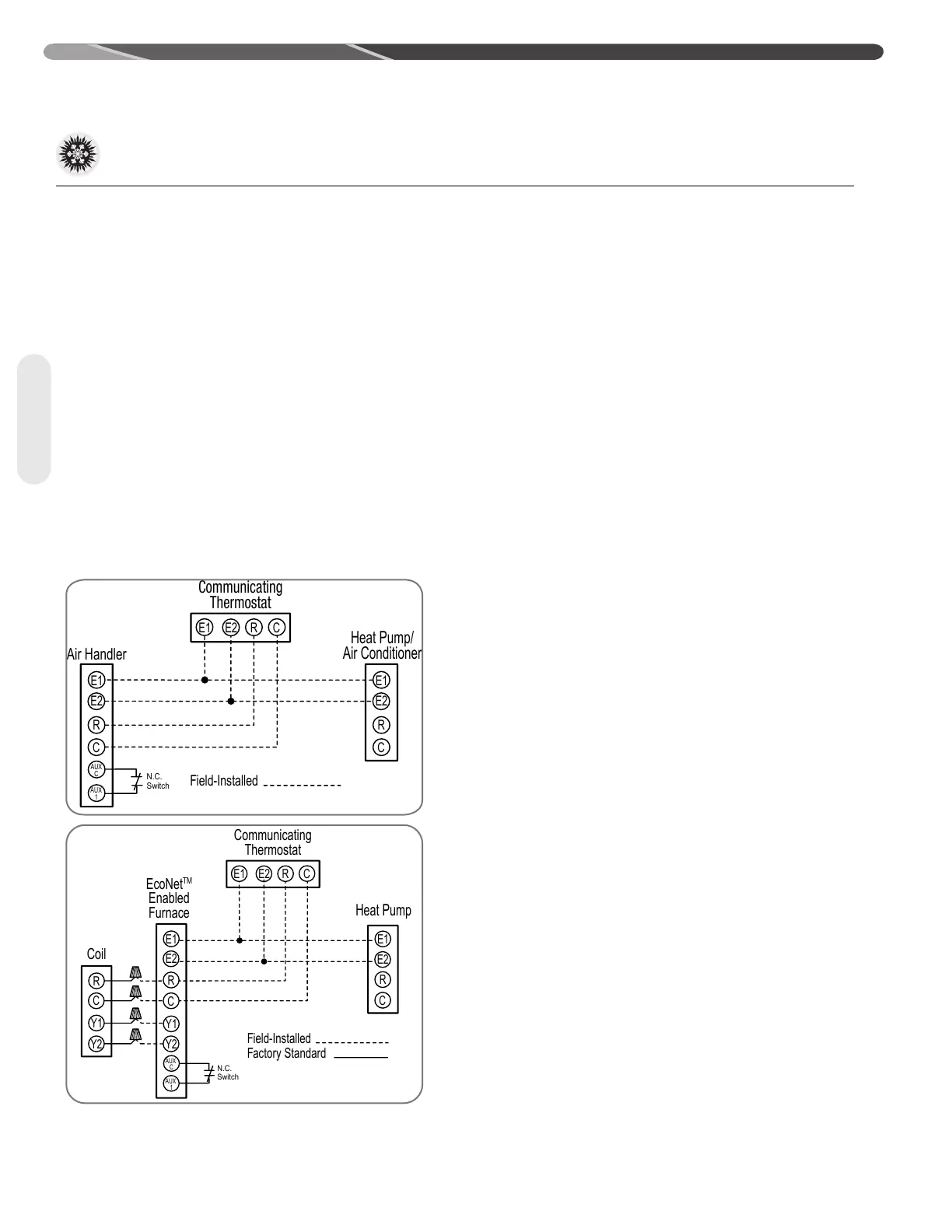
3. Wire the outdoor unit, indoor air mover/furnace,
indoor coil TXV control (when necessary), and
EcoNet™ Control Center according to the following
wiring diagrams.
4. Supply high and low voltage to the system.
5. Once each control is powered turn off the
Dehumidification feature:
a. Pressing the “Settings” button on the home
screen followed by pressing the “humidity”
button.
b. Once in the “humidity” screen, select “Yes” next
to the “Enable Dehumidification ?” label.
c. To turn dehumidification off press the orange up
or blue down arrows once.
d. The “Yes” should turn to a value of “No.”
6. Once the dehumidification feature is turned off, the
Aux 1 configuration needs to be set to normally
closed (N.C.) as to permit a closed switch attached
to the Aux 1 contacts to keep the system operating.
Thereby an open switch would indicate to the
system to shut down:
a. Press the back arrow in the bottom left of
the dehumidification screen to return to the
“settings” screen.
b. Press the “installer” button in the bottom right
corner of the “settings” screen.
c. Press the “air handler” or “furnace” button.
d. Once in the “air handler settings” or “furnace
settings” screen select “N.C.” next to the “Aux
Input #1 Config” label.
e. Change the “Aux #1 Config” type to “N.C.” by
pressing the orange up or blue down arrows at
the bottom of the screen twice.
f. Select “Off” next to the “Aux Input #1 Config”
label.
g. Change the “Aux #1 Config” value from “Off”
to “Shutdown” by pressing the orange up
button at the bottom of the screen two times.
After each press of the orange up button the
value next to the “Aux #1 Config” label should
change.
7. Entering the Test Mode
a. Press the back arrow in the bottom left of the
screen 3 times to return to the home screen
showing the inside temperature.
b. Press the “Service” button on the home screen.
c. Press the “ODU check-out” button in the
bottom right corner of the “service” screen to
enter the “installer checkout” screen.
d. Select the desired mode of operation by
pressing “Off” next to the “Var Speed ODU
Test” label and then the orange up arrow or
blue down arrow at the bottom of the “installer
checkout” screen.
NOTE: Any faults must be resolved before the
system will start. See the troubleshooting guide
in this manual for assistance.
NOTE: If the unit does not start when the “start”
button is pushed verify the switch attached to
Air Handler
E1
E2
C
R
Communicating
Thermostat
Heat Pump/
Air Conditioner
E1
E2
C
R
E1
E2
C
R
Field-Installed
AUX
C
AUX
1
N.C.
Switch
Coil
E1
E2
C
R
Communicating
Thermostat
Heat Pump
E1
E2
C
R
R
C
Y2
Y1
Field-Installed
Factory Standard
E1
E2
C
R
Y1
Y2
AUX
C
AUX
1
EcoNet
TM
Enabled
Furnace
N.C.
Switch
12.1 Agency Performance Audit Test Instructions
12.0 APPENDIX
Appendix


 To Next Page
 Loading...