Chapter
1
Operation
Procedures
4)
Mount a
paper
master. (without clamping the tail edge)
(1)
(2)
0
~
<
1
>-DDD~
CYCLE
~
SET
00
[gJ
I!:::::::=D=o=~
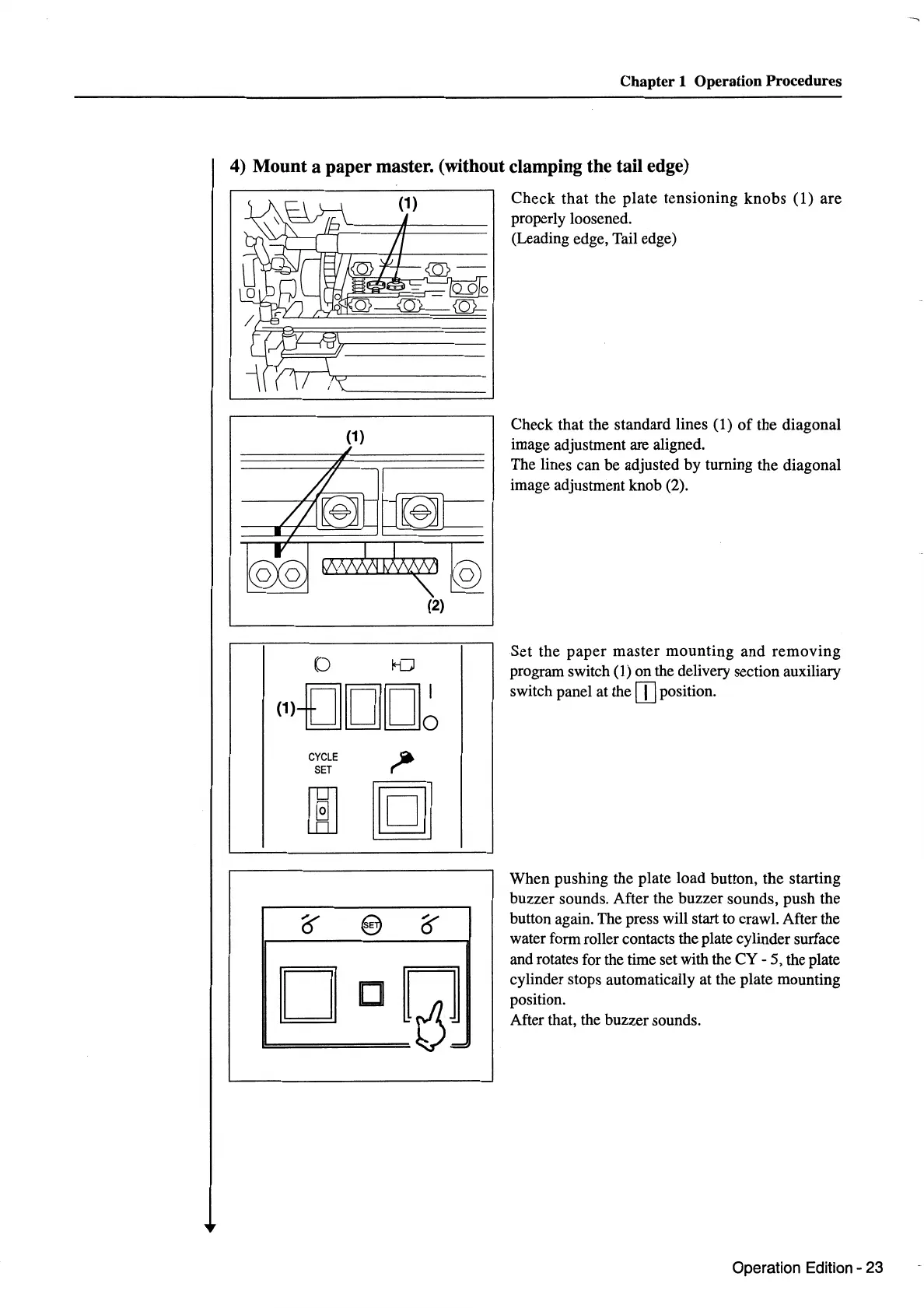
Check
that
the
plate
tensioning
knobs
(1)
are
properly loosened.
(Leading edge, Tail edge)
Check that the standard lines
(1)
of
the diagonal
image adjustment are aligned.
The lines can be adjusted by turning the diagonal
image adjustment knob (2).
Set
the
paper
master
mounting
and
removing
program switch (1) on the delivery section auxiliary
switch panel at the
rn
position.
When pushing the plate load button, the starting
buzzer sounds. After the buzzer sounds, push the
button again. The press will start to crawl. After the
water form roller contacts the plate cylinder surface
and rotates for the time set with the
CY-
5, the plate
cylinder stops automatically at the plate mounting
position.
After that, the buzzer sounds.
Operation Edition - 23


 To Next Page
 Loading...