~~
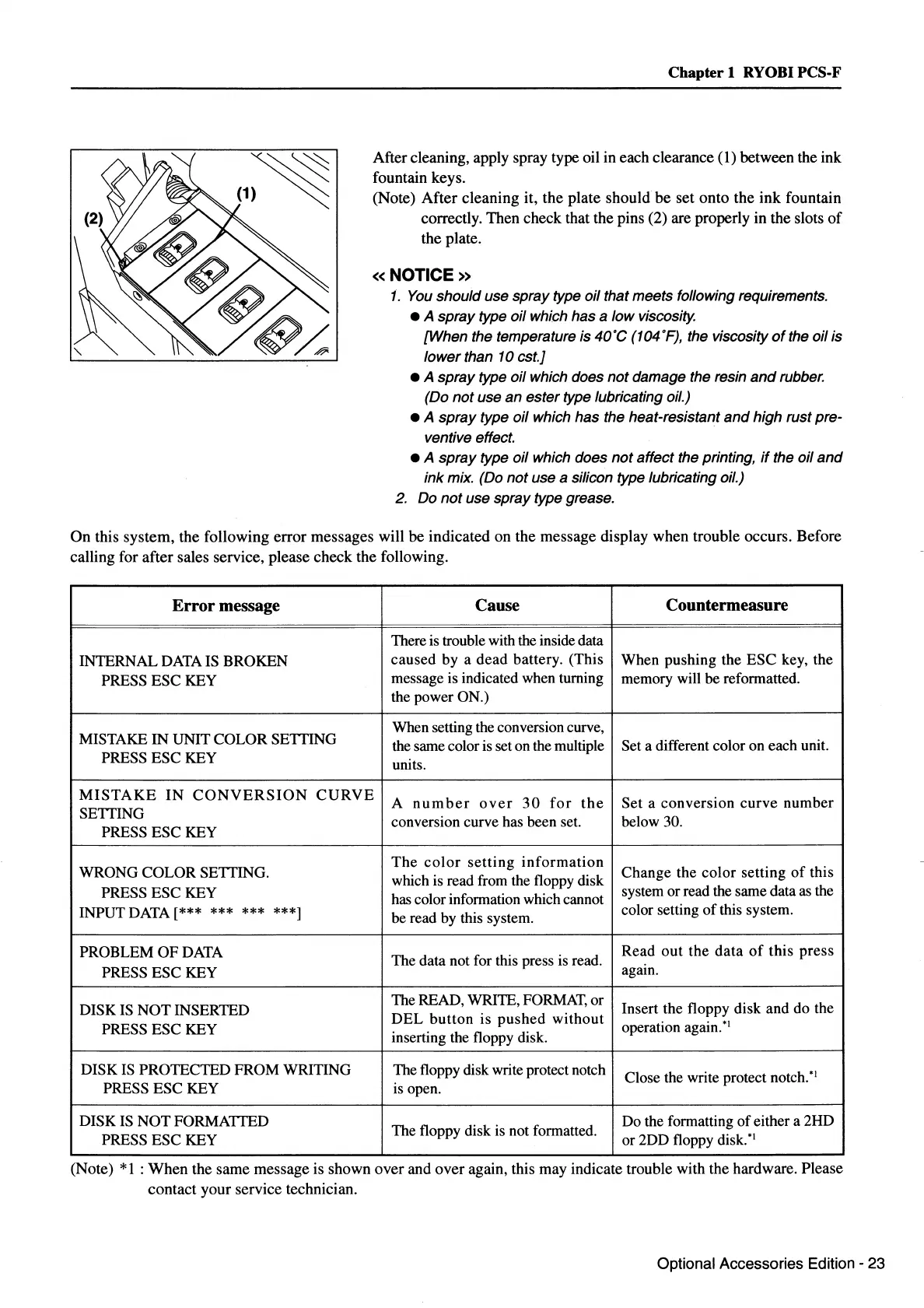
(1)
~
Chapter
1 RYOBI PCS-F
After cleaning, apply spray type oil in each clearance ( 1) between the ink
fountain keys.
(Note)
After
cleaning it, the plate should
be
set onto the
ink
fountain
correctly. Then check that the pins (2) are properly in the slots
of
the plate.
«NOTICE»
1.
You
should use spray type oil that meets following requirements.
• A spray type oil which has a low viscosity.
[When the temperature is
40'C
(1
04 'F), the viscosity
of
the oil is
lower than 10 est.]
• A spray type oil which does not damage the resin
and
rubber.
(Do
not
use an ester type lubricating oil.)
• A spray type oil which has the heat-resistant
and
high rust pre-
ventive effect.
• A
spray
type oil which does
not
affect the printing,
if
the oil
and
ink mix. (Do
not
use a silicon type lubricating oil.)
2. Do
not
use spray type grease.
On
this system, the following error messages will be indicated on the message display when trouble occurs. Before
calling for after sales service, please check the following.
Error
message Cause
Countermeasure
There is trouble with the inside data
INTERNALDATAISBROKEN
caused by a dead battery. (This
When pushing the ESC key, the
PRESS ESC KEY
message is indicated when turning
memory will be reformatted.
the power ON.)
MISTAKE
IN
UNIT COLOR SETTING
When setting the conversion curve,
the same color
is
set on the multiple Set a different color on each unit.
PRESS ESC KEY
units.
MISTAKE
IN
CONVERSION
CURVE
A
number
over
30
for
the
Set a conversion curve number
SETTING
conversion curve has been set. below 30.
PRESS ESC KEY
WRONG COLOR SETTING.
The
color
setting
information
Change the color setting
of
this
which is read from the floppy disk
PRESS ESC KEY
has color information which cannot
system or read the same data
as
the
INPUT DATA[*** ***
*** ***]
be read by this system.
color setting
of
this system.
PROBLEM
OF
DATA
The data not for this press
is
read.
Read
out
the data
of
this press
PRESS ESC KEY
again.
DISK
IS
NOT
INSERTED
The READ, WRITE,
FORMAT,
or
Insert the floppy disk and do the
PRESS ESC KEY
DEL
button
is
pushed
without
operation again.
*
1
inserting the floppy disk.
DISK
IS
PROTECTED FROM WRITING The floppy disk write protect notch
Close the write protect notch.
*
1
PRESS ESC KEY is open.
DISK
IS
NOT FORMATTED
The floppy disk is not formatted.
Do the formatting
of
either a 2HD
PRESS ESC KEY
or 2DD floppy
disk.*
1
(Note)
*1
:When
the same message is shown over and over again, this may indicate trouble with the hardware. Please
contact your service technician.
Optional Accessories Edition - 23



 To Next Page