14
ASSEMBLY
FEED
DIRECTION
STARTING
PIN HOLES
STARTING PIN
Fig. 16
SLOT
FEATHERBOARD
BOLT
CARRIAGE
BOLT
WASHER
FENCE LOCK KNOB
Inch
1
0
1
2
3
Fig. 17
MITER GAUGE
SLOT
MITER
GAUGE BAR
POINTER
FEATHERBOARD
Fig. 15
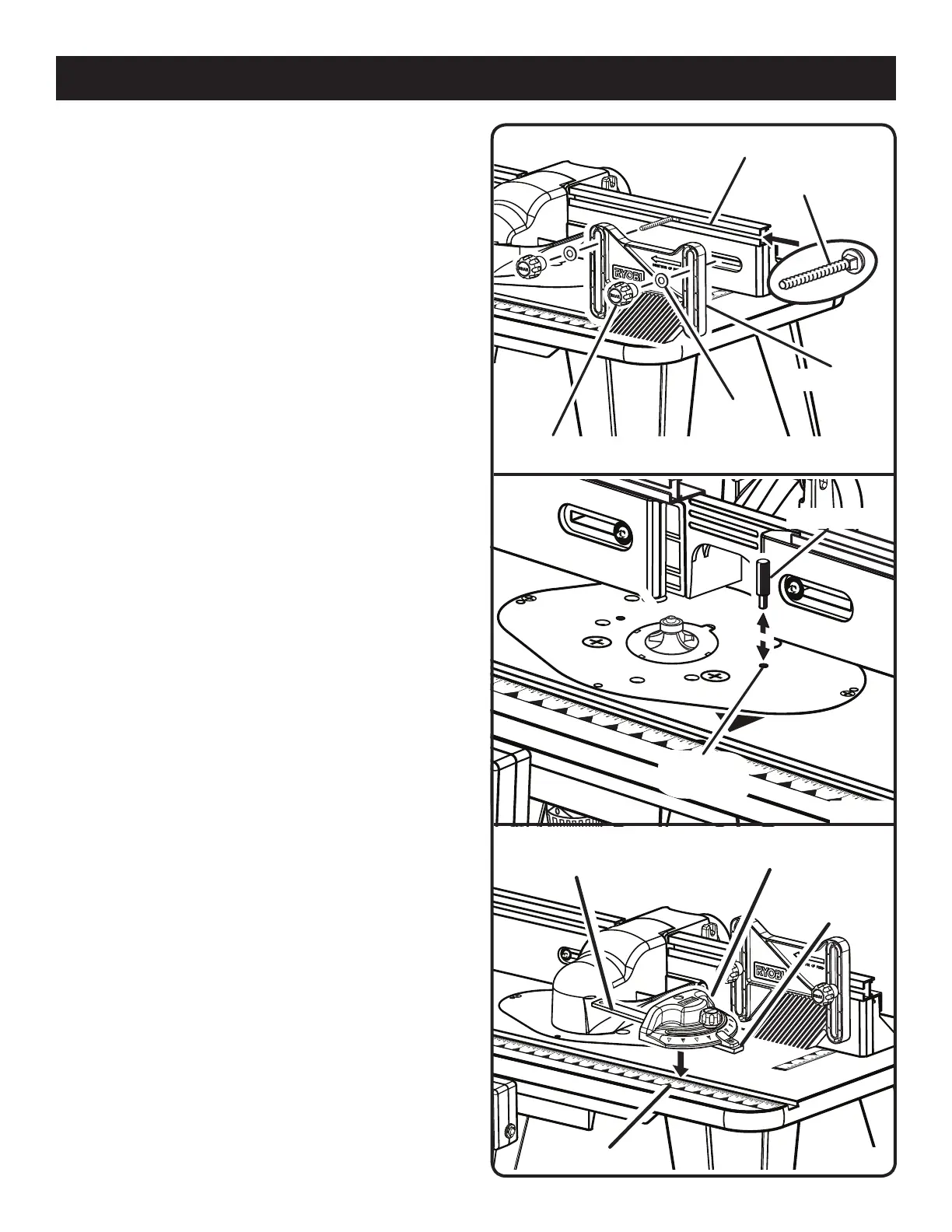
ATTACHING THE FEATHERBOARD
See Figure 15.
Unplug the router table and/or the router.
Insert the featherboard bolts through the slots in the fence
assembly.
Slide the featherboard over the featherboard bolts.
Install the fence lock knobs and carriage bolt washers
over the carriage bolts.
Tighten the fence lock knobs.
INSERTING THE STARTING PIN
See Figure 16.
Place the starting pin on the router table and use it as a pivot
point when cutting small, odd-shaped pieces.
NOTE: It is not necessary to use the fence when you are
using the starting pin, but the bit guard should be used to
cover the cutter. Additionally, only use piloted cutters when
using the starting pin.
Unplug the router table and/or the router.
Place the starting pin into the hole to the right of the router
table throat opening.
Push the pin in to secure.
INSTALLING THE MITER GAUGE
See Figure 17.
Unplug the router table and/or the router.
With the router table right side up, and the front edge
closest to you, place the miter gauge bar in the slot near
the front of the table with the pointer on the right.
ATTACHING THE VACUUM HOSE
See Figure 18.
The vacuum port molded into the fence will accept either a
1-1/4 in. or 2-1/2 in. vacuum attachment.


 To Next Page