The NetBox Enterprise Hard Drives
The NetBox Enterprise comes equipped with an 80 gigabyte hard drive. This drive can be
replaced but the unit must first be powered down.
The NetBox Enterprise Ultra comes equipped with hot swappable RAID 1 mirrored drives. The
drives are 80 Gigabytes each. If a drive is not functioning properly the drive light shows red or
does not light up at all. Once a new drive is inserted it will be automatically updated with a
mirror image of the other drive.
Removing and Replacing Enterprise Ultra Hard Drives
NOTE: You need not power down the NetBox Enterprise Ultra to perform this operation. The
Enterprise Ultra will continue to perform its access control functions throughout this process.
6. Open the lockable drive door.
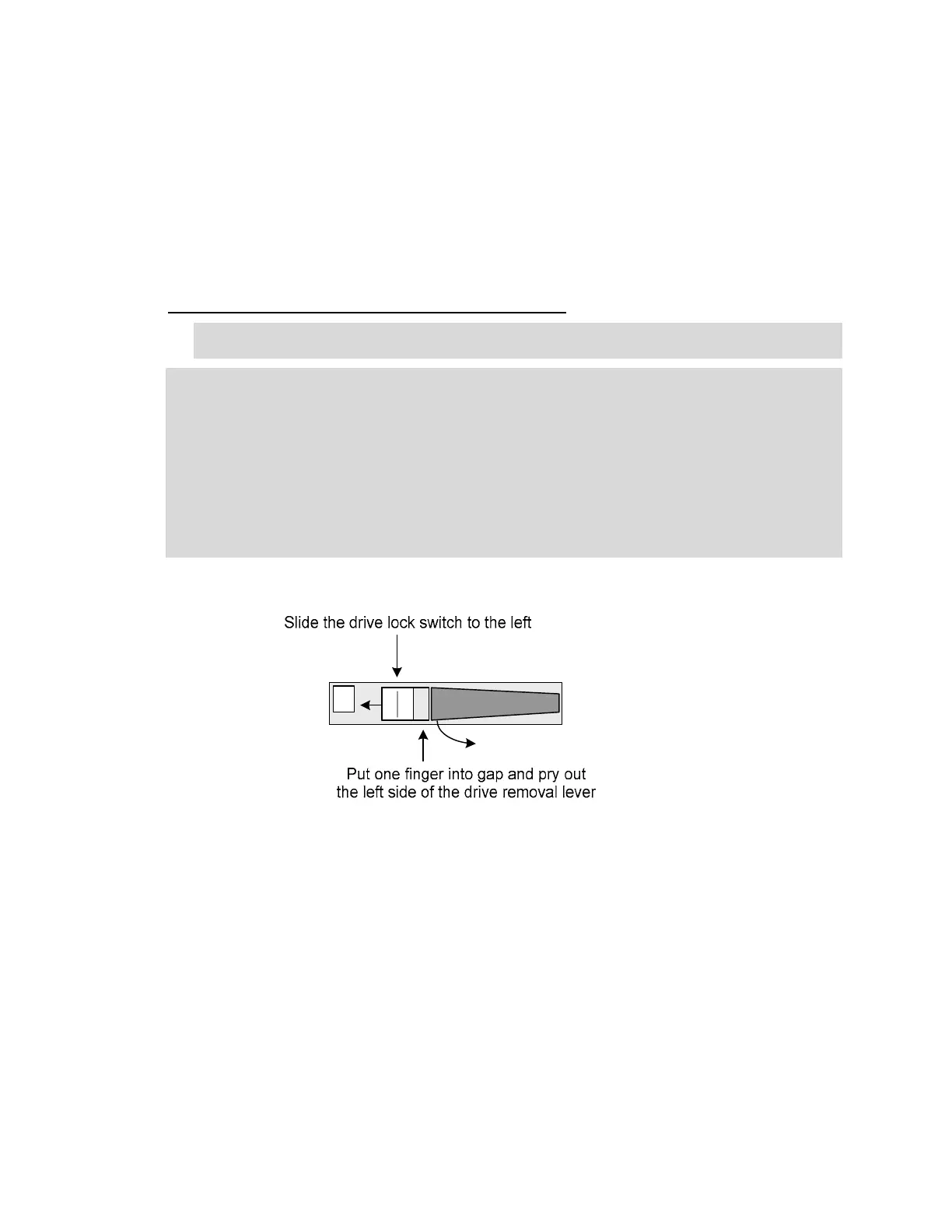
7. Slide the drive lock switch to the left. See image below.
8. Place a finger into the gap to the right of the drive lock switch and pry the drive removal lever
out and to the right. This will unseat the drive.
9. Pull the drive out of the NetBox Enterprise Ultra.
10. Place the new drive into the NetBox Enterprise Ultra and press the drive level all the way in
until it snaps into position.
11. The new drive will automatically update itself to mirror the other drive.
Removing a hot-swapable drive
8



 To Next Page