R5 SUPREME - Navigation System
OPERATION
7000 118-301, A Page 77
6. Press ―Sail‖ in the Sail To view to start sailing towards the chosen
destination.
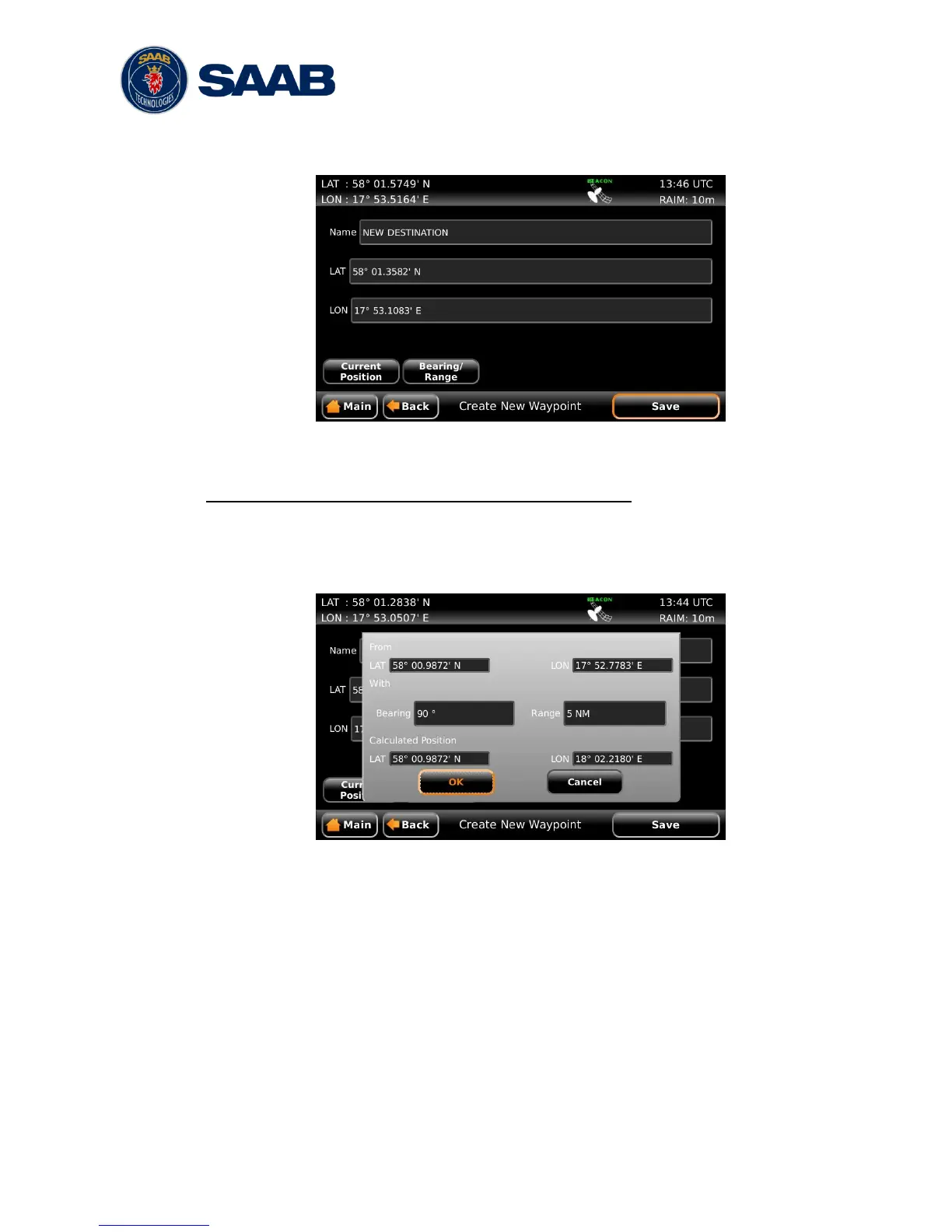
Figure 50 – Create New Waypoint – Latitude and Longitude
Create a new waypoint by specifying bearing and range
1. Press the button ―Create New WPT‖ to show the Create New Waypoint view.
2. Press on the ―Name‖ edit field and enter a new name for the destination.
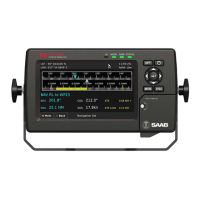
3. Press the button ―Bearing/Range‖. A popup window will appear:
Figure 51 – Create New Waypoint – Range and Bearing
4. Press on the ―Bearing‖ edit field and enter a bearing from the current
position.
5. Press the ―Range‖ edit field and enter a range from the current position.
6. The calculated position will be shown at the bottom of the popup window.
7. Press OK when done.
8. Press ―Save‖ in the Create New Waypoint view to choose the new waypoint
as destination in the Sail To view.
9. Press ―Sail‖ in the Sail To view to start sailing towards the chosen
destination.


 To Next Page