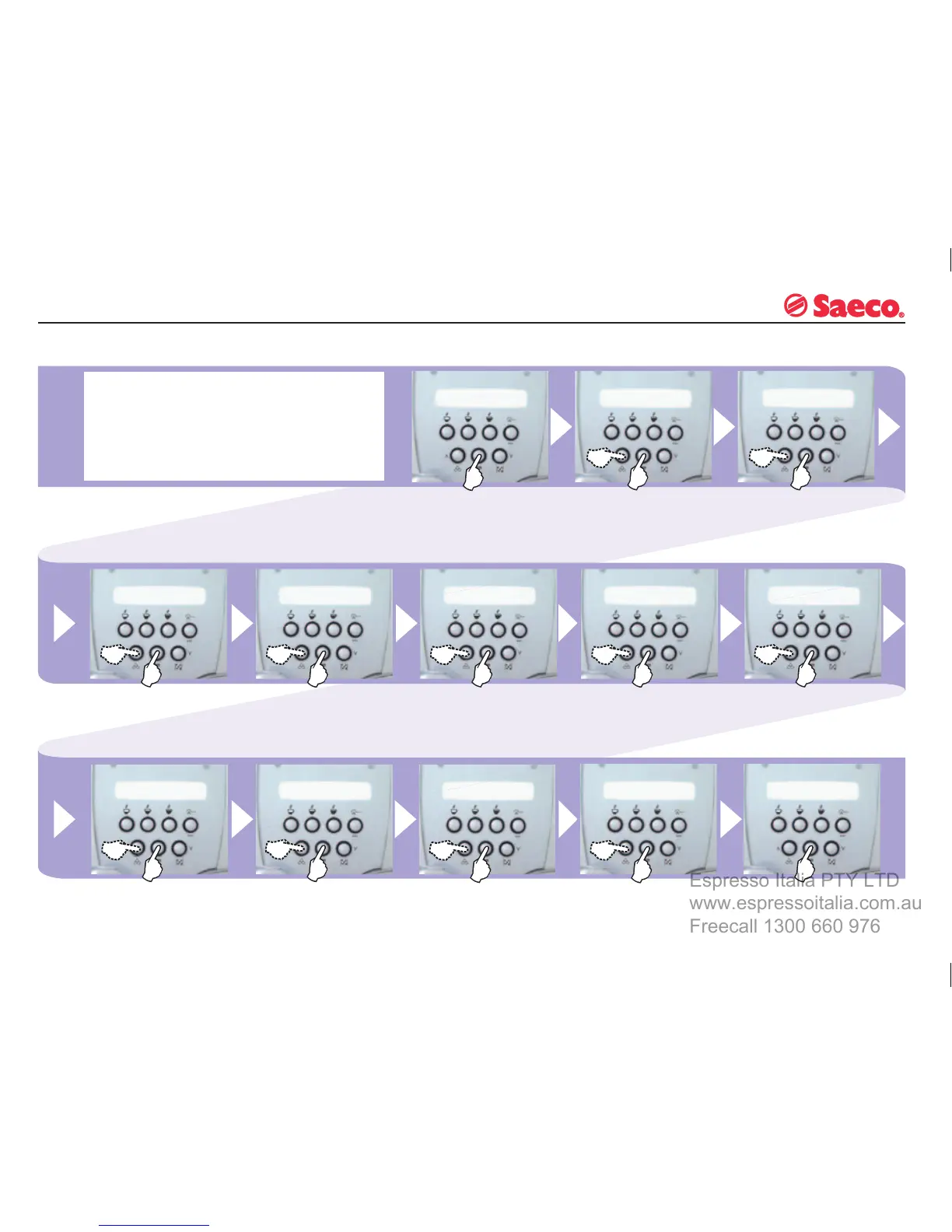
PROGRAMMING MACHINE FUNCTIONS
CLOCK
Select using the “∧” and
“∨” buttons and press “OK”
to
activate the clock setting
procedure.
This
function may be activated and deactivated by the
user to:
-
display the current time when the machine is in the
“ENERGY SAVING” or “SELECT PRODUCT” mode
- program the machine to switch on and off at a specifi c
time.
Set
the hour using the “∧”
and
“∨” buttons and press
“OK”:
Set the minutes using
the “∧” and “∨” buttons and
press “OK”.
If
this option is selected,
the clock time will be
shown on the display.
Select using the “∧”
and
“∨”
buttons and press “OK”
to show the clock time.
Set
the time you want the
machine to turn off.
Menu for switching clock
function on or off.
This option activates the
clock function.
This
option deactivates the
clock function.
This appears when the
machine time settings are
OFF. Press “OK” to activate.
Menu for programming
machine ON/OFF times.
Set
the time you want the
machine to turn on.
If this option is selected,
the clock time will NOT be
shown on the display.
When the function ap-
pears, select it using the
“OK” button.








 To Next Page