19
ENGLISH
19
3
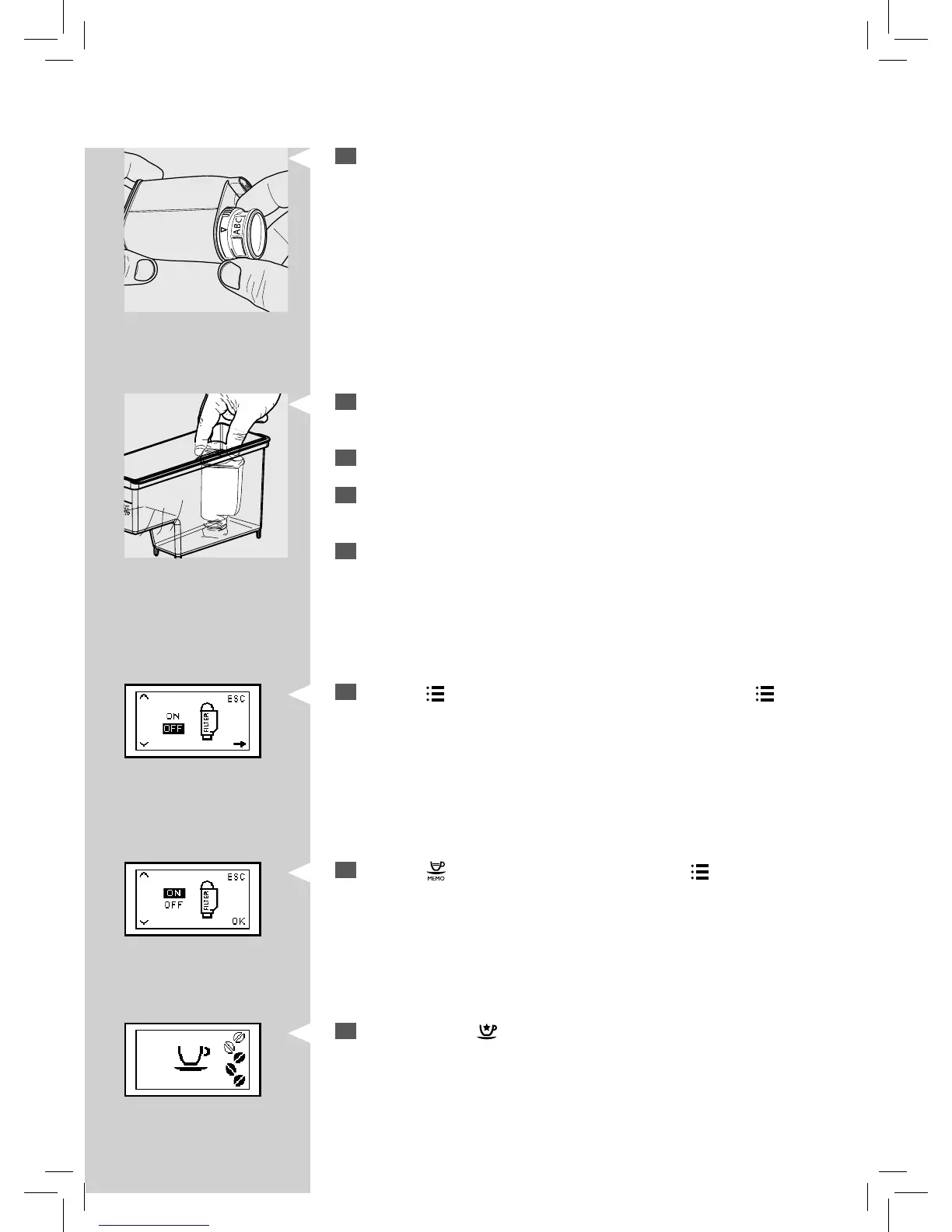
Set the “INTENZA+” water lter according to the measurements per-
formed (see previous chapter) and indicated on the base of the lter:
A = soft water – equals 1 or 2 on the test strip
B = hard water (standard) – equals 3 on the test strip
C = very hard water – equals 4 on the test strip
4
Put the “INTENZA+” water lter into the empty water tank. Press it
down until it cannot move any further.
5
Fill the water tank with fresh water and put it into the machine.
6
Dispense all the water in the water tank by using the hot water func-
tion (see the “Dispensing Hot Water” chapter).
7
Fill the water tank again.
8
Press the “ ” button and scroll the options by pressing the “ ” button
until the following display is shown.
Yellow
9
Press the “ ” button to select “ON” and press the “ ” button to con-
rm.
YellowGreen
10
To exit, press the “ ” button. The machine shows this display and is
ready to brew.
In this way the machine has been programmed to inform the user of
the need to replace the “INTENZA+” water lter.







 To Next Page