English
35
8
Numeric
keypad
8888
Tapthe"numerickeypad"icontodisplaythenumeric
keypad.
88
8.3Enter values
8
Thevaluesoftheprogrammingmenucanbe
entered/modified as follows:
8
•
Keypad
8
•
Numeric keypad
8
•
Check-box
8
•
Drop-down lists
8
•
Value selectors
888
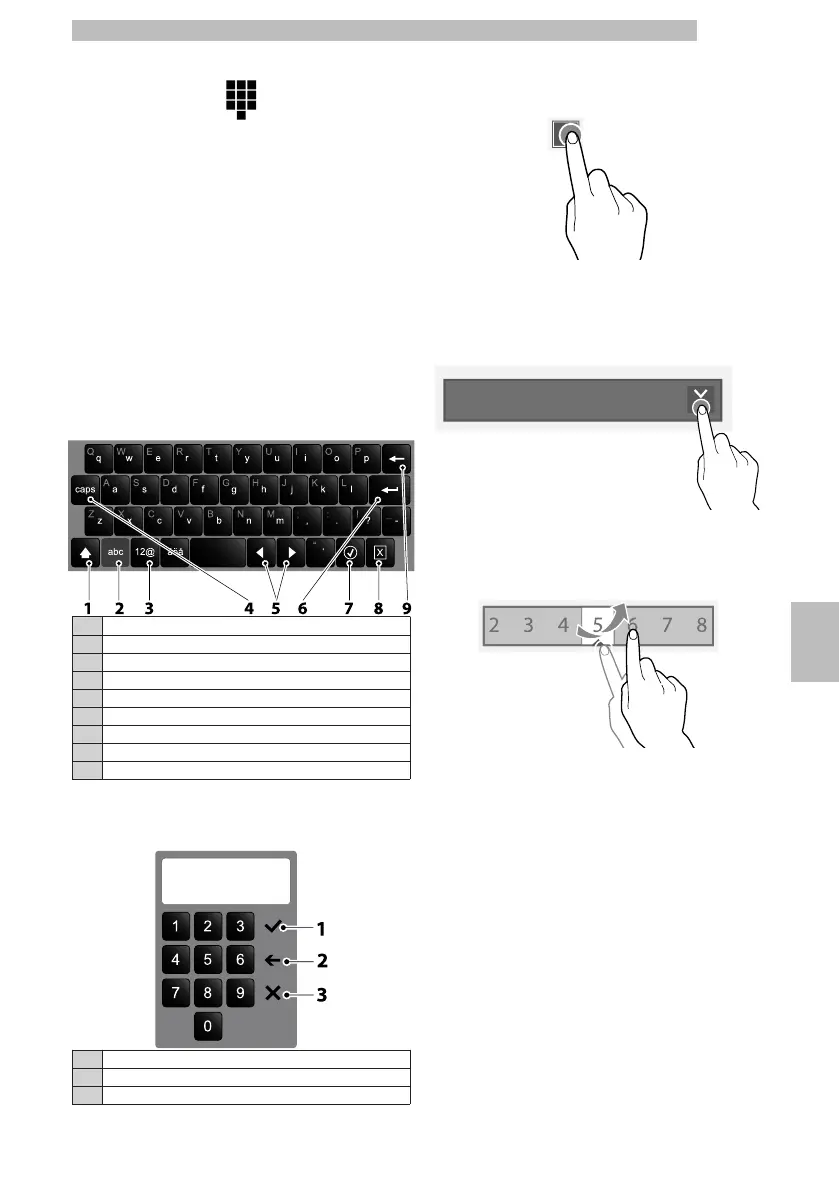
Keypad
8888
1Uppercase (shift)
2
Switch the "number/symbol" keypad to the "letter" keypad
3
Switch the "letter" keypad to the "number/symbol" keypad
4Caps lock
5Moves the cursor in the text
6New line (text over two lines)
7Confirm
8Cancel
9Clear (back space)
8888
Numeric
keypad
8888
1Confirm
2Clear (back space)
3Closes the keypad
88
Check-box
8
Tap the check-box to enable/disable the option.
88888
Drop-down
lists
8
Tap to open the drop-down list and select the value.
88888
Value
selectors
8
Scroll and select the desired value.
88888










 To Next Page