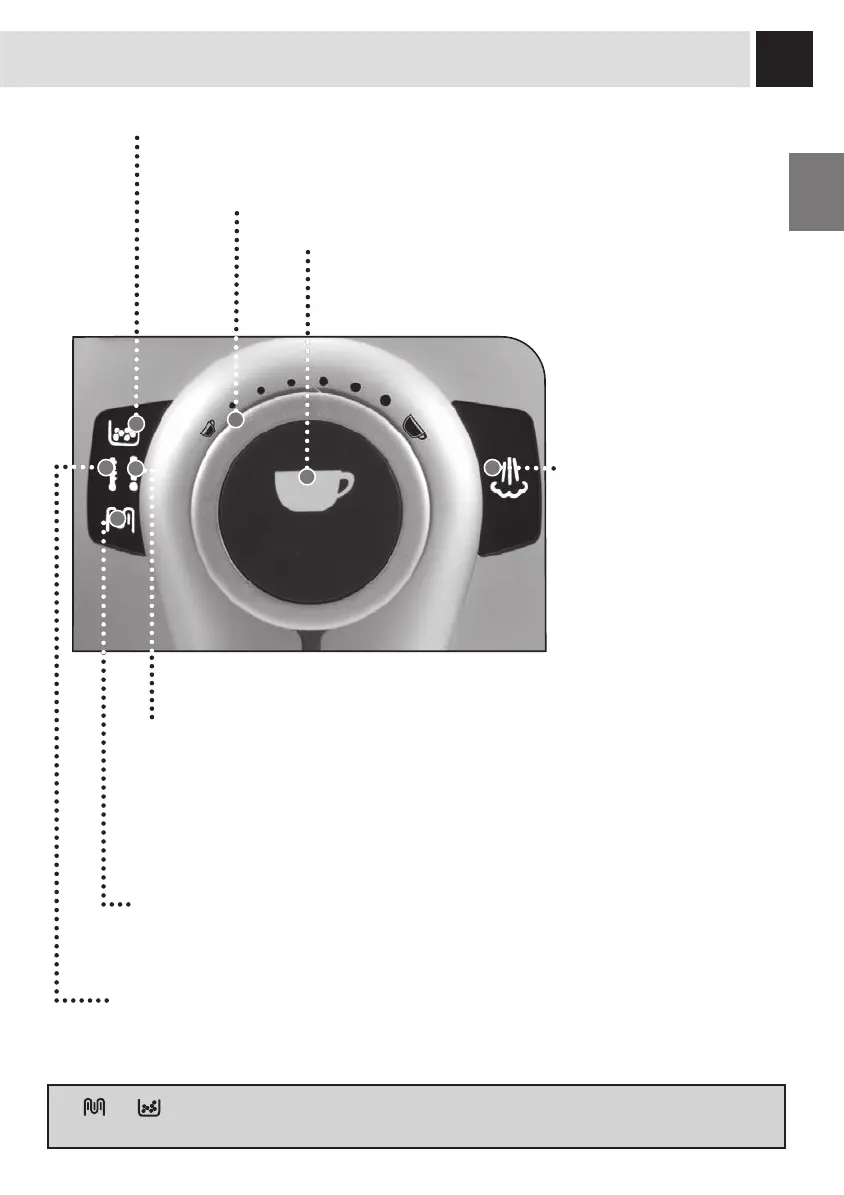
CONTROL PANEL
Coffee dose adjusting knob (see page 10).
Coffee button:
• the button has been pushed once:1 coffee has been selected.
• the button has been pushed twice: 2 coffees have been selected.
Hot water/steam button:
• on: steam function is selected
• off: hot water function is
selected
Alarm light:
• permanently on (one or more events): signals the machine is out of coffee, that the
water tank is empty, or the dregs drawer is full.
• on and slowly fl ashing (one or more events): signals that the Brew Group is not
inserted, the dregs drawer is not inserted, the cover of the coffee hopper is not inserted
or the service door is open.
• on and quickly fl ashing: signals the need to prime the water circuit.
Descaling light:
• on and fl ashing: signals the need to perform a descaling cycle (see page 14).
Machine ready light:
• permanently on: signals that the machine is ready for use.
• on and fl ashing: signals that the machine is warming up.
• on and quickly fl ashing: signals that the machine is too warm; dispense water.
Alarm light to empty the dregs drawer:
• permanently on: signals the need to empty the dregs drawer; this operation must be
performed with the machine turned on (steps 4 and 5, page 16).
The and lights fl ash alternately: switch off the machine and turn it on again after 30 seconds. If this
signal appears again, contact the customer service centre.






 To Next Page