6
1 2 3
4 5
7 8
6
These settings allow you to regulate the machine’s parameters to dispense coffee according to the
typical parameters of the country where it is used. For this reason, the languages are also differentiated
by location.
show
text
8:30 am
15/06/06
go to
menu
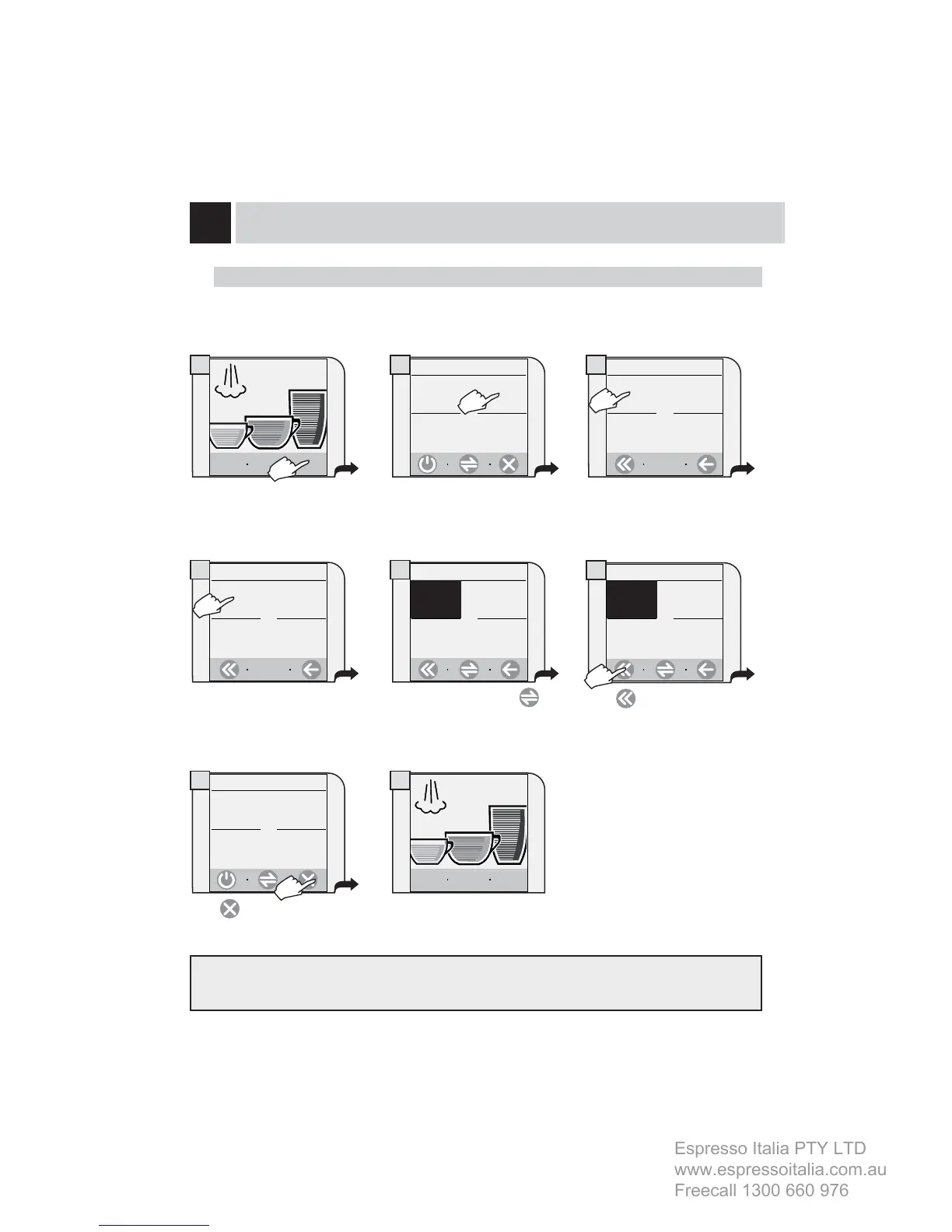
Press “go to menu”.
Press “language & display”.
Press “machine settings”.
Press “language”.
Press
.
1. main menu
beverage
settings
machine
settings
time/date
settings
1.2 machine settings
language &
display
cup-warming
surface
1.2.1 language & display
language
English
contrast
8/15
If necessary, press the key to
display the desired language.
Select the language.
1.2.1.1.a language
english
italiano (it)
Italiano (ch)
1. main menu
The machine is now ready for
use.
maintenance
settings
water
settings
alerts and
acoustic
settings
deutsch
show
text
8:30 am
15/06/06
go to
menu
1.2.1.1.a language
english
italiano (it)
Italiano (ch) deutsch
Press .
Set the clock and the calendar of the machine as shown on page 25.
SETTING THE LANGUAGE
INSTALLATION
beverage
settings
machine
settings
time/date
settings
maintenance
settings




 To Next Page