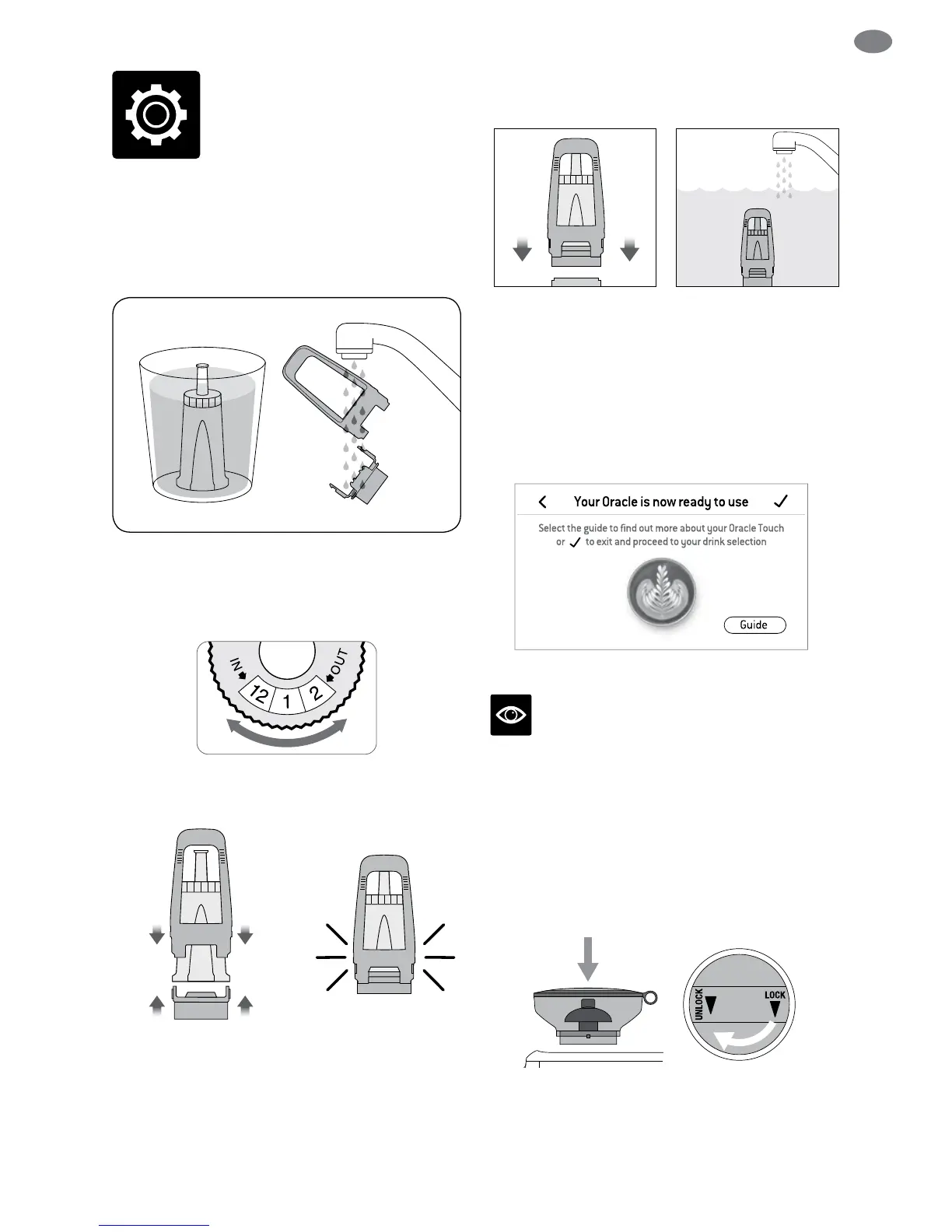
INSTALLING THE WATER FILTER
• Soak the lter in cold water for 5 minutes.
• Wash the lter holder with cold water.
• Set the reminder for next month of
replacement. We recommend to replace
the lter after 3 months.
• Insert the lter into the two parts of the
lter holder.
• To install the assembled filter holder into the
water tank, align the base of the lter holder
with the adapter inside the water tank. Push
down to lock into place.
• Fill the water tank with cold water, slide and lock
back into position.
FIRST USE
1. Press POWER button to turn the machine on.
2. Follow the instructions on screen to guide
you through rst use setup.
3. After completing setup, the machine will
tell that it is ready to use.
The machine is now in STANDBY mode.
NOTE
If your water hardness is either 4 or 5 when
tested, we strongly recommend you change to an
alternate water source.
GRINDING OPERATION
Insert bean hopper into position on-top of the
machine. Turn dial to lock into place.
Fill hopper with fresh beans.
Functions





 To Next Page