34
DESCALE (dESc)
NOTE
Even if you used the provided water
filter, we recommend you to descale if
there is scale build-up in the water tank.
Only descale via the descale menu.
1 – Prepare for Descale
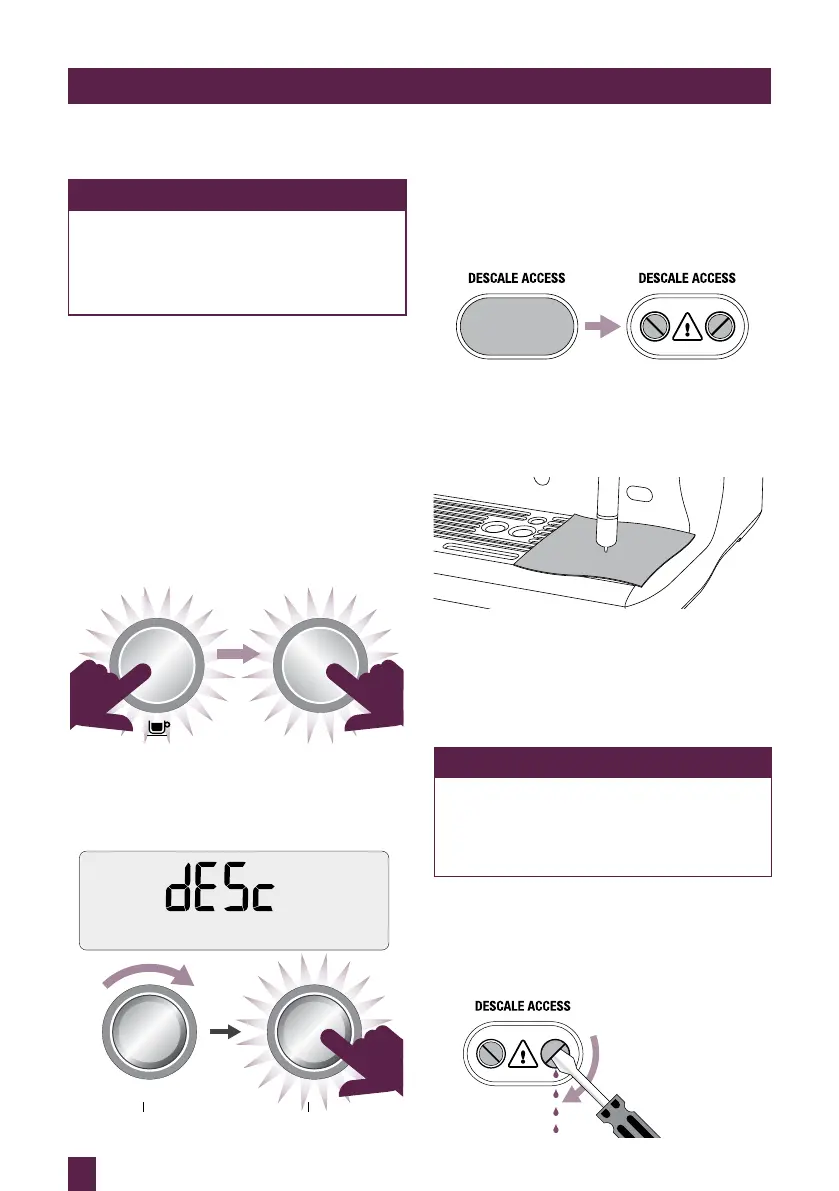
a) Empty the drip tray and insert into
position.
b) Turn the machine off and allow to cool for
at least 4 hours. With the machine off, press
and hold the 1 CUP button, then press and
hold the POWER button together for
3 seconds. rSEt will appear on the LCD.
POWER
& HOLD
c) Rotate SELECT dial until ‘dESC” appears
on LCD and press the dial to confirm.
SELECTSELECTSELECT
TEMP TEXTURETEMP TEXTURETEMP TEXTURE
SELECTSELECTSELECT
TEMP TEXTURETEMP TEXTURETEMP TEXTURE
CARE & CLEANING
2 – Empty Boilers
a) Remove the grey silicone cover on the
lower front panel marked DESCALE
ACCESS.
REMOVE
b) Place a cloth over the drip tray to prevent
steam escaping.
c) Use a flat head screw driver to rotate the
right valve counter-clockwise SLOWLY
until fully open. As the valve opens, steam
may be released.
NOTE
If there’s no water released into the drip
tray, press and hold the 1 CUP button for
3 seconds. This will release water from
the boiler.
When the water is completely empty, close
the valve by rotating screws clock-wise until
seated. Do not overtighten screws to avoid
damages to the valves.




 To Next Page