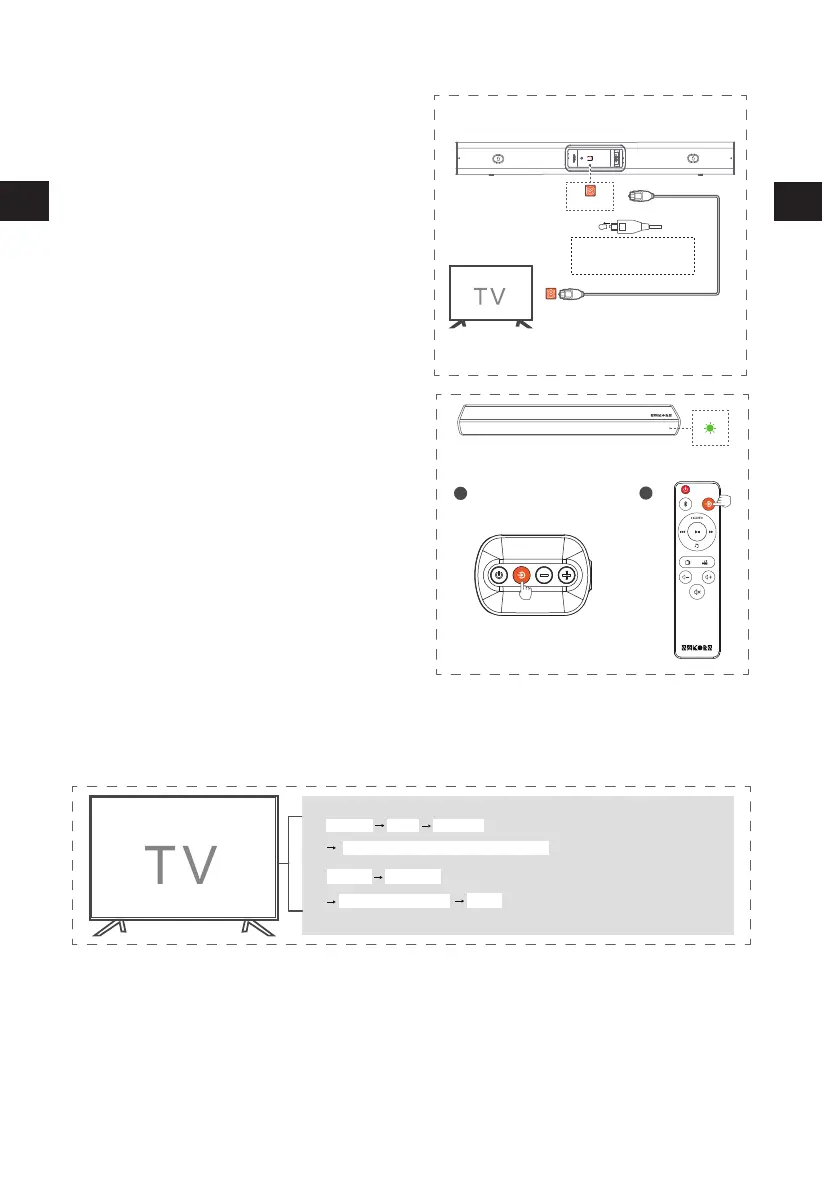
Connect to OPTICAL Socket
-
11
AUX IN
OPTISCH
OPTICAL OUT
OPTICAL
Note: Make sure to remove the protective
covers on the ends of the cable.
Incorrect insertion will damage the port
and/or the connector.
OPT
A
B
Press the
Source
button on sound bar /remote
control repeatly to select the OPT
mode, the indicator light up green.
Menu
Sound
Sakobs SB2122/External Device/Auto/OPT/Toslink
①
Audio Output
②
Menu
Expert setting
Digital audio output format
PCM
Some TVs are not that smart and need to select the Audio Source or set the Audio format rst, otherwise
there will be no sound.Below are some general settings, if it is different from your TV,please refer to
your TV manual to enable the OPT operation.
2
3
Remove the protective cap of the OPTICAL
socket, then connect an OPTICAL cable
(included) to the TV's OPTICAL OUT socket
and the OPTICAL socket on the unit.
EN
EN


 To Next Page