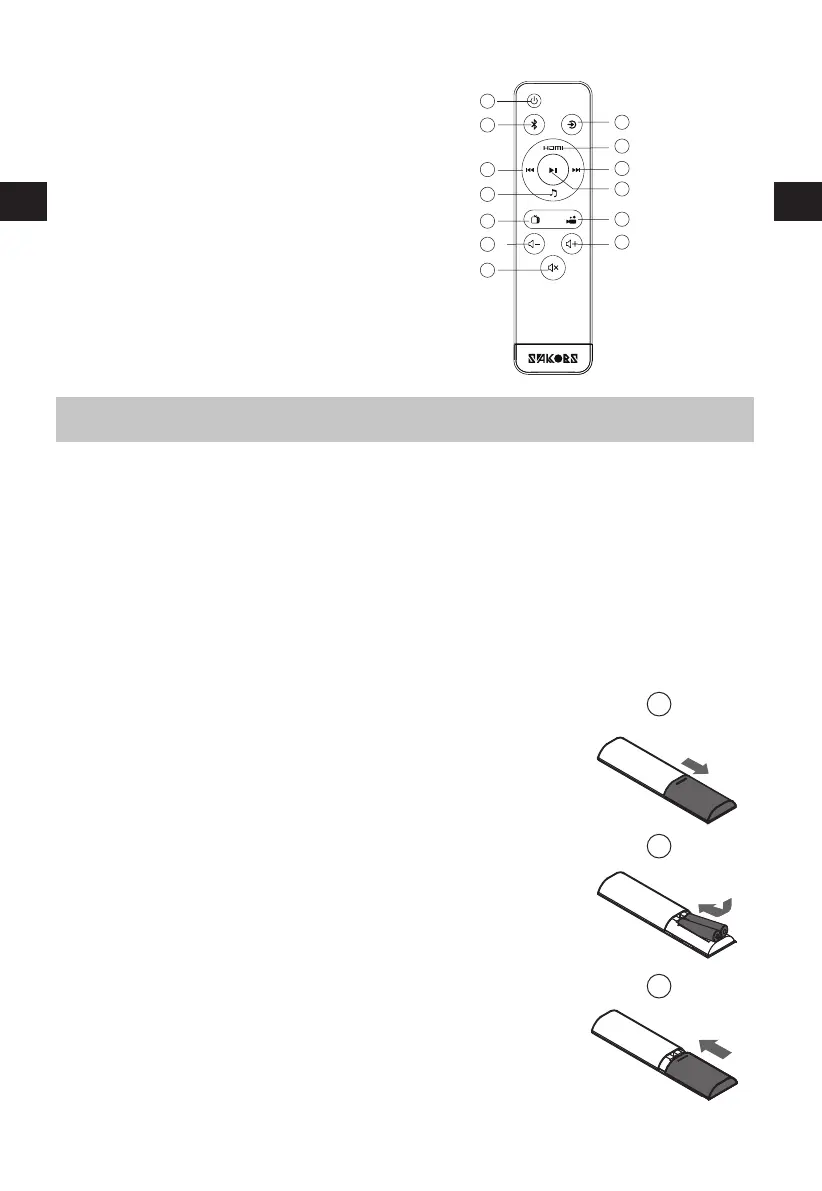
The Remote Control allows the unit to be operated from a distance.
Even if the Remote Control is operated within the effective range 26.2 feet (8m) inch, remote control
operations may be disrupted if there are any obstacles between the unit and the remote control.
If the Remote Control is operated near other products that generate infrared rays, or if other remote control
devices using infrared rays are used near the unit, it may operate incorrectly. Conversely, the other products
may operate incorrectly.
7
Remote Control
Instructions
Prepare the Remote Control
•
•
First-time Use:
Replace the Remote Control Battery
Precautions Concerning Batteries
•
•
•
•
•
•
•
1
2
3
EN
1
3
4
6
9
10
11
12
13
2
5
7
8
1. Power on off
2. Bluetooth
3. Previous track
4. Music mode
5.TV mode
6.Volume down
7.Mute
8. Source
9. HDMI
10. Next track
1 1. Play/ Pause
1 2. Movie mode
13. Volume up
Put the 2 x AAA batteries into the remote control before use.
1. Push the tab on the side of the battery tray towards the tray and then
pull the battery tray out of the remote control.
2. Remove the old batteries. Place 2 X new AAA batteries into the battery
tray with the correct polarity (+/-) as indicated.
3. Slide the battery tray back into the slot in the remote control.
When the remote control is not to be used for a long time (more
than a month), remove the batteries from the remote control to
prevent it from leaking.
If the batteries leak, wipe away the leakage inside the battery
compartment and replace the batteries with new ones.
Do not use any batteries other than those specifed.
Do not heat or disassemble batteries.
Keep away from heat or moisture.
Do not carry or store batteries with other metallic objects.
Doing so could cause batteries to short circuit, leak or explode.
Never recharge a battery unless it is conrmed to be a rechargeable
type.
EN


 To Next Page